
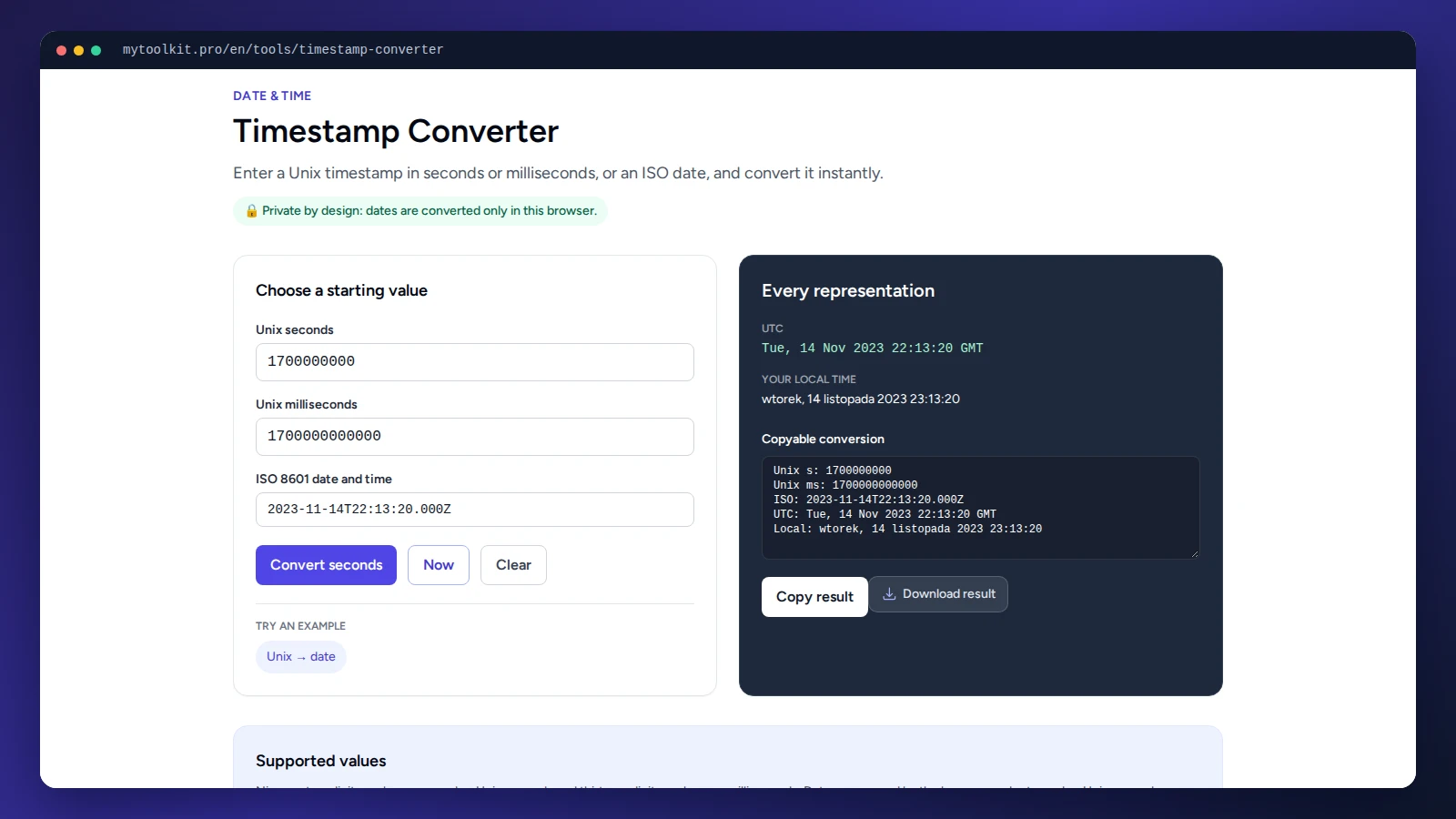
A log line says 1700000000. Read as seconds, that is 22:13:20 UTC on 14 November 2023. Read as milliseconds, it is 20 January 1970. Subtract two such numbers taken either side of New Year 2017 and the result is one second shorter than the time that actually elapsed, as an atomic clock counts it. None of this is a bug. A Unix timestamp is a position on the calendar, written as a count of 86,400-second days plus the seconds into the current day. It was never a stopwatch reading.
Most people meet that definition through a wrong date. This article is organised around those wrong dates: each section starts with a symptom and traces it back to the part of the definition that causes it. Use the map below to jump to yours. You can reproduce every value in the Timestamp Converter.
| What you see | Section |
|---|---|
| A date in January 1970, or tens of thousands of years ahead | Symptom: a date in 1970 or in the far future |
| One string, different numbers on different machines | Symptom: one string, two different numbers |
| A duration across the end of 2016 is one second short | Symptom: a duration one second short |
| A date that jumps back to 1901, or input that is refused | Symptom: a jump to 1901, or input that is refused |
| A pre-1970 value that is one second off | Symptom: a pre-1970 value one second off |
Symptom: a date in 1970 or in the far future
A unit mix-up puts the date wildly off, not slightly off. Read as milliseconds, 1700000000 is 1970-01-20T16:13:20.000Z, less than three weeks after the epoch. Read as seconds, 1700000000000 lands more than 50,000 years in the future.
The common conventions share the 1970 epoch and the 86,400-second day, but they count in different units:
| System | Unit | 14 Nov 2023 22:13:20 UTC | Digits today |
|---|---|---|---|
POSIX time_t |
seconds | 1700000000 | 10 |
| ECMAScript time value | milliseconds | 1700000000000 | 13 |
Java Instant |
seconds + nanoseconds of second | 1700000000 s + 0 ns | 10 + up to 9 |
Temporal Instant |
nanoseconds | 1700000000000000000 | 19 |
ECMAScript defines time values in milliseconds (ECMA-262, Time Values and Time Range). Date.now() returns that value, and it is what the converter's Unix milliseconds field holds after you press Now. Temporal, the newer JavaScript date API, works in nanoseconds and exposes both epochMilliseconds and epochNanoseconds.
Counting digits to guess the unit works for recent decades and fails at the edges. A timestamp from early 1970 is short in any unit, and a seconds value far in the future can reach 13 digits. The converter does not guess. The field you type into decides the unit, so the same digits typed into Unix seconds and into Unix milliseconds give different instants.
Going from milliseconds to seconds also loses precision. The seconds field accepts whole numbers only, so 1700000000.5 is rejected. Enter 1700000000123 as milliseconds and the seconds field shows 1700000000. The .123 survives only in the milliseconds value and in the ISO string, 2023-11-14T22:13:20.123Z.
The lasting fix is to put the unit in the name (created_at_s, expires_ms) so nobody has to infer it from the digits.
Symptom: one string, two different numbers
Two people paste the same text and get different Unix values. In JavaScript the cause is almost always a missing offset. The values in the comments are Unix seconds, that is getTime() / 1000:
new Date("2024-11-15")            // date-only: UTC midnight
                                  // -> 1731628800 s everywhere

new Date("2024-11-15T00:00:00")   // date-time, no offset: local midnight
                                  // UTC+00:00     -> 1731628800 s
                                  // Europe/Warsaw -> 1731625200 s (UTC+01:00 in November)
                                  // New York      -> 1731646800 s (UTC-05:00 in November)
ECMA-262 reads a date-only form as UTC and a date-time without an offset in the reader's own zone (MDN). The two forms agree only for a reader whose zone is UTC+00:00 on that date. Paste the zone-less string into the converter on two laptops in different zones and you get two different Unix numbers, both correct for their browsers. Temporal avoids the ambiguity with separate types: PlainDate and PlainDateTime carry no zone, ZonedDateTime carries a named zone, and Instant is an exact point.
The fix is to always send Z or an explicit offset. Once you do, the number is the same everywhere, because the timestamp itself has no zone; only the display of it does.
Which "ISO format" the string is in
"ISO format" can mean three different things, and a string valid in one is not always valid in another.
- ISO 8601 was first published in 1988 and since 2019 has two parts, basic rules and extensions (ISO). It covers week dates, ordinal dates, reduced precision, durations and intervals that most software never reads.
- RFC 3339, from July 2002, is a narrower Internet profile. It requires a four-digit year, makes fractional seconds optional, and allows an offset of Z or ±hh:mm. It gives −00:00 its own meaning: UTC with an unknown local offset. Lowercase t and z are also allowed; the RFC notes that ISO 8601 permits them too. It also lets applications use a space instead of T for readability, which ISO 8601 does not allow.
- ECMA-262 specifies its own subset,
YYYY-MM-DDTHH:mm:ss.sssZ, plus shorter forms and a six-digit signed year. Engines must accept it and, for a Date with no milliseconds, parse their owntoString,toUTCStringandtoISOStringoutput back to the same instant.
Strings outside the ECMA-262 subset are implementation-defined, so 11/15/2024 or Nov 15 2024 can parse differently, or not at all, in different browsers. Temporal's documentation says it parses RFC 9557 strings, which extend RFC 3339 with bracketed annotations such as a time zone name.
What the converter gives back
Whatever you type, the ISO 8601 date and time field comes back normalised by toISOString: UTC, three fractional digits and a Z. Enter 2023-11-15T00:13:20+02:00 and it returns 2023-11-14T22:13:20.000Z. The offset described the wall clock where the time was written. It was not part of the instant.
The UTC line uses toUTCString, which gives an English HTTP-date-style string such as Tue, 14 Nov 2023 22:13:20 GMT, whatever the page language.
The Your local time line uses the browser's own locale and time zone, so it differs between visitors while the timestamp stays the same. To convert wall-clock times between named zones, use the Time Zone Converter. For the gaps and repeated hours that DST creates, see converting time across time zones: DST gaps and overlaps.
Symptom: a duration one second short
Subtract the Unix timestamp for 00:00 UTC on 31 December 2016 from the one for 00:00 UTC on 1 January 2017 and you get exactly 86,400. An atomic clock counted 86,401 seconds that day, because the last minute of 2016 had 61 seconds.
The definition is calendar arithmetic
You can decode a Unix timestamp with pencil and paper. Divide 1700000000 by 86,400, the number of seconds in a day, and you get 19,675 whole days with 80,000 seconds left over. 19,675 days after 1 January 1970 is 14 November 2023, and 80,000 seconds into that day is 22:13:20. No lookup table is needed.
That works because of how the number is defined. POSIX section 4.16, "Seconds Since the Epoch", quoted here from the Issue 7 (2018) text, takes a broken-down UTC time and computes:
tm_sec + tm_min*60 + tm_hour*3600 + tm_yday*86400 +
    (tm_year-70)*31536000 + ((tm_year-69)/4)*86400 -
    ((tm_year-1)/100)*86400 + ((tm_year+299)/400)*86400
- Every day is 86,400 seconds. Nothing in the formula lets a day be longer or shorter.
- The
/4,/100and/400integer divisions apply the Gregorian leap-year rule. tm_yearcounts from 1900, sotm_year-70starts the count in 1970.
The input is a date and a time of day. No clock is consulted, and the specification says so directly: "The relationship between the actual time of day and the current value for seconds since the Epoch is unspecified."
The Date Difference calculator confirms the day count. From 1970-01-01 to 2023-11-14 is 19,675 days with Include the end date switched off. The match is exact because the formula contains nothing but whole days and the seconds within the day.
Where the extra second went
UTC is atomic time kept close to Earth's slightly irregular rotation by adding leap seconds. According to the IERS leap-second list, UTC in its current leap-second form began on 1 January 1972, 10 seconds behind International Atomic Time (TAI). Twenty-seven leap seconds followed, the last at 2016-12-31T23:59:60Z. Since 1 January 2017, TAI − UTC has been 37 seconds.
RFC 3339 allows 23:59:60 in its grammar. The POSIX formula has no way to produce it: 23:59:60 on 31 December 2016 and 00:00:00 on 1 January 2017 give the same value. A strictly POSIX system must either repeat a value, so two real moments share one timestamp, or hide the extra second.
Google's public NTP service hides it with a 24-hour linear smear from noon to noon UTC, which makes every second in that window slightly longer. Around the leap second, smeared time is about half a second away from UTC. Google's FAQ says: "We recommend that you do not mix smeared and non-smeared NTP servers." It adds that results during a leap second may be unpredictable.
The 86,400-second day is not specific to Unix. Java's Instant documents a "Java Time-Scale" that divides each day into exactly 86,400 seconds and absorbs leap seconds. JavaScript's Date ignores them too (MDN), so this converter never shows second 60. What happens when you type 2016-12-31T23:59:60Z into the ISO 8601 date and time field depends on the browser's parser, which may reject it or roll it over to the next second.
When physical duration matters, measure it on a scale that counts leap seconds, such as TAI, not by subtracting Unix timestamps.
Will the gap keep growing?
Probably not. In 2022 the General Conference on Weights and Measures adopted Resolution 4, which decides that the maximum allowed difference between UT1 (Earth-rotation time) and UTC will be increased in, or before, 2035. The new tolerance is left for a later agreement, and leap seconds could still be announced before then. The 37 seconds already applied stay either way, so Unix time will still differ from TAI unless UTC itself is redefined.
Symptom: a jump to 1901, or input that is refused
A signed 32-bit seconds counter tops out at 2,147,483,647, which is 2038-01-19T03:14:07Z. One second later it wraps to −2,147,483,648, which is 1901-12-13T20:45:52Z. This is the Year 2038 problem. A 64-bit time_t removes it for running code, but any stored format with a 32-bit seconds field keeps the limit until the format itself changes. Both boundary values convert normally in the tool.
JavaScript's Date is not affected. It stores time as a 64-bit floating-point number of milliseconds, not a 32-bit count of seconds (MDN). Its limit is much further away: ECMA-262 caps time values at ±8.64 × 10^15 ms, exactly ±100,000,000 days from the epoch. That runs from 20 April −271821 (astronomical year numbering) to 13 September 275760 UTC. Outside that range a Date is invalid and the converter rejects the input.
A separate check runs first: the typed integer must be a JavaScript safe integer, no larger in absolute value than 9,007,199,254,740,991. The two checks do not line up:
- 99999999999999999 typed as milliseconds fails the safe-integer check.
- 9000000000000 typed as seconds passes it, but multiplied by 1000 it falls outside the date range and is rejected.
- The largest seconds value that works is 8,640,000,000,000.
After year 9999 and before year 0, toISOString writes a six-digit signed year, so the upper limit prints as +275760-09-13T00:00:00.000Z.
Symptom: a pre-1970 value one second off
Negative timestamps are ordinary instants before the epoch: −1 second is 1969-12-31T23:59:59.000Z. The trouble starts when milliseconds are dropped. Truncation rounds toward zero, floor rounds toward minus infinity, and for negative values with a fraction they give different answers. The converter truncates toward zero:
milliseconds   instant                      truncated s   floored s
-1             1969-12-31T23:59:59.999Z     0             -1
-1500          1969-12-31T23:59:58.500Z     -1            -2
With −1 ms the Unix seconds field shows 0, although the instant is before the epoch. With −1500 ms it shows −1 (23:59:59), a moment later than the original. Floor would give −2 (23:59:58), the second that actually contains the instant. Neither convention is wrong, but when you move sub-second pre-1970 values between systems, check each language's documentation for its rule and agree on one at both ends.
Why the count starts in 1970 at all
The zero point was not always 1 January 1970. The first edition of the UNIX Programmer's Manual, dated 3 November 1971 and kept in Dennis Ritchie's archive, describes the time call as returning "the time since 00:00:00, Jan. 1, 1971, measured in sixtieths of a second". Wikipedia's Unix time article quotes the same wording.
A 32-bit counter of sixtieths of a second runs out in about two and a quarter years: 2^32 sixtieths is roughly 828 days. Early versions of Unix later moved to whole seconds counted from 1 January 1970. No primary record explains why that exact date was chosen, so treat origin stories that cite no source with caution. The history matters for one reason: it shows that the epoch and the unit are both conventions, and the unit is the one that still varies between systems.
What the number does not carry
Every symptom above comes from information the timestamp simply does not hold:
- No time zone. The POSIX formula takes UTC as input, so the same instant has the same number everywhere. Zones matter only when the number is shown as local time, or when a string without an offset is parsed in the local zone.
- No unit. Seconds, milliseconds and nanoseconds look alike apart from length, and length is an unreliable guide.
- No leap seconds. During a leap second a strictly POSIX system gives two moments the same number, and the 37-second gap to TAI stays even after new leap seconds stop.
- No rounding rule. Below zero, the same instant can map to two different whole seconds.
Everything in the converter runs in your browser with the JavaScript Date and Intl APIs, and the Copy result button copies to your clipboard locally. When a single value looks suspicious, paste it into the Timestamp Converter and compare the date it gives as seconds with the date it gives as milliseconds. One of the two is usually obviously wrong.