
The browser's atob() turns both Zg== and Zh== into the same single letter, f. A strict decoder that follows RFC 4648 to the letter accepts the first string and may reject the second. That gives two strings, one byte and two verdicts, and there is a good reason for both.
The reason is in the bits. Z is 011001, g is 100000 and h is 100001. A decoder takes the first eight bits, 01100110, which is 0x66, the letter f. The four bits left over are spare. With g they are 0000. With h they are 0001. One decoder discards them unchecked; the other insists they are zero.
Base64 is a small piece of arithmetic plus more than 30 years of choices about alphabets, padding and how strict to be. This article explains those choices. You can try these examples in the Base64 encoder and decoder; to see the rejections, set the direction to Decode.
A format designed to survive mail gateways
Early email was a text channel. Arbitrary 8-bit data such as keys, signatures and later attachments had to cross mail systems and gateways that changed line endings, converted character sets or handled high-bit bytes badly. The answer was to write binary data using only characters that every system passed through unchanged.
Privacy Enhanced Mail set out the scheme in RFC 1421 (February 1993, replacing RFC 1113). Section 4.3.2.4 splits the data into 24-bit groups. Each 6-bit piece is an index into "an array of 64 printable characters", and = is the padding marker. The characters are a subset of International Alphabet IA5 that is "universally representable" and leaves out characters that mean something to SMTP, such as ., CR and LF. PEM lines hold exactly 64 characters, except for the last one.
MIME took the same idea for message bodies. RFC 2045 (November 1996) defines the base64 Content-Transfer-Encoding in section 6.8 and calls it "virtually identical" to the PEM encoding. Encoded lines may be at most 76 characters long. The same RFC defines quoted-printable for data that is mostly printable US-ASCII, where keeping the text readable matters more than compact encoding.
Today's definition is RFC 4648 (October 2006, obsoleting RFC 3548). It covers Base16, Base32 and Base64 apart from any mail protocol, so other specifications can refer to it.
In every one of these documents the goal is transport: the bytes must arrive unchanged. None of them is about secrecy. The security section below comes back to this.
Three bytes in, four characters out
The whole algorithm fits in one example. Take the ASCII text Man:
Text:     M         a         n
Hex:      4D        61        6E
Bits:     01001101  01100001  01101110
6-bit:    010011  010110  000101  101110
Index:    19      22      5       46
Base64:   T       W       F       u
The 64-character alphabet is Table 1 of RFC 4648:
| Index | Characters |
|---|---|
| 0–25 | A–Z |
| 26–51 | a–z |
| 52–61 | 0–9 |
| 62 | + |
| 63 | / |
To check a row of 8-bit groups like the one above, paste it into Binary to Text and it turns the bytes back into characters.
Four characters carry three bytes, so the output is 4/3 the size of the input, about 33% larger, before any line breaks are added.
Lengths follow from the bits. When the input runs out, a final group of one byte (8 bits) needs two characters (12 bits, 4 of them spare). A final group of two bytes (16 bits) needs three characters (18 bits, 2 spare). Padding with = brings the output to a multiple of four. One leftover character holds only 6 bits, which is less than a byte, so no input can produce it. That is why a Base64 string whose length is 4n+1 is never valid, with or without padding.
The test vectors in section 10 of RFC 4648 show every case:
BASE64("")       = ""
BASE64("f")      = "Zg=="
BASE64("fo")     = "Zm8="
BASE64("foo")    = "Zm9v"
BASE64("foob")   = "Zm9vYg=="
BASE64("fooba")  = "Zm9vYmE="
BASE64("foobar") = "Zm9vYmFy"
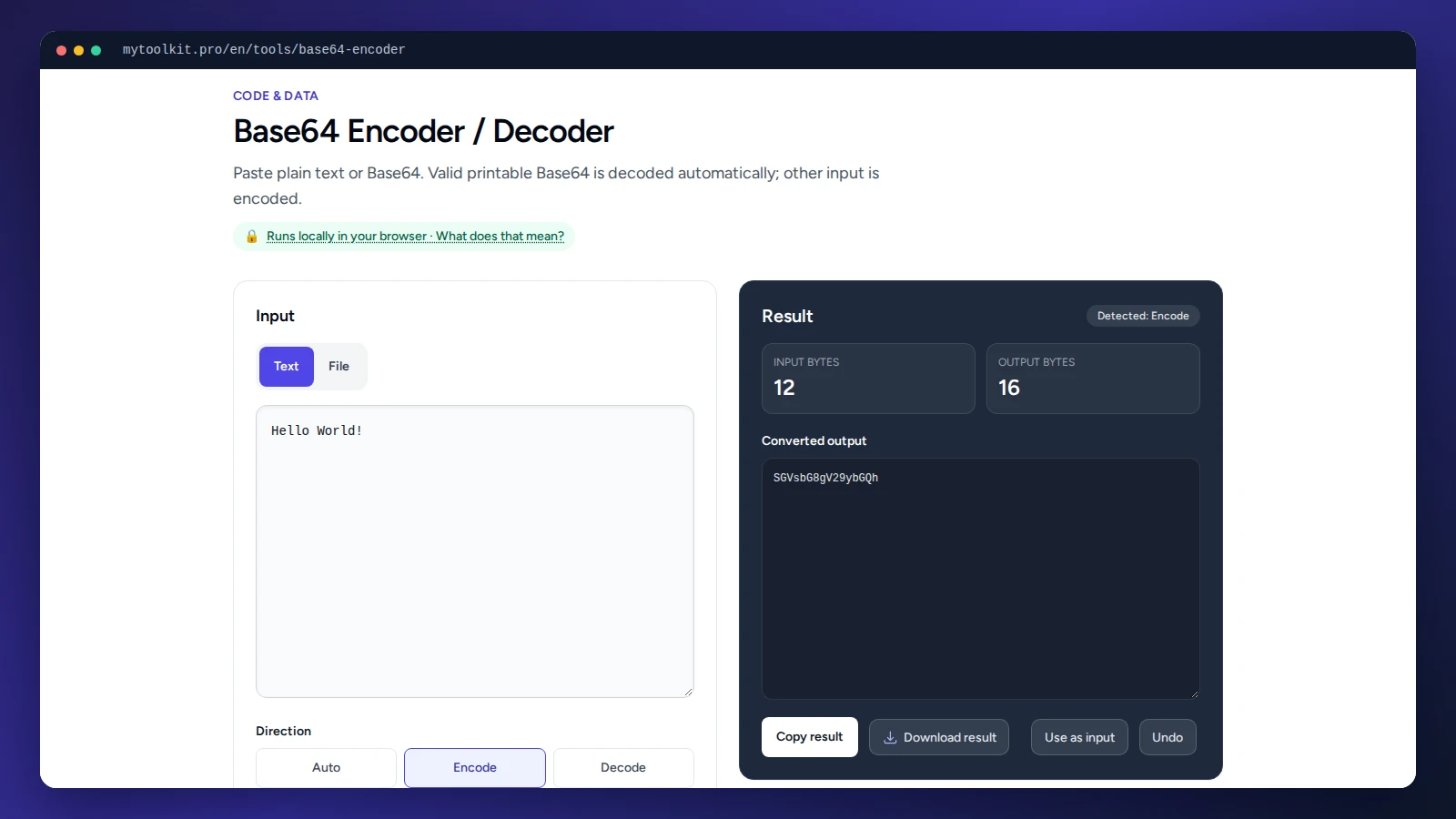
A familiar case: Hello World! is 12 bytes, a multiple of three, so it becomes SGVsbG8gV29ybGQh with no padding at all.
One encoding, several dialects
Every variant uses the same 6-bit arithmetic. They differ in the last two characters of the alphabet, in padding and in line breaks:
| Dialect | Characters 62 / 63 | Padding | Line breaks | Where you meet it |
|---|---|---|---|---|
| RFC 4648 base64 | + / |
= required unless the referring spec says otherwise |
none (section 3.1) | APIs, JSON payloads, data: URLs |
| MIME (RFC 2045) | + / |
= |
lines of at most 76 characters | email sources |
| PEM (RFC 1421) | + / |
= |
64-character lines | PEM-style text blocks |
| base64url (RFC 4648 section 5) | - _ |
may be skipped when the length is known | none | URLs, file names |
| JWS / JWT base64url (RFC 7515) | - _ |
all trailing = removed |
none, no whitespace | JWT header, payload and signature |
base64url exists because + and / mean something in URLs and file paths. RFC 4648 section 5 also notes that = is usually percent-encoded inside a URI, and that this can be avoided by skipping the padding when the length is known in some other way.
RFC 7515 (JSON Web Signature, May 2015) makes that the rule. Section 2 defines Base64url Encoding as the RFC 4648 section 5 alphabet "with all trailing '=' characters omitted and without the inclusion of any line breaks, whitespace, or other additional characters". The compact form, which is what a JWT looks like, is three such strings joined by dots: header, payload and signature. A 32-byte SHA-256 value encodes to 43 base64url characters. Padded Base64 would need 44, the last one being =. Appendix C of RFC 7515 shows how to add and remove the padding.
Libraries do not agree on this point. Python's urlsafe_b64encode() swaps in - and _ but keeps the = padding by default, while JWS forbids it. A value that is correct for one program can be wrong for another, even though both call it "URL-safe Base64".
The tool keeps the two alphabets apart. Its Variant setting decides which one applies, and a string that mixes + or / with - or _ is rejected rather than guessed at: Decode reports an error, and Auto encodes it as text. When it encodes in the URL-safe variant, the output has no = padding.
For example, the bytes FB FF EF give +//v in Standard Base64.
The same bytes give -__v in Base64URL. A JWT segment that contains - or _ is rejected in Decode mode while the standard variant is selected.
Strict and forgiving decoders
RFC 4648 sets a strict default. Section 3.3 says implementations "MUST reject the encoded data if it contains characters outside the base alphabet", unless the specification that uses Base64 explicitly says otherwise. Section 3.5 (canonical encoding) says encoders must set the spare bits to zero, and that decoders "MAY chose [sic] to reject an encoding if the pad bits have not been set to zero." Under that rule, Zh== is a legal thing to reject.
Other specifications chose to be lenient on purpose:
- MIME: RFC 2045 says "all line breaks or other characters not found in Table 1 must be ignored by decoding software". That tolerance makes sense for wrapped mail bodies that pass through many hands.
- Browsers:
atob()runs the WHATWG forgiving-base64 decode algorithm. It removes ASCII whitespace, removes one or two trailing=when the length is a multiple of four, and fails when the length leaves a remainder of 1 or when a character is outside the standard alphabet. It drops the spare bits without checking them. For example,YQandYRboth returna. That is whyZh==passes. - Python:
base64.b64decode()discards non-alphabet characters by default. Withvalidate=Trueit raisesbinascii.Errorinstead.
The strictness matters when several strings decode to the same bytes. RFC 4648's Security Considerations (section 12) warn that ignored characters open "a covert channel that can be used to 'leak' information" and can be used "to avoid a string equality comparison". Section 3.5 raises the same concern for the non-significant bits next to padding. In practice, anything that compares or stores the encoded text instead of the decoded bytes can be fooled. A blocklist entry, a cache key or a deduplication check can treat Zg== and Zh== as different values, even though both decode to one byte.
The Base64 encoder and decoder sits on the strict side, with one convenience. It removes all whitespace first, so Base64 wrapped at 64 or 76 characters is accepted. Padding is optional in both variants. It rejects = in the middle of the string, more than two =, and any length of 4n+1. After decoding, it encodes the bytes again and compares the result with the input, ignoring padding.
Wrapped lines are not the only thing in a real PEM block or mail source. The -----BEGIN …----- and -----END …----- lines of a PEM block are not Base64 and must be removed before decoding. Many payloads, such as a certificate or a mail attachment, are binary, so the decoded bytes are not text. In the Text tab, Decode then reports that the bytes are not valid UTF-8. Save the Base64 as a file, open it in the File tab with Decode selected, and use Download decoded file to get the bytes.
With Decode selected, a string with non-zero spare bits fails the re-encoding check, so Zh== gets "Enter valid Base64 for the selected variant." Under the default Auto direction there is no error: a string that fails these checks is treated as ordinary text and encoded instead.
One common failure is not about Base64 at all. In Decode mode, a pasted data:image/png;base64,iVBOR… string fails the alphabet check, because :, ; and , are not Base64 characters. The data: URL syntax is data:[<media-type>][;base64],<data>. Remove everything up to and including the comma, and the rest decodes.
Base64 carries bytes, not characters
Base64 encodes bytes. Text has to become bytes first, and that step is where many "wrong Base64" reports come from.
The browser's btoa() predates binary data types on the web, so it takes a "binary string" in which each character stands for one byte. MDN's btoa() reference explains that a character whose code point is above 0xFF makes it throw an InvalidCharacterError. As a result, btoa("zażółć") fails. The MDN glossary says the names should be read as "binary to ASCII" and "ASCII to binary".
The fix is to encode the text explicitly. According to the WHATWG Encoding Standard, TextEncoder only produces UTF-8. The tool encodes those UTF-8 bytes, so zażółć gęślą round-trips correctly. This also explains why another program can give a different Base64 for "the same text": it encoded different bytes, such as UTF-16 or Latin-1, or it wrapped the lines. Compare the decoded bytes, not the Base64 strings.
Decoding has the opposite trap. TextDecoder replaces invalid UTF-8 sequences with U+FFFD by default, which silently damages binary data that is shown as text. With fatal: true it throws instead. The tool uses fatal mode. /wA= decodes to the bytes FF 00, and FF can never appear in UTF-8, so in Decode mode the tool reports that the bytes are not valid UTF-8 text instead of showing replacement characters.
Is this string Base64? Only a guess
Any string of alphabet characters with a valid length is valid Base64. TWFu could be a product code, a password or a token, and it is also the encoding of Man. No rule can tell these apart from the characters alone.
Detection can only stack up evidence: the right alphabet, a valid length, canonical spare bits, decoded bytes that are valid UTF-8, and a re-encode that matches. Short words can still pass every check. The tool's Auto direction works this way and needs at least four characters before it tries to decode. When it guesses wrong, choosing an explicit direction overrides it.
Readable by anyone: encoding is not encryption
RFC 4648 is direct about this: Base64 "visually hides otherwise easily recognized information, such as passwords, but does not provide any computational confidentiality." The RFC adds that this has caused security incidents when people posted protocol traces without realising that a password was in them.
A JWT is the everyday example. Its header and payload are base64url, so anyone who holds the token can read every claim. RFC 7515 protects integrity with the signature, which proves the token has not been changed. It does not hide anything. The same applies to the credentials in an HTTP Basic authentication header, which are Base64, not encrypted.
Base64 is often confused with two other kinds of transformation:
- A cipher needs a key. A Caesar shift is technically a cipher, but one that is trivial to break. Base64 has no key at all.
- A hash or checksum is one-way and fixed in length. It cannot be turned back into the input, but it can show that a file has not changed. What a checksum match proves covers that side.
Encoding is not sanitising either. <script>alert(1)</script> becomes a harmless run of letters, digits, +, / and =, but decoding it gives the original script back. Any filter has to inspect the decoded content.
The cost of a third more bytes
The most visible use on the web is the data: URL, which puts a resource inside the document, as in data:image/png;base64,…. The cost is the 4/3 ratio: a 300 KB image becomes about 400 KB of text. The bytes travel inside the HTML, CSS or JSON document, so they cannot be cached separately and are downloaded again every time that document is. Small icons can be worth it. Large images usually are not.
Overhead follows from each encoding's definition:
| Encoding | Characters per bytes | Overhead |
|---|---|---|
| Hex (Base16) | 2 per 1 | 100% |
| Base32 | 8 per 5 | 60% |
| Base64 | 4 per 3 | about 33% |
| Ascii85 / Base85 | 5 per 4 | 25% |
| Raw binary over an 8-bit clean channel | 1 per 1 | 0% |
Python's base64 module offers Ascii85 and Base85 next to Base16, Base32 and Base64. When the channel can carry bytes, as with multipart/form-data uploads or binary protocols, no text encoding is needed at all.
Speed is a separate question. The classic implementation is a table lookup per character. Muła and Lemire, in Faster Base64 Encoding and Decoding Using AVX2 Instructions (ACM Transactions on the Web, 2018), showed that SIMD code can encode and decode much faster than scalar code while still validating the input and reporting errors.
Privacy
The tool encodes and decodes in the browser. Typed text and files up to 10 MB are processed locally and are not uploaded. As the file field puts it: "Up to 10 MB. The file never leaves this browser."
FAQ
Can two different Base64 strings decode to the same bytes?
Yes. In the last character before padding, the spare bits do not reach any output byte, so Zg== and Zh== both carry the single byte f. Decoders that ignore unknown characters or line breaks create more look-alikes. RFC 4648 lets decoders reject non-zero spare bits, and this tool does not accept them as Base64.
Why does the browser's atob() accept strings that other decoders reject?
atob() follows the WHATWG forgiving-base64 algorithm. It removes whitespace, accepts missing padding and drops spare bits without checking them. Strict decoders that apply RFC 4648 sections 3.3 and 3.5 refuse some of those inputs. Both are behaving as specified. They follow different specifications.
Why does another program produce different Base64 for the same text?
It almost always encoded different bytes. One program may use UTF-8, another UTF-16 or Latin-1, and some add a line break every 64 or 76 characters, or a trailing newline. Decode both results and compare the bytes.
Is base64url the same as percent-encoding a Base64 string?
No. Percent-encoding keeps the standard alphabet and writes +, / and = as %2B, %2F and %3D. base64url uses - and _ as different alphabet characters and often drops the padding. A base64url decoder will not accept a percent-encoded string, and the reverse also fails.
Does Base64 compress data or make it harder to read?
Neither. The output is about a third larger than the input. RFC 4648 says it only "visually hides" information and provides no confidentiality. Anyone can reverse it without a key.
Further reading
- RFC 4648: the current definition of Base16, Base32, Base64 and base64url, with test vectors and security considerations.
- RFC 2045: MIME's base64 Content-Transfer-Encoding, 76-character lines and the "ignore other characters" rule.
- RFC 1421: the PEM printable encoding that the Base64 alphabet comes from.
- RFC 7515: JSON Web Signature, which defines unpadded base64url and the compact form used by JWTs.
- WHATWG Infra: forgiving-base64: the algorithm behind
atob()andbtoa(). - WHATWG Encoding Standard:
TextEncoder,TextDecoderand the fatal flag. - MDN: btoa(): binary strings,
InvalidCharacterErrorand Unicode workarounds. - Muła and Lemire, Faster Base64 Encoding and Decoding Using AVX2 Instructions: SIMD Base64 with validation.
- Wikipedia: Base64: a general overview of variants and history, useful as a map rather than a source.