
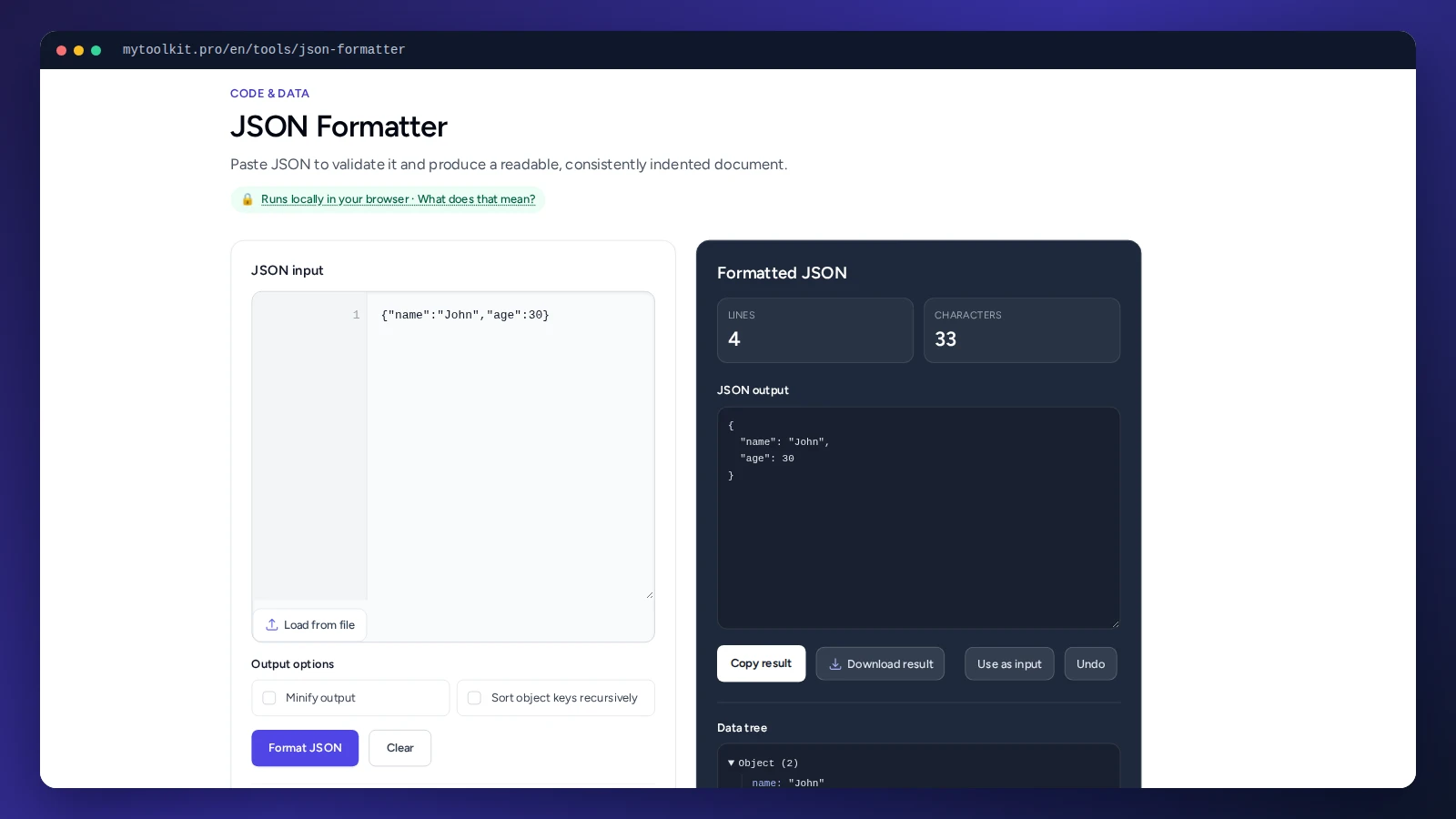
{"id":9007199254740993} goes into a formatter, and "id": 9007199254740992 comes out. There is no error and no warning, and the last digit is different. Nothing edited the text: the JSON Formatter runs three steps. JSON.parse reads the text, the values sit in memory as JavaScript numbers, strings and objects, and JSON.stringify writes completely new text from those values.
Each step has its own rules, and each one can make the output differ from the input. This article follows the steps in order. It helps to keep two kinds of equality apart. Semantic equality means the same names, values and structure, and that is all JSON as an interchange format promises. Byte-for-byte equality means the same text, and signatures, hashes, caches and line-based diffs compare exactly that. A round trip usually keeps the first and changes the second. With large numbers and repeated names, though, the data itself changes.
What the round trip keeps and what it can change
| Difference you may see | Step that causes it | Data changed? | Who notices |
|---|---|---|---|
| Indentation and line breaks | writing | no | diffs, byte comparisons |
\u00e9 written as é, \/ as / |
writing | no | signatures, hashes |
1.0 written as 1, 1e2 as 100 |
writing | no | signatures, hashes |
-0 written as 0 |
writing | only the sign of zero | code that tells -0 from 0 |
| Keys in a different order | holding | no | byte comparisons |
| A repeated name keeps one value | reading | yes, earlier values are lost | every consumer |
| Integers beyond ±(2^53 − 1) and long decimals | reading | yes, can be rounded | IDs, money, measurements |
1e400 becomes null |
reading and writing | yes | every consumer |
The first rows are harmless for a config file read by a standard parser, or for a copy you only need to read. The last rows are why a formatted copy should not silently replace a payload that carries large integers, exact decimals or names you have not checked. If the bytes are signed or hashed, every row matters.
Whitespace changes only the layout, not the values. The tool's 'Simple object' example gives 4 lines and 33 characters of indented output. With Minify output switched on, the same data takes 1 line and 24 characters.
Step 1: JSON.parse reads the text
The reported error is often after the real mistake
A JSON parser reads left to right and stops at the first character that cannot continue a valid document. That point often comes after the actual mistake:
{
  "a": 1,
}
The extra comma is on line 2, but the formatter reports "Invalid JSON." followed by "Line 3, column 1." After a comma the parser expects another member name. It meets the closing brace at the start of line 3, and the parse fails there.
The line and column come from the browser's own error message, and engines word those messages differently (MDN). When the browser uses wording the tool does not read, only "Invalid JSON." appears. The error is still real, so check the text around your last edit.
Some text is refused on purpose
The grammar is small and leaves little room. Between tokens, RFC 8259 allows only four whitespace characters: space, horizontal tab, line feed and carriage return. A non-breaking space copied from a web page is not whitespace to a JSON parser, even though it looks identical. Strings need double quotes, and any single value is a complete document:
42                  valid: a complete JSON text
"hello"             valid
{'name': 'John'}    invalid: JSON strings use double quotes only
The most common complaints are the missing comments and trailing commas. Relaxed variants exist for exactly that reason:
| JSON (RFC 8259) | JSON5 | JSON with Comments (VS Code) | JSON Lines | |
|---|---|---|---|---|
| Comments | no | yes | yes, line and block | no (each line must be valid JSON) |
| Trailing commas | no | yes | accepted, with an editor warning | no |
| Unquoted keys | no | yes (ES5.1 identifiers) | not defined | no |
| Single quotes | no | yes | not defined | no |
| NaN / Infinity | no | yes | not defined | no |
| Typical use | data interchange | hand-written config files | VS Code settings files | logs, record streams, pipelines |
Sources: RFC 8259, json5.org, VS Code documentation, jsonlines.org.
The JSON5 specification says JSON5 is a superset of JSON, so every valid JSON file is also valid JSON5, but not the reverse. A strict formatter reports a JSON5 or JSONC file as invalid, and that is correct behaviour, not a bug. A JSON Lines file with more than one record also fails as a whole, because it holds several JSON texts instead of one.
The strictness was a choice. Crockford has explained that he removed comments because people were using them to hold parsing directives, a practice he said would have destroyed interoperability. The statement comes from a Google+ post that is no longer online, and it is quoted by Michael Tsai and Jeroen Wiert Pluimers. In his talk The JSON Saga, he also explains that JSON has no version number, so the grammar would not change.
Other parsers draw the line in different places. Nicolas Seriot's Parsing JSON is a Minefield ran more than 30 parsers against more than 300 test files. Some accepted comments or trailing commas, and some crashed on deeply nested input. A file that one library reads without complaint can fail in a strict browser parser, and the reverse also happens.
JSON that arrives inside another encoding, such as a Base64 data URL, is refused too until you unwrap it. Remove the data:…;base64, prefix, decode the rest with the Base64 encoder and decoder, and then format the result. JSON Web Token segments use the base64url variant instead, which the article on why a JWT is readable but not encrypted explains.
A repeated name collapses to one value
RFC 8259 says the names in an object SHOULD be unique. It notes that implementations differ when they are not: many report only the last name/value pair, some report an error and some report every pair. ECMAScript's JSON.parse keeps the last value:
input:   {"a":1,"a":2}
output:  {
           "a": 2
         }
The first value is gone before anything is written, so the output cannot show it. Seriot's tests found this variety in real parsers, including some that keep the first value, so the same file can mean different things to two services. The I-JSON profile removes the ambiguity: objects in I-JSON messages MUST NOT have duplicate names (RFC 7493).
To check for duplicates, compare counts. The tree labels each object with its key count after parsing, such as Object (3). If the source object lists more names than that, a name was repeated. For a single suspect key, search the input for it in quotes and count the matches.
Sometimes the text output is complete and only the preview looks short. The Data tree preview stops at 1,000 nodes and shows a notice when it does. It also skips anything nested more than 50 levels deep, without a notice. Neither limit affects parsing or the text output.
Step 2: values live as JavaScript numbers and objects
Every number becomes a binary64 double
The JSON grammar defines a number as decimal digits with an optional sign, fraction and exponent, and sets no length limit. Section 6 of RFC 8259 then adds an interoperability warning. Software that uses IEEE 754 binary64 ("double precision") numbers only agrees with other software within that range and precision, and integers agree exactly only from −(2^53)+1 to 2^53−1. JavaScript's Number is binary64, so the formatter has the same limit.
input                       output
9007199254740993            9007199254740992
12345678901234567890        12345678901234567000
0.1000000000000000055511    0.1
1e400                       null
Parsing rounds the decimal text to the nearest double (ECMA-262). The first two lines lose integer digits. Not every larger integer changes: some, such as 9007199254740992 itself, are exact doubles and come back unchanged, which makes the problem easy to miss in a quick test. The third line loses decimal digits, because 0.1000000000000000055511 and 0.1 round to the same double. The last line takes two steps: 1e400 is too large for a double, so it parses to Infinity, and JSON.stringify writes non-finite numbers as null.
This can silently corrupt 64-bit database IDs, snowflake-style IDs and money amounts in minor units. RFC 7493 says a sender cannot expect a receiver to treat an integer with an absolute value above 9007199254740991 as exact, and recommends sending such numbers as JSON strings.
BigInt alone does not fix this, because JSON.stringify throws a TypeError when it meets a BigInt (MDN). The TC39 proposal JSON.parse source text access, an advanced-stage proposal, passes the original text of each primitive value to the reviver as context.source and adds JSON.rawJSON for writing exact numeric text. The formatter uses neither feature, so large numbers become ordinary doubles and no warning appears.
The engine decides the key order
Keys can move even when no option is switched on. ECMAScript lists an object's array-index keys first, in ascending numeric order, and then its other string keys in insertion order. Array-index keys are canonical non-negative integers below 2^32 − 1, so "01" or "4294967295" keeps its insertion position. The formatter writes keys in the order the engine gives them:
input:   {"b":1,"2":0,"1":0}
output:  {
           "1": 0,
           "2": 0,
           "b": 1
         }
Under JSON's rules this is the same data. RFC 8259 notes that parsers differ on whether they expose member order, and that software which does not depend on it will interoperate (RFC 8259). Compared byte by byte, it is a different document.
Step 3: JSON.stringify writes new text
Escapes and number spelling are chosen again
The writer does not remember how the input was spelled. An escape such as \u00e9 comes back as the literal character é, and \/ comes back as a plain /. The serializer escapes only what it must: quotation marks, backslashes, control characters below U+0020 and lone surrogates (QuoteJSONString). The lone-surrogate rule arrived in ES2019 as "well-formed JSON.stringify".
Numbers are written with Number::toString. That drops a trailing ".0", writes moderate exponents in full (1e2 becomes 100) and writes negative zero as 0. Only the sign of zero is a change in value, and it matters only to code that tells -0 apart from 0.
Two characters have their own history. U+2028 LINE SEPARATOR and U+2029 PARAGRAPH SEPARATOR were always allowed unescaped inside JSON strings, but before ES2019 they were syntax errors in JavaScript string literals, so some valid JSON was not valid JavaScript. ES2019 made JSON a subset of ECMAScript, a change V8 shipped in Chrome 66 (V8). On the wire, RFC 8259 requires JSON exchanged outside a closed ecosystem to be UTF-8 and says implementations must not add a byte order mark.
The counts on the page follow JavaScript's string model. The Characters tile counts UTF-16 code units, so an emoji outside the Basic Multilingual Plane counts as 2. Error columns are counted the same way, so a line with emoji can report a column higher than the number of symbols you see.
Sorted keys are still not canonical JSON
The Sort object keys recursively option sorts object keys at every depth and leaves the order of array elements alone. That helps when two API responses list the same fields in different orders. The tool compares keys with localeCompare, which follows language rules (MDN), so "a" can come before "B" and accented letters are placed by the browser's language. Array-index keys still come first because of the engine rule.
A signature or hash needs more than a sort. RFC 8785, the JSON Canonicalization Scheme (JCS), sorts property names by their UTF-16 code units, independent of locale, and also fixes exactly how numbers, strings and whitespace are written.
| This tool's sort | Code-point sort only (no canonical form) | RFC 8785 (JCS) | |
|---|---|---|---|
| "B" vs "a" | locale rules; "a" can come first | "B" first (U+0042 < U+0061) | "B" first (UTF-16 code units) |
| "é" | placed by language rules | after all unaccented ASCII letters (U+00E9) | after all unaccented ASCII letters |
| Array-index keys ("2", "10") | first, in numeric order (engine rule) | compared as strings: "10" before "2" | compared as strings: "10" before "2" |
| Number spelling | ECMAScript Number::toString via JSON.stringify |
— | ECMAScript number serialization, required |
| Whitespace | indented by default, or minified | — | none |
One changed byte changes a digest completely, as the article on how MD5 and SHA-256 work shows. For the same reason you cannot re-serialize a JSON Web Token's payload and expect the signature to verify: the signature covers the exact base64url bytes, not the parsed JSON.
Why the grammar is this strict
JSON was not designed from scratch. Around 2001, Crockford and Chip Morningstar used JavaScript's existing object-literal syntax to send data to browsers, and in The JSON Saga Crockford says he "discovered" the format rather than invented it. json.org still carries his definition: a lightweight, text-based, language-independent format built from collections of name/value pairs and ordered lists of values.
Early browser code often turned received text into values with eval(), which runs whatever code it is given. Crockford's json2.js provided JSON.parse and JSON.stringify before browsers had them. The native API was standardized in ECMAScript 5, published in December 2009.
The format was then written down in these documents:
- RFC 4627, July 2006, an Informational RFC rather than a standard
- RFC 7159, March 2014
- RFC 8259, December 2017, which is also Internet Standard STD 90
- ECMA-404, 1st edition, October 2013
- ECMA-404, 2nd edition, December 2017, also published as ISO/IEC 21778:2017
The current documents do different jobs. ECMA-404 says its goal is "only to define the syntax of valid JSON texts", not what those texts mean. RFC 8259 defines the same grammar and adds guidance on encoding, duplicate names and numbers. Most of the surprises above come from that guidance, or from gaps where neither document says anything.
The small grammar also pays off in engineering. Crockford's json_parse.js, in the same repository as json2.js, is a recursive-descent parser you can read in one sitting. The V8 team has recommended JSON.parse over large JavaScript object literals because JSON is much simpler to parse than JavaScript (V8 blog). That native parser is what the JSON Formatter relies on.
Privacy and safety
Parsing and serialization both run in your browser, and the page shows Runs locally in your browser. The document you paste is not sent anywhere to be formatted.
Valid JSON means correct syntax, not safe content. A "__proto__" key stays an ordinary own key after parsing and sorting, and a string such as <script> stays a string. Neither does anything inside the formatter. Problems start later, when code carelessly merges the parsed object into another object or inserts a string into HTML without escaping it.
FAQ
Why did the last digits of a long ID change after formatting?
The formatter parses numbers into JavaScript's binary64 Number, which represents integers exactly only up to 2^53 − 1 (9007199254740991). Larger integers can be rounded to the nearest representable double, so 9007199254740993 becomes 9007199254740992 (RFC 8259, section 6). RFC 7493 recommends sending such values as strings.
Is a document that is just a number or a string valid JSON?
Yes. RFC 8259 allows any JSON value as the whole text, so 42, "x", true and null are complete documents (RFC 8259). JSON.parse accepts them, and the formatter outputs them unchanged.
Which value survives when the same key appears twice in an object?
In JavaScript's JSON.parse the last one survives, and the earlier value is dropped without a warning (ECMA-262). Other parsers can behave differently, as the section on repeated names above explains.
Why does JSON not allow comments?
Crockford has explained that he removed them because people were using comments to hold parsing directives, which would have broken interoperability. The statement comes from a Google+ post quoted by Michael Tsai and others. Relaxed variants such as JSON5 and VS Code's JSON with Comments add comments back for hand-edited files.
Will two different formatters produce byte-identical output for the same data?
Not necessarily. RFC 8259 and ECMA-404 do not fix indentation, key order, number spelling or escaping, so tools can make different choices. If you need identical bytes, use a canonicalization scheme such as RFC 8785, which defines key order, number format and string escaping.
Why did a value like 1e400 turn into null?
1e400 is larger than the largest finite double, so JSON.parse turns it into Infinity. JSON.stringify writes non-finite numbers as null (ECMA-262), so the round trip replaces the number with null.
Further reading
- RFC 8259: The JSON Data Interchange Format
- ECMA-404: The JSON Data Interchange Syntax
- RFC 7493: The I-JSON Message Format
- RFC 8785: JSON Canonicalization Scheme (JCS)
- ECMAScript specification: the JSON object
- Nicolas Seriot: Parsing JSON is a Minefield
- Douglas Crockford: The JSON Saga
- json.org: Introducing JSON