
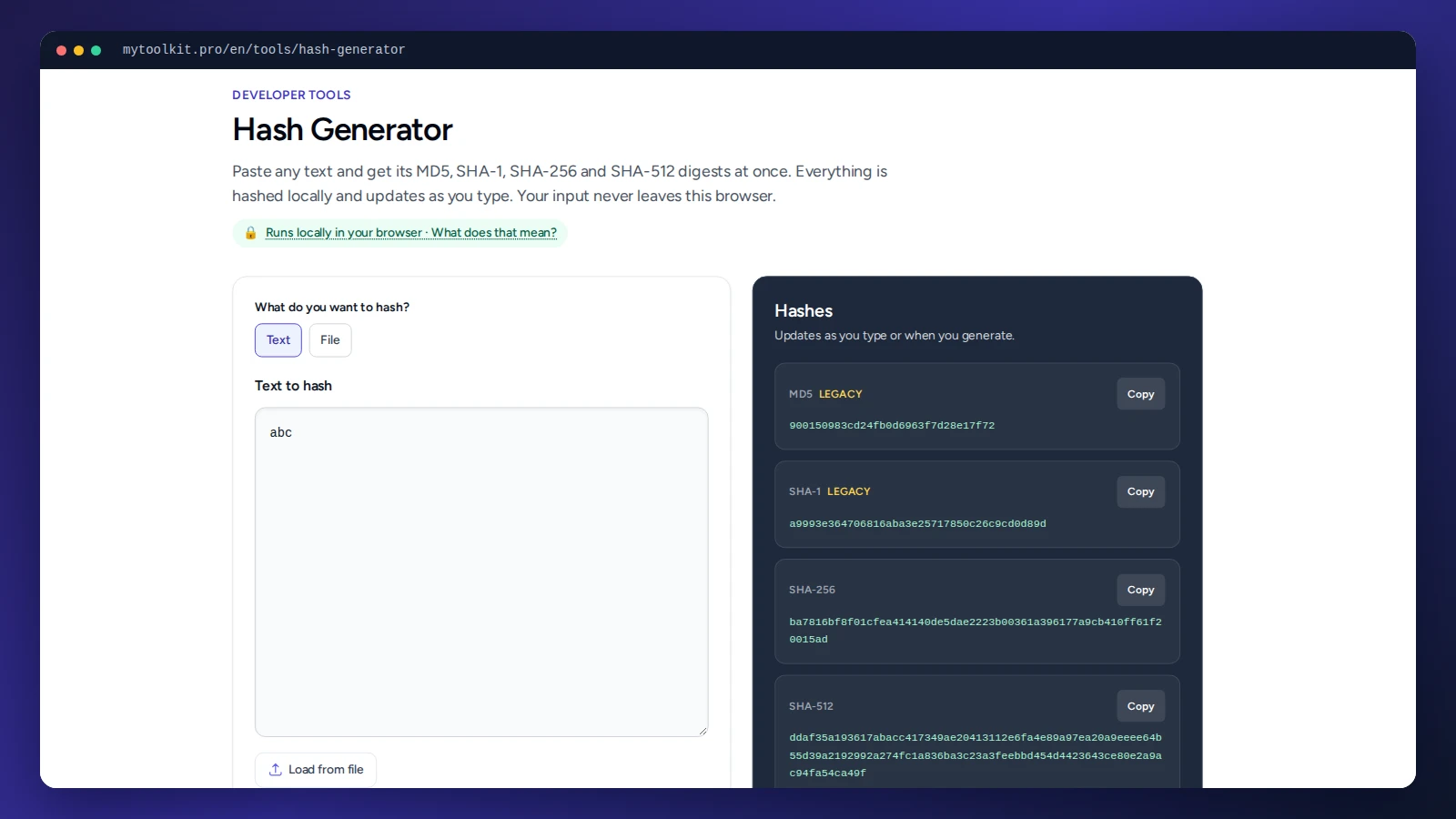
Two checksums that differ do not tell you which side is wrong. The file may be damaged, but often the two values could never have matched: they came from different algorithms or different bytes, or one was pasted with extra text attached. Each of these takes a minute to rule out, which is quicker than downloading a multi-gigabyte image again.
Start with the published value
Before you compute anything, look at what the publisher gave you. Three things decide whether a comparison can work at all.
Its length
A hex digest uses four bits per character, so its length tells you the digest size and narrows down the algorithm. MD5 is defined in RFC 1321, and SHA-1 and SHA-2 in FIPS 180-4.
| Hex characters | Bits | Most common algorithm | Supported by the tool |
|---|---|---|---|
| 32 | 128 | MD5 | Yes |
| 40 | 160 | SHA-1 | Yes |
| 56 | 224 | SHA-224 | No |
| 64 | 256 | SHA-256 | Yes |
| 96 | 384 | SHA-384 | No |
| 128 | 512 | SHA-512 | Yes |
Length alone does not identify the algorithm. A 64-character value is usually SHA-256, but other 256-bit hashes produce the same length, for example SHA3-256 from FIPS 202. Check which algorithm the publisher names next to the value. The Hash Generator computes only MD5, SHA-1, SHA-256 and SHA-512, so a SHA-224, SHA-384 or SHA-3 value will never match there.
Its encoding
The tool compares hex only and produces plain hex digests, with no HMAC and no base64 output. Some publishers give base64 with an algorithm prefix instead. Subresource Integrity values such as sha384-… are one example, and they cannot match here.
Letter case does not matter. BA7816BF… and ba7816bf… are the same value.
What else is on the line
Checksum files and default sha256sum output put a file name after the hash:
ba7816bf8f01cfea414140de5dae2223b00361a396177a9cb410ff61f20015ad example.iso
Some files use the tagged form instead, produced by sha256sum --tag, which puts the algorithm and file name first:
SHA256 (example.iso) = ba7816bf8f01cfea414140de5dae2223b00361a396177a9cb410ff61f20015ad
One file can list many downloads, and the name tells a checker which file each line belongs to. In either form, copy only the hex part for a manual comparison.
Checking a downloaded file
A published checksum covers the exact bytes of the file. To hash those bytes in the Hash Generator, pick the file with Choose a file to hash. That reads the raw bytes without any text decoding, and it switches the source to File automatically. The file is read and hashed in your browser and is not uploaded.
The shared Load from file control is a different thing. It copies a text file's content into the editor (text files only, up to 2 MB), so the digest you get is of the editor text, not of the original file. Do not use it to check download checksums.
The file name is not part of the hash. A renamed file keeps the same digest.
If you choose a file and then switch the source back to Text, the tool hashes the text box, not the file, even though the file is still selected. Check which source is active before you compare.
Very large files
The tool reads the whole file into memory and hashes it inside the page, with no progress indicator. For images several gigabytes in size, a command-line utility is more practical. On Linux, GNU coreutils provides sha256sum and related commands, including sha224sum and sha384sum for the sizes this tool does not cover. Its -c option checks a checksum file directly:
sha256sum example.iso
sha256sum -c SHA256SUMS
On Windows, use certutil:
certutil -hashfile example.iso SHA256
Checking the hash of a piece of text
Text is hashed as UTF-8 bytes, and every byte counts. The input is not trimmed, so a trailing space or newline produces a completely different digest. This often explains a mismatch with a value made with a shell echo, which normally adds a newline, or with text copied from an editor that adds a final line break.
Line endings matter in the same way. Windows uses CR LF and Unix uses LF, so the same multi-line text gives different digests depending on where it was saved.
Encoding is the third trap. In UTF-8, a character outside ASCII takes several bytes (RFC 3629). "é" is 2 bytes and has the MD5 66ddcd97cfdeabb2f6fb8a999b4bc76f, "☃" is 3 bytes and "😀" is 4. Software that hashes UTF-16 bytes instead gets different digests for the same visible text.
For plain ASCII text, the Input size (UTF-8 bytes) counter should equal the number of characters you can see. A higher count means something invisible is present. Pasted text can carry zero-width spaces or a byte order mark. Finding zero-width spaces, the BOM and other hidden Unicode explains how to find and remove them.
When the comparison still says no match
The Compare with an expected hash field removes spaces around the value and ignores letter case. Apart from that, the value must match one of the digests exactly.
Only ticked algorithms are compared. If the matching algorithm is unticked under Algorithms, the result is "No selected hash matches." even though the digest is correct.
On a match, the line reads "Match:" followed by the algorithm name, for example "Match: SHA-256". It updates as you type.
What a match proves, and what it does not
A match shows that your bytes are identical to the bytes the checksum was computed from. That reliably catches accidental damage, such as a truncated download, a failing disk or a broken transfer.
It does not prove that the file is genuine if an attacker can change both the file and the checksum, for example when both sit on the same compromised server. To check authenticity, get the checksum through a separate, trusted channel, or use a checksum file the publisher has signed.
This is also why the tool tags MD5 and SHA-1 as "legacy". RFC 6151 says MD5 is no longer acceptable where collision resistance is required, such as digital signatures. In 2017, CWI Amsterdam and Google announced SHAttered, a practical SHA-1 collision: two different PDF files with the same digest (EFF coverage). Both algorithms still catch accidental corruption. If a deliberate attacker is a concern, prefer SHA-256 or SHA-512 when the publisher offers them.
None of these digests is meant for storing passwords, as the page's "Not for passwords" note says. Passwords need a slow, salted algorithm such as Argon2id or bcrypt (OWASP Password Storage Cheat Sheet).
FAQ
What does a SHA-256 of e3b0c442…b855 mean?
e3b0c44298fc1c149afbf4c8996fb92427ae41e4649b934ca495991b7852b855 is the SHA-256 of empty input. If a utility reports it for a download, the file is zero bytes long, which usually means the download did not complete. In this tool, empty text input shows a dash instead of a digest.
Does the Digest letter case setting affect the comparison?
No. Digest letter case only changes how the digests are displayed and copied. The comparison ignores case either way.
Can two different files share an MD5 or SHA-1 checksum?
Yes, collisions have been shown for both. See "What a match proves" above for what that means in practice.