
Two strings look the same on screen, yet a search skips one of them, an equality check returns false, or a parser rejects a line that looks fine. The cause is often a character that has no width and leaves nothing visible behind.
Why two identical-looking strings fail to match
Compare invisible with in[U+200B]visible. In this article, a code in square brackets inside a code sample stands for the invisible character itself. On screen both read "invisible". The second one, though, has U+200B ZERO WIDTH SPACE after "in". That makes it 10 code points long instead of 9, so any comparison or search treats the two as different strings.
The usual causes are zero-width spaces, a byte order mark at the start of the text, soft hyphens, bidirectional control characters and invisible maths operators. The Invisible character remover marks each one in a live preview, lists where it sits, and removes only the types you choose. It leaves ordinary spaces, tabs and line breaks alone.
Finding the hidden characters before you remove anything
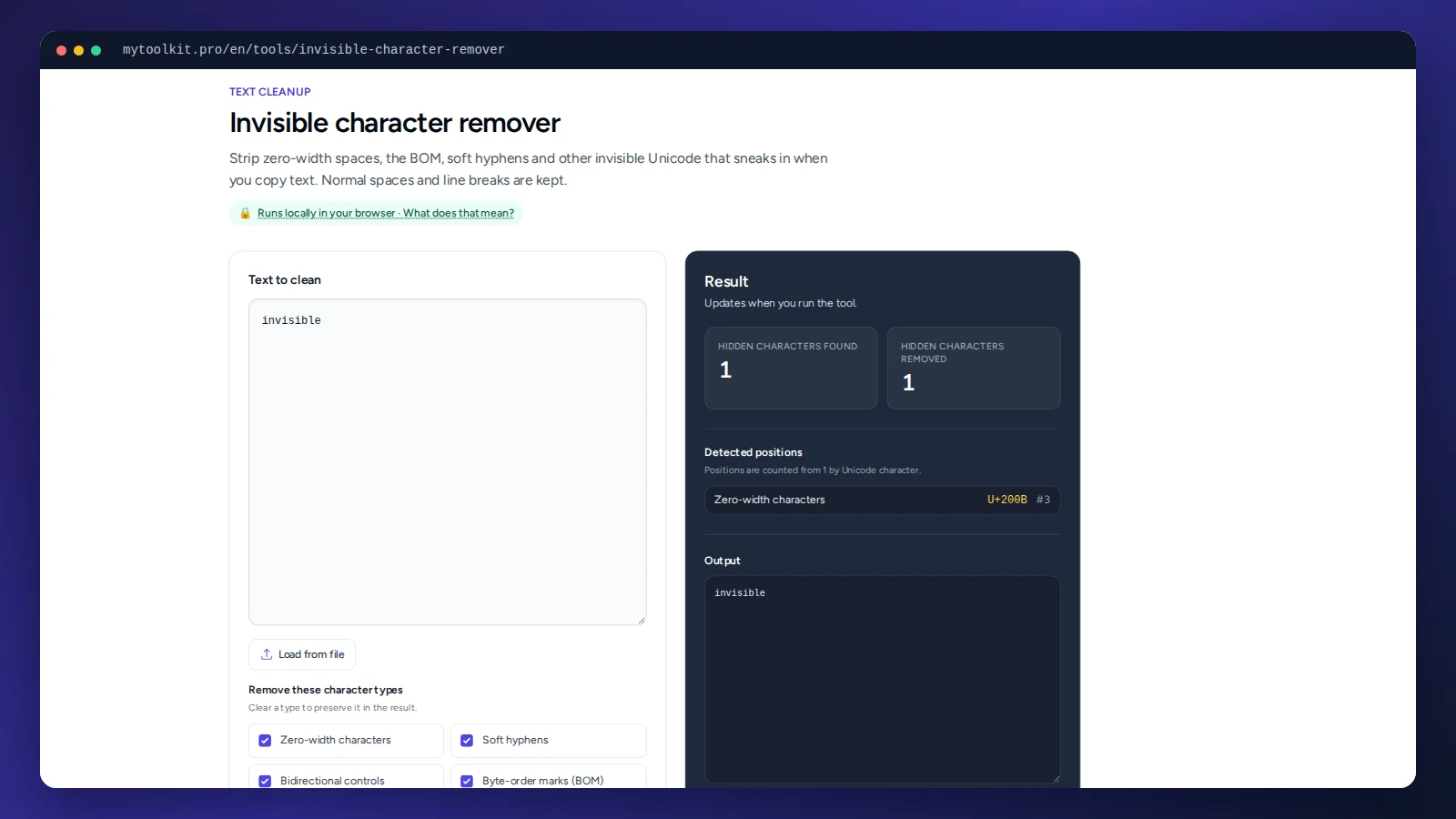
Paste your text into Text to clean. To use a text file, pick it with Load from file or drag it in (Drop a text file to load it).
The preview under the input updates as you type. Each hidden character appears as a highlighted tag showing its code, such as U+200B. Hover over a tag to see its type, code and position. If the text has no hidden characters, the preview says "No hidden characters detected."
In the result area, Hidden characters found counts every catalogued hidden character, whatever the type checkboxes are set to.
Under the counters, the list of detected positions has one row per hit, with the type, the code and a position that starts at 1. Positions count Unicode code points, not UTF-16 units, so an emoji counts as one. For example:
🙂a[U+200B][U+FEFF]
Here the zero-width space is #3 and the byte order mark is #4, even though the emoji takes two UTF-16 units.
To see how this works before pasting your own text, use the Try an example buttons: Zero-width space, BOM + soft hyphen and Clean text. Clicking one fills the input and updates the preview. It does not run the removal. With BOM + soft hyphen the tool finds 2 characters: U+FEFF at #1 and U+00AD at #7, inside what looks like "cleantext".
The five character types and what each one covers
The tool recognises 28 code points, grouped into five types:
| Type | Code points removed | What they are normally for |
|---|---|---|
| zero-width | U+180E, U+200B, U+200C, U+200D, U+2060 |
Line-break opportunities (ZERO WIDTH SPACE), preventing breaks (WORD JOINER), and controlling joining (ZWNJ, ZWJ) |
| soft hyphen | U+00AD |
A hint for where a word may be hyphenated |
| bidirectional controls | U+200E, U+200F, U+202A–U+202E, U+2066–U+2069, U+206A–U+206F |
Marks, embeddings, overrides and isolates that set the direction of mixed right-to-left and left-to-right text |
| byte order mark | U+FEFF |
A signature at the start of a text stream |
| invisible format operators | U+2061–U+2064 |
FUNCTION APPLICATION, INVISIBLE TIMES, INVISIBLE SEPARATOR and INVISIBLE PLUS, used in mathematical notation |
The character names and purposes follow the Unicode Standard, Chapter 23 and UAX #9. The grouping is the tool's own: it puts U+180E with the zero-width characters and U+206A–U+206F with the bidirectional controls.
All five types are selected by default. Clear a type to keep those characters in the result. If you clear every type, nothing is removed.
Selective removal example, with only the zero-width and byte order mark types selected:
Input:  a[U+200B]b[U+00AD]c[U+202E]d[U+FEFF]
Output: ab[U+00AD]c[U+202E]d
Two characters are removed. The soft hyphen and the RIGHT-TO-LEFT OVERRIDE stay. Hidden characters found still shows 4, while Hidden characters removed shows 2. The two counters can differ because "found" ignores your selection and "removed" follows it.
When a hidden character is doing a job
Not every invisible character is junk. Check these before you remove everything.
ZERO WIDTH JOINER (U+200D) and ZERO WIDTH NON-JOINER (U+200C) control joining and ligatures in scripts such as Persian and the Indic scripts, and ZWJ also links emoji into sequences (Unicode Standard, Chapter 23). The tool removes them everywhere and does not look at context. Removing the zero-width type can therefore split joined emoji or change how those scripts render. If your text contains them, clear the zero-width type.
Bidirectional marks and isolates can belong in mixed right-to-left and left-to-right text, such as Arabic or Hebrew mixed with Latin. Removing them can change the order in which the text is displayed. The W3C recommends the isolates (U+2066–U+2069) over the older embeddings and overrides when controls are needed (W3C; see also UAX #9).
A soft hyphen only becomes visible when a line breaks at it. In typeset text it does no harm. In search, URL slugs or data fields it is a nuisance, because the character is still in the string.
The Unicode FAQ gives the UTF-8 byte order mark as the bytes EF BB BF. It advises against using one where a protocol or parser expects ASCII characters at the start. A U+FEFF in the middle of text usually comes from joining files together. For the old "zero width no-break space" meaning of U+FEFF, the FAQ says to use U+2060 WORD JOINER instead.
Bidi controls hidden in code
The Trojan Source research by Nicholas Boucher and Ross Anderson at the University of Cambridge showed that bidi overrides such as RLO (U+202E) can make source code display differently from how a compiler reads it. The issue is tracked as CVE-2021-42574. The researchers recommend making these characters visible, and that is what the preview does. With the bidirectional type selected, the tool also removes them from snippets you paste.
The tool does not scan or secure code. It only removes the catalogued characters from the text you give it.
Running the removal and taking the result
Click Remove hidden characters. The cleaned text appears in Output under Result, and Hidden characters removed shows how many characters were removed.
If you edit the input or change any type, the output is cleared and the removed count goes back to 0. This is intentional, so that the output never shows a result for text or settings that have changed. Click Remove hidden characters again to get a fresh result.
Copy result copies the output and shows "Result copied to clipboard." Clear empties the input.
The tool does no normalisation and no trimming, and it does not rewrite anything else. Every character outside the catalogue comes out exactly as it went in.
What the tool leaves in place, and size limits
These characters are not removed:
- NO-BREAK SPACE (
U+00A0) - LINE SEPARATOR and PARAGRAPH SEPARATOR (
U+2028,U+2029) - HAIR SPACE (
U+200A) and other space variants - the Hangul filler
U+3164 - variation selectors
- tag characters
U+E0000–U+E007F - ARABIC LETTER MARK (
U+061C) - C0 and C1 control characters
Ordinary spaces, tabs and newlines are kept exactly as they are.
Limits:
- The input accepts at most 1,000,000 characters.
- The preview shows only the first 10,000 characters, and says so when the text is longer.
- The list of detected positions shows at most 200 rows. Hidden characters found still counts every hit.
To keep tidying the text afterwards, use the whitespace normalizer to collapse repeated spaces and trim lines, find and replace for other targeted replacements, and remove empty lines for blank lines. To clean the next text, go back to the Invisible character remover.
Privacy
The text is processed by JavaScript in your browser. The page states that no text is uploaded or stored, and the badge reads Runs locally in your browser. No text content leaves your browser.
FAQ
Is the character at the very start of my text a BOM, and is it safe to remove?
If the list of detected positions shows U+FEFF at #1, it is a byte order mark. Removing it is usually safe and often fixes parsers that expect plain ASCII at the start of the input. The Unicode FAQ advises against a UTF-8 BOM in that situation.
Will removing zero-width characters break emoji or Persian and Hindi text?
It can. ZWJ (U+200D) and ZWNJ (U+200C) belong to the zero-width type, and the tool removes them without looking at context. That can split joined emoji or change how scripts that rely on joiners render. Clear the zero-width type if your text contains them.
What is the difference between a non-breaking space and a zero-width space, and does the tool remove both?
A non-breaking space (U+00A0) has the width of a space and prevents a line break at that point. A zero-width space (U+200B) has no width at all. The tool removes the zero-width space and keeps the non-breaking space.
Why does Hidden characters found show a higher number than Hidden characters removed?
The found counter counts every catalogued hidden character, whatever types are selected. The removed counter counts only the characters of the types you kept selected. It also stays at 0 until you click Remove hidden characters.
Can hidden characters be used to mark or fingerprint text?
The tool does not look at where a character came from or why it is there. It finds and removes the catalogued characters wherever they appear. Characters outside the catalogue, such as tag characters or variation selectors, stay in the text.
Why did my result disappear after I edited the text?
Editing the input or changing any type clears Output and resets Hidden characters removed to 0. Click Remove hidden characters again to get a result that matches the current text and selection.