
A web server learns about its visitors in two very different ways. It observes one thing directly: the address at the other end of the TCP connection, which its operating system recorded when the connection was set up. Everything else arrives as text in request headers, written by the browser or appended by proxies on the way. Those headers are claims, not observations. Every “what is my IP” page, including My IP, shows the result of a decision between the two.
This article is about what happens after your packets leave your own network. Why your router shows 192.168.x.x while websites see a different address is covered in our article on what websites see about your connection. The question here is narrower. Once a request reaches a server, possibly through several machines in between, which address does the server decide is yours, and why should it believe it?
The only address a server actually observes
A TCP connection has two endpoints, and each side knows the other's address because the opening handshake completed between them. Applications receive this as the peer address of the socket.
The peer address is harder to fake than a header for a simple reason: the server's replies go to it. A machine that sends packets with someone else's source address does not receive the responses, so in the normal course of things it cannot finish the handshake and carry on an HTTP conversation. This is a consequence of how TCP works rather than a guarantee against every possible network attack, but it is why the peer counts as observed.
The catch is that the peer is only the last hop, meaning whichever machine opened the connection to the server. For a small site served directly, that is the egress address of your network. For many larger sites it is a CDN edge, a load balancer or a reverse proxy, and your own address never appears at the socket level at all.
The peer also has an address family. IPv4 addresses are 32 bits long and IPv6 addresses are 128 bits. The version suffix next to Public IP address on the tool shows which family your connection used. The same visitor can reach one site over IPv6 and another over IPv4. When both ends support both families, clients typically try IPv6 first and start an IPv4 attempt shortly afterwards if IPv6 has not connected, using whichever succeeds first. This is Happy Eyeballs, described in RFC 8305. When a site publishes only IPv4 addresses, there is no choice to make. IPv6 adoption differs by country and network and changes over time; Google publishes a running measurement if you want a current figure.
One convention before the examples. Every address in this article comes from the ranges reserved for documentation: 192.0.2.0/24, 198.51.100.0/24 and 203.0.113.0/24 for IPv4 (RFC 5737, listed in the IANA special-purpose registry), and 2001:db8::/32 for IPv6 (RFC 3849). None of them belongs to a real host.
When the peer is a machine in the middle
A reverse proxy or CDN terminates your connection. It accepts your TCP connection, reads the HTTP request, and opens a separate connection to the origin server to fetch the response. From the origin's point of view the peer is now the proxy. Without extra information, every visitor appears to come from a handful of proxy addresses.
Proxies solved this by writing the address they observed into a header before passing the request on. No standard existed at first, so a family of conventions grew up:
X-Forwarded-For, the most widespread, holds a comma-separated list of addresses (MDN).X-Real-IPholds a single address and is common in nginx setups.- Vendor headers such as Cloudflare's
CF-Connecting-IPhold the one address the vendor saw as the visitor.
Via looks related but answers a different question. RFC 9110 defines it as a record of the protocol versions and intermediaries a message passed through, for example Via: 1.0 fred, 1.1 p.example.net. An intermediary may be named by host name or by a pseudonym, so a Via value often contains no IP address at all. That is why the Proxy hints card can show a Via entry that tells you a proxy was involved without saying where the request came from.
Reading an X-Forwarded-For chain
The header is a list. The first proxy writes the peer it received the request from, and every later proxy appends its own peer to the end:
X-Forwarded-For: <client>, <proxy1>, <proxy2>
A proxy does not list itself. It lists whoever connected to it. The last proxy in the chain therefore never appears in the header; it is the TCP peer.
A worked chain
Suppose a request travels from a laptop through a corporate forward proxy, then a CDN edge, then a load balancer, and finally reaches the application. You operate the CDN configuration and the load balancer, and both use addresses in 203.0.113.0/24.
Laptop                   198.51.100.23
Corporate proxy          192.0.2.5
CDN edge                 203.0.113.10
Load balancer            203.0.113.20

Header received by the application:
X-Forwarded-For: 198.51.100.23, 192.0.2.5, 203.0.113.10

TCP peer seen by the application:
203.0.113.20
Each entry was written by a different machine. The corporate proxy wrote 198.51.100.23, the CDN edge appended 192.0.2.5, and the load balancer appended 203.0.113.10.
Only the entries written by machines you operate are facts from your point of view. Everything to their left came from upstream, and upstream includes the client. Nothing stops a client from sending its own X-Forwarded-For header with any value it likes, and a proxy that appends to an existing header keeps that value at the front of the list.
Reading from the right
The dependable reading goes from right to left:
- Start with the TCP peer. If it is not one of your trusted proxies, it is the client, and the header is ignored.
- Otherwise, look at the rightmost entry in the header. If it belongs to a proxy you trust, skip it and move one entry left.
- The first address that is not a trusted proxy is the best available client address.
In the example, the peer 203.0.113.20 is trusted, 203.0.113.10 is trusted, and 192.0.2.5 is not. The answer is 192.0.2.5, the corporate proxy's address. The laptop entry, 198.51.100.23, may well be accurate, but it rests on the word of a machine you do not control.
The same reading with a forged entry
Now take a client with no proxy at all that sends its own header:
Client's real address:   198.51.100.23
Client sends:            X-Forwarded-For: 192.0.2.99

Header received by the application:
X-Forwarded-For: 192.0.2.99, 198.51.100.23, 203.0.113.10

TCP peer seen by the application:
203.0.113.20
A server that takes the leftmost entry concludes the visitor is 192.0.2.99, an address the client chose. A right-to-left reader confirms that the peer 203.0.113.20 is trusted, skips the trusted entry 203.0.113.10 and stops at 198.51.100.23, the address your own CDN edge saw as its peer. MDN's guidance on selecting an address gives the same advice: the leftmost value is easy to spoof, so count trusted proxies from the right.
Forwarded: the standard that tried to tidy this up
RFC 7239, published in June 2014 as a Proposed Standard, defines a single structured Forwarded header to replace the scattered X-Forwarded-* conventions. Each hop adds one element, elements are separated by commas, and parameters within an element are separated by semicolons:
Forwarded: for=192.0.2.60;proto=http;by=203.0.113.43
Forwarded: for=192.0.2.43, for=198.51.100.17
There are four parameters. for identifies the node that made the request to the proxy, by identifies the interface where the proxy received it, host carries the original Host value, and proto carries the protocol the client used, such as http or https.
Parsing traps
The structure is cleaner than X-Forwarded-For, but it is easy to parse badly:
- An IPv6 address must be in square brackets and, because brackets and colons are not allowed in a bare token, the whole value must be quoted:
for="[2001:db8:cafe::17]:4711", where 4711 is a port. - A proxy may hide a node behind an obfuscated identifier that starts with an underscore, such as
for="_gazonk". for=unknownis valid. It means the proxy forwarded the request but does not know, or will not say, who sent it.
Code that splits on commas and colons mangles the IPv6 form, and code that expects every for value to be an IP address fails on the other two. Use a parser that understands quoted strings, and treat non-address values as “no usable address”.
| X-Forwarded-For | Forwarded | |
|---|---|---|
| Standardised | No, a de facto convention | Yes, RFC 7239 (Proposed Standard) |
| Structure | Comma-separated list of bare addresses | Comma-separated elements of key=value pairs |
| IPv6 | Usually written bare | Bracketed and quoted |
| Protocol and host | Separate headers (X-Forwarded-Proto, X-Forwarded-Host) |
Same header (proto, host) |
| Hidden or unknown hops | No convention | Underscore identifiers and unknown |
What the standard does not change is trust. RFC 7239's own security considerations warn that the header's values can be forged by any node along the way, and that the header discloses client addresses and details of the internal network. Forwarded tidies the syntax; deciding which elements to believe is still the receiver's job.
Trust is configuration, not protocol
No header can prove who wrote it. A server knows which forwarded address to believe only because an operator told it which peer addresses are allowed to supply one. Every working setup follows that pattern.
A CDN
Cloudflare's header reference says CF-Connecting-IP carries the visitor address Cloudflare saw, and that when a request already has an X-Forwarded-For header, Cloudflare appends to it rather than replacing it. Anything the visitor sent stays on the left. These headers mean something only if the request really came through Cloudflare, because anyone who can reach the origin directly can send a CF-Connecting-IP header too. Origins should therefore honour them only from Cloudflare's published address ranges.
A web server
The nginx realip module implements the right-to-left rule directly:
set_real_ip_from  203.0.113.0/24;
real_ip_header    X-Forwarded-For;
real_ip_recursive on;
set_real_ip_from lists the trusted peers, and the header is consulted only for requests from them. real_ip_header chooses the header. With real_ip_recursive on, nginx skips trusted addresses from the right and uses the last untrusted one; with it off, nginx takes the last address in the header. The $realip_remote_addr variable keeps the original peer, so logs can record both.
A framework
Application frameworks wrap the same idea. In Laravel, trusted proxies are declared in bootstrap/app.php (Laravel documentation):
->withMiddleware(function (Middleware $middleware): void {
    $middleware->trustProxies(at: ['203.0.113.0/24']);
})
After that, $request->ip() follows the trusted-proxy rules instead of returning the proxy's own address. Laravel also accepts '*' to trust every proxy, which is convenient when load balancer addresses are not known in advance. If the application can also be reached without going through that proxy, '*' lets any client choose its own address.
Below HTTP: the PROXY protocol
The PROXY protocol, specified by HAProxy, moves the information out of HTTP entirely. The proxy sends a short preamble at the very start of the TCP connection, before any client data, stating the original source and destination addresses and ports. Version 1 is a single human-readable line such as PROXY TCP4 198.51.100.23 203.0.113.20 56324 443; version 2 is binary. Because the proxy writes it before the client's bytes, there is no header for a client to forge. The specification requires the receiver to be explicitly configured for it rather than guessing whether a preamble is present, so it works only between components set up to use it. nginx, for example, can read it with real_ip_header proxy_protocol.
What goes wrong when the wrong address wins
Trusting too much is the first failure mode. A server that takes the leftmost X-Forwarded-For entry, or honours the header from any peer, lets the client pick its own address. Per-IP rate limits can be sidestepped by changing the value on each request, allow-lists can be satisfied by writing an allowed address, and logs fill with addresses that never connected.
Trusting too little is the opposite failure. If the origin ignores forwarding headers behind a CDN, every visitor appears to share the CDN's addresses. A rate limit then throttles many unrelated users at once, and geolocation reports where the edge server is rather than where the visitors are.
The third failure mode is a reachable origin combined with a loose trust rule. A trust list protects only traffic that actually passes through the listed proxies. If the origin also accepts connections from the open internet, a client can connect to it directly and send whatever forwarding headers it likes. Common ways this goes wrong:
- trusting
'*'or a broad address range, so the direct client's own peer address counts as a trusted proxy; - reading
CF-Connecting-IPor a similar vendor header from any peer, without checking that the request came from the vendor's ranges.
There are two fixes, and they combine well: firewall the origin so that only the proxy's address ranges can reach it, and check the peer address before reading any forwarding header.
The user agent: a claim with a long memory
User-Agent is defined in RFC 9110 as a request header the client supplies to describe itself. It belongs in the same category as the forwarding headers: claimed, not observed. Browser extensions, developer tools and command-line clients can all set it to anything.
Its odd opening has a history. Early servers sent richer pages only to Netscape's browser, which identified itself as “Mozilla”, so other browsers began to include the same token to receive those pages, and the practice stuck. MDN notes that almost every browser today sends Mozilla/5.0 for historical reasons and recommends feature detection instead of parsing the string.
The string has also become deliberately less informative. Chrome's User-Agent Reduction, which began rolling out with Chrome 101 in 2022, keeps the major version but freezes the minor, build and patch numbers to zeros, so the string reads Chrome/<major>.0.0.0. It also freezes the platform details. The stated aim is to limit passive fingerprinting. Sites that need more detail can request it through User-Agent Client Hints, which a browser supplies only when the server asks.
The practical result: the Browser user agent card shows what your browser chose to send. It is useful for debugging, and unreliable for detecting browsers or making security decisions.
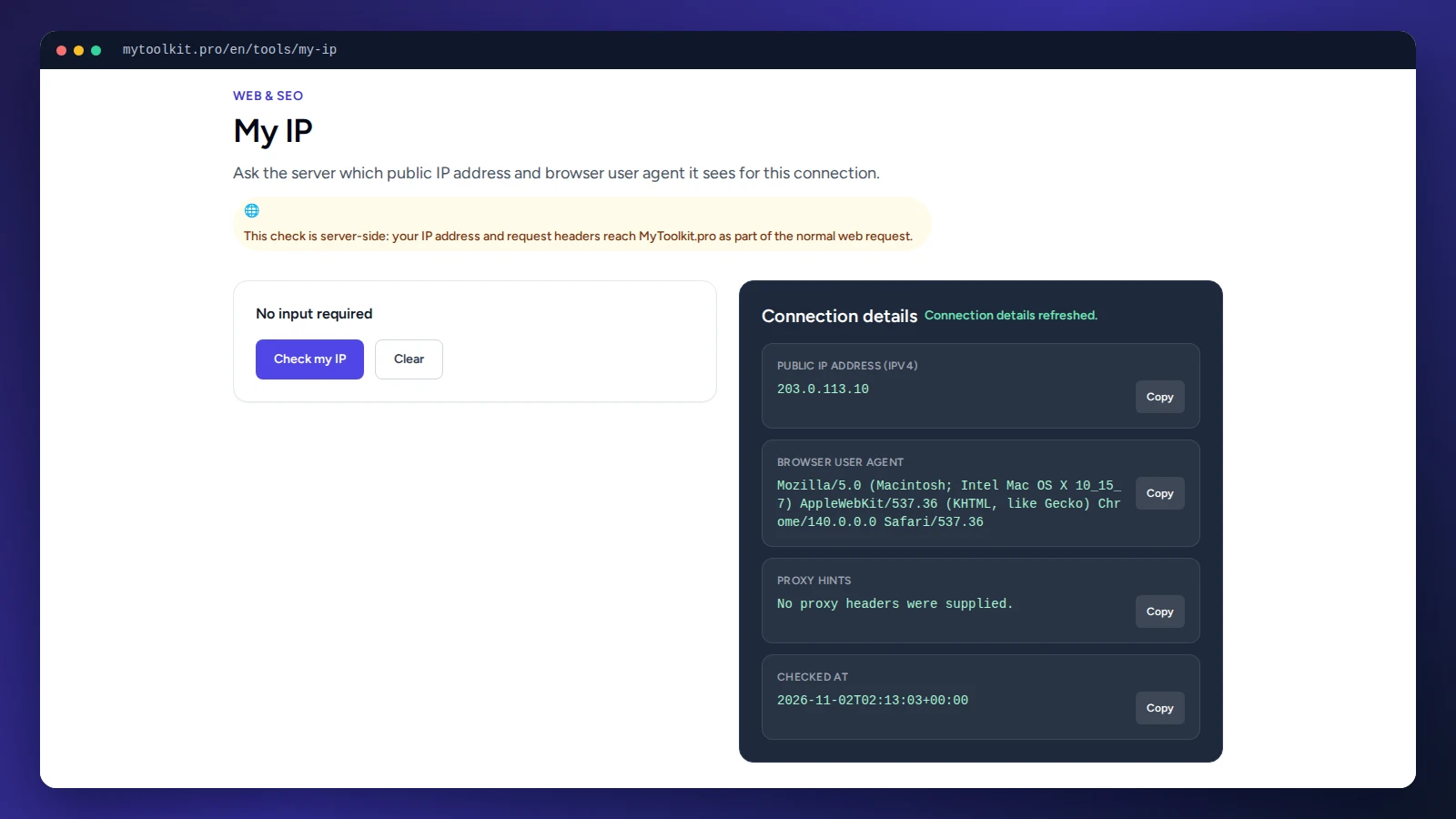
Reading the four cards with this in mind
The tool's output maps onto the observed-versus-claimed split:
- Public IP address is the server's chosen answer, after whatever trust rules its operator configured.
- Proxy hints lists forwarding information about your route: any
CF-Connecting-IPorX-Forwarded-Forentries other than the address shown as your public IP, plus anyViavalue, joined with “ · ”. If nothing remains, it says “No proxy headers were supplied.” That message can appear even when forwarding headers arrived, if their only entry was your own detected address. - Browser user agent is a client claim, passed back as received.
- Checked at is when the server answered, given in UTC.
One practical experiment: open My IP with and without a VPN or corporate proxy, pressing Check my IP each time. Comparing the public address shows which hop the site ends up treating as you. Do not expect the hints card to change every time. A VPN usually changes only the public address, and extra forwarding entries appear mainly behind HTTP proxies that add them.
This tool reflects the request side. For the other direction, HTTP headers shows the response headers a server sends back. To see whether a site publishes IPv4 (A) or IPv6 (AAAA) addresses, which decides whether your connection can use IPv6 at all, use DNS lookup.
Privacy
An IP lookup cannot run in the browser alone. Your public address and your request headers are known only to the party receiving the request, so the tool reads them on the server and sends them back to you. You type nothing, and the page says that the check is processed on the server.
More generally, IP addresses and user agents are passive signals that every site you visit receives without asking. That is the reasoning behind Chrome's user-agent reduction, and behind RFC 7239's warning that forwarding headers expose client addresses to every server further down the chain.
FAQ
Why can the Proxy hints card list more than one address?
The card combines CF-Connecting-IP, X-Forwarded-For and Via, separated by “ · ”, and X-Forwarded-For is itself a list with one entry per proxy that handled the request. The address already shown as your public IP is left out, so what remains are the other hops, which can include an entry added by your own software or a proxy before the request reached the site.
Can a website be fooled by a forged X-Forwarded-For header?
Yes, if it reads the leftmost entry or accepts the header from any peer. A site that reads the list from the right and skips only proxies it operates ignores a forged entry, because the forged value stays to the left of the address its own proxy observed.
What is the difference between Forwarded and X-Forwarded-For?
X-Forwarded-For is a de facto convention: a plain comma-separated list of addresses. Forwarded is standardised in RFC 7239 and records for, by, host and proto for each hop, with stricter syntax for IPv6 and support for obfuscated or unknown nodes. Neither can prove who wrote it, so both depend on a trusted-proxy configuration.
Why does my browser's user agent start with Mozilla even in Chrome or Safari?
It is a compatibility leftover, explained in the user agent section above. If a site needs reliable browser details, User-Agent Client Hints are the structured alternative to parsing the string.
Why did one site show me an IPv6 address and another an IPv4 address?
The connection to each site used a different address family, usually because one site publishes IPv6 addresses and the other does not (see the section on the address a server observes).
Can my browser see or change the PROXY protocol header?
Not in the normal setup. The preamble is written by a proxy on a separate connection that starts at the proxy, where your own connection terminates, so the browser never sees it. A backend configured for the PROXY protocol expects the preamble on every connection, which is why such ports should accept connections only from the proxy.
Further reading
- RFC 7239: Forwarded HTTP Extension defines the
Forwardedheader, its parameters, its syntax and its security warnings. - RFC 9110: HTTP Semantics is the current definition of the
ViaandUser-Agentheaders. - MDN: X-Forwarded-For covers the header's syntax and how to choose a trustworthy address.
- nginx realip module documents
set_real_ip_from,real_ip_headerandreal_ip_recursive. - Cloudflare HTTP headers explains
CF-Connecting-IPand how Cloudflare handlesX-Forwarded-For. - The PROXY protocol specification describes versions 1 and 2 of the connection preamble.
- Chromium: User-Agent Reduction explains which parts of the string are frozen and how Client Hints replace them.