
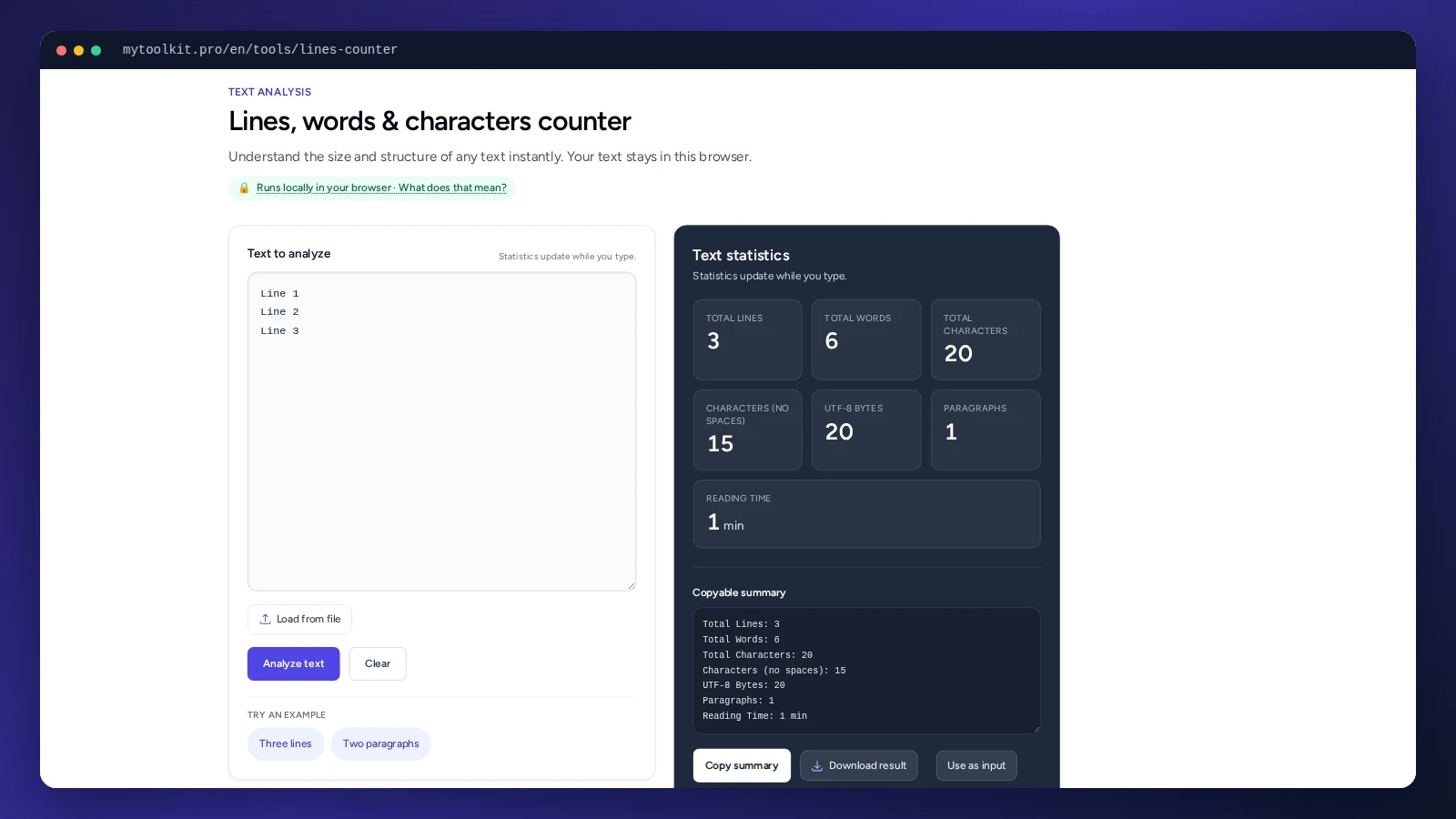
Take the short string zażółć 😀: one Polish word, a space and an emoji. A browser counter reports 8 characters, 15 bytes and 1 word. JavaScript's .length says 9. wc -m in a UTF-8 locale says 8, and wc -c says 15. None of these tools is broken. Each one counts a different unit, and once you know the unit behind a number, the disagreement makes sense.
One string, four honest answers
Here is the same string measured in each unit:
text:                 zażółć 😀
user-perceived chars: 8
Unicode code points:  8
UTF-16 code units:    9    (JavaScript .length)
UTF-8 bytes:          15   (wc -c)
words:                1
A count only means something once you know its unit. "Character" can mean three different things. A byte count depends on the encoding. A line count depends on whether a newline ends a line or sits between two lines. "Word" has at least three common definitions. Paragraphs and reading time are conventions built on top of all that.
The lines, words and characters counter shows several of these units side by side, so it is a handy place to try the examples below. Where its rules differ from other software, this article points that out.
What a 'character' can mean: code units, code points and grapheme clusters
UTF-16 code units
JavaScript strings are sequences of 16-bit UTF-16 code units. Characters outside the Basic Multilingual Plane, which includes most emoji, are stored as a surrogate pair of two units, so '😀'.length is 2. Mathias Bynens' JavaScript has a Unicode problem walks through the surprises this causes with .length, split('') and regular expressions.
HTML forms use the same unit. The HTML Standard measures maxlength in UTF-16 code units. The counter's own input box caps typed or pasted text at 1,000,000 units, so it accepts a million plain Latin letters but only half a million emoji like 😀.
Code points
A code point is the number Unicode gives a character, such as U+017C for ż. Array.from(text) and regular expressions with the u flag step through a string one code point at a time (Bynens). wc -m counts characters as the current locale defines them, which in a UTF-8 locale means code points, not what a reader sees as one character (POSIX, GNU coreutils). That is why wc -m and the counter agree on zażółć 😀 but disagree on a flag.
Extended grapheme clusters
What a reader sees as one character can be made of several code points. UAX #29 defines the extended grapheme cluster as the default stand-in for a "user-perceived character", and its rules spell out what belongs together:
- GB9, GB9a and GB9b attach combining marks, spacing marks and prepended characters to their base. So e followed by U+0301 COMBINING ACUTE ACCENT displays as é and counts as one cluster.
- GB11 keeps emoji joined by ZERO WIDTH JOINER (U+200D) in a single cluster, as in the family emoji.
- GB12 and GB13 pair regional-indicator symbols, which is how two of them combine into one flag.
The Total Characters tile counts grapheme clusters using Intl.Segmenter at grapheme granularity, an API defined in ECMA-402 and documented on MDN. In a browser without Intl.Segmenter, the tool falls back to counting code points, which gives a higher number for flags, joined emoji and decomposed accents. A line break also counts as one character.
The Characters (no spaces) tile leaves out every cluster that is a single whitespace character, so zażółć 😀 drops from 8 to 7.
| Visible text | Grapheme clusters | Code points | UTF-16 units | UTF-8 bytes |
|---|---|---|---|---|
zażółć 😀 |
8 | 8 | 9 | 15 |
| é typed as e + U+0301 | 1 | 2 | 2 | 3 |
| 🇵🇱 (Polish flag) | 1 | 2 | 4 | 8 |
| 👨👩👧 (man, ZWJ, woman, ZWJ, girl) | 1 | 5 | 8 | 18 |
One caveat: ECMA-402 leaves the details of segmentation to each implementation, and engines follow whatever Unicode data they ship. Unicode revises UAX #29 and its emoji data with new versions. An older browser may therefore split a recently added emoji sequence into several clusters, and the same text can show slightly different character counts on two machines.
Bytes: how UTF-8 turns characters into storage
Unicode assigns code points. An encoding decides how those numbers become bytes. Joel Spolsky's well-known essay puts it simply: there is no such thing as plain text, because a string means nothing until you know its encoding. On the web that encoding is almost always UTF-8. The WHATWG Encoding Standard names it the encoding for new content, and TextEncoder produces nothing else.
RFC 3629 defines how many bytes each code point needs:
| Code point range | UTF-8 bytes |
|---|---|
| U+0000 – U+007F | 1 |
| U+0080 – U+07FF | 2 |
| U+0800 – U+FFFF | 3 |
| U+10000 – U+10FFFF | 4 |
ASCII text is unchanged byte for byte. Lead bytes and continuation bytes have distinct bit patterns, so a decoder that starts in the middle of a stream can find the next character boundary. This is what "self-synchronising" means.
Now work through zażółć 😀. The z, the a and the space are ASCII at 1 byte each. ż (U+017C), ó (U+00F3), ł (U+0142) and ć (U+0107) fall in the two-byte range. 😀 (U+1F600) needs four. That gives 3 + 8 + 4 = 15, the figure in the UTF-8 Bytes tile.
The counter measures bytes after it has turned every CRLF pair and every lone CR into a single LF. So a file saved with Windows line endings is one byte larger per line break on disk than the counter reports: one\r\ntwo\r\n is 10 bytes in the file and 8 in the tool. The same effect is behind many confusing hash mismatches. Text that looks identical but uses different line endings is made of different bytes, so it gives a different checksum, as explained in what a checksum match actually proves.
One rare edge case: a lone surrogate (half of a UTF-16 pair without its partner) has no UTF-8 form. TextEncoder replaces it with U+FFFD REPLACEMENT CHARACTER, which takes 3 bytes, so the byte count then describes a slightly different string from the one you pasted.
Carriage return and line feed
The two control codes behind line endings are named after teleprinter mechanics, as on the Teletype Model 33 shown above. Carriage return (CR, U+000D) moved the print position back to the left margin, and line feed (LF, U+000A) moved the paper up one line.
Software never settled on one of the two. Text files today usually end lines with LF alone, as on Linux and macOS, or with the pair CR LF, as on Windows, and a lone CR still turns up in some older files. The counter accepts all three and treats each as one line break.
Unicode also recognises other line-ending characters: NEXT LINE (U+0085), inherited from older control-code standards, and its own LINE SEPARATOR (U+2028) and PARAGRAPH SEPARATOR (U+2029). The counter does not treat these as line breaks. After normalisation it splits only on LF, so these characters stay inside the line where they appear.
Browsers already smooth over part of this. The HTML Standard says that when a script reads a textarea's value, CR and CRLF have been normalised to LF, and that form submission sends line breaks as CRLF. The counter applies the same normalisation to the text itself, so identical lines pasted from any system produce identical counts.
Terminator or separator: why the last line is ambiguous
There are two ways to think about a newline.
The terminator model says a newline ends a line. POSIX defines a line this way, and wc -l just counts newline characters. a\nb contains one newline, so wc -l reports 1. A final line without a trailing newline is not counted.
The separator model says a newline sits between lines, so you split on it and count the pieces. The counter's Total Lines works this way. a\nb gives 2 pieces. a\nb\n gives 3, because the trailing break leaves an empty piece at the end.
| Input | wc -l |
This tool |
|---|---|---|
a |
0 | 1 |
a\n |
1 | 2 |
a\nb |
1 | 2 |
a\nb\n |
2 | 3 |
| (empty) | 0 | 0 |
Here is a Windows-style example with both effects at once:
input:       one\r\ntwo\r\n
after CRLF → LF: one\ntwo\n
lines:       3   (one, two, empty last line)
words:       2
characters:  8   (o n e LF t w o LF)
bytes:       8
The edge cases follow from the separator model. Empty input is 0 lines, but any other input is at least 1. Three spaces count as 1 line, 0 words and 0 paragraphs. Neither model is wrong. wc -l tells you how many line terminators a file contains, which is what most Unix tools care about. The split count tells you how many line slots the text takes up, including the empty one after a final break.
To make two counts agree, first decide whether your text should end with a line break. Then remove stray whitespace and blank lines, for example with the whitespace normalizer and remove empty lines, before you compare numbers.
Three definitions of a word
Whitespace words
POSIX wc defines a word as a non-zero-length string of characters delimited by white space. Anything between spaces, tabs and newlines counts, so well-known, 3.14, snake_case and even a lone — are one word each.
Unicode word boundaries
UAX #29 sets default word boundaries more precisely. Rules WB6 and WB7 prevent a break at an apostrophe or similar mid-word punctuation between letters, so don't stays whole. Other rules in the same section keep a decimal number such as 3.14 together and join parts linked by an underscore. A hyphen is a boundary, so well-known splits into two words.
This tool's words
The counter's Total Words counts runs of Unicode letters and digits, the L and N General_Category values defined in UAX #44. A run can be joined by a straight (') or curly (’) apostrophe, but by nothing else:
/[\p{L}\p{N}]+(?:[’'][\p{L}\p{N}]+)*/gu
Everything else either splits a word or is skipped. That includes hyphens, full stops, the underscore (connector punctuation, Pc), plus signs, dashes and emoji (mostly other symbol, So).
| Token | wc -w (whitespace rule) |
This tool |
|---|---|---|
don't |
1 | 1 |
well-known |
1 | 2 |
3.14 |
1 | 2 |
snake_case |
1 | 2 |
C++ |
1 | 1 |
— |
1 | 0 |
😀 |
1 | 0 |
What this means in practice: an essay portal, a content management system and a word processor can each give a different total for the same draft, because each one chose its own rule, and few say which. Text full of hyphenated compounds, numbers or code identifiers diverges the most. If specific software enforces a word limit, do the final check with that software's own counter.
The tool's definition is a single regular expression with Unicode property escapes. If you want to see why a pattern like this matches what it does, read why a regex matches too much, too little or nothing. To look at the individual words in a text and how often each appears, try the word frequency counter. Keep in mind that its tokenising rules may not be identical.
Writing systems without spaces
UAX #29 notes that its default word rules are not adequate for Thai, Lao, Khmer or CJK text, which need a dictionary or a similar method.
The counter uses no dictionary. In Chinese or Japanese, every uninterrupted run of letters counts as one word, and only punctuation or spaces split it. So 日本語の文章です。 counts as 1 word.
Scripts that write vowels or tone marks as combining marks run into a different problem. Thai is one example. Combining marks belong to the Mark category, not the Letter category, so the tool's rule breaks the text at each mark, and the pieces it counts do not match real words. Accented Latin text in decomposed form (e + U+0301) can split in the same way.
For any of these texts, word counts and reading-time estimates tell you little. Total Characters is the more useful measure.
Paragraphs are a blank-line convention
The Paragraphs tile counts blocks separated by at least one blank line, and a blank line may contain spaces or tabs. A single line break does not start a new paragraph, and blank lines at the start or end are ignored.
First paragraph.\n \t\nSecond paragraph.
→ 2 paragraphs, 4 words
This follows the plain-text habit of separating paragraphs with an empty line. CommonMark works the same way: it treats a line of only spaces or tabs as blank, and a blank line ends a paragraph.
One practical result: removing every empty line merges all paragraphs into one as far as the count is concerned, while reducing runs of several blank lines to one leaves the count unchanged. Keep that difference in mind if you tidy a draft with remove empty lines before you count it.
Reading time is a constant, not a measurement
The Reading Time tile is plain arithmetic. With no words it shows 0. Otherwise it divides the word count by 200 and rounds up, so the minimum is 1 minute.
| Words | Shown |
|---|---|
| 0 | 0 min |
| 1 | 1 min |
| 200 | 1 min |
| 201 | 2 min |
| 1,000 | 5 min |
Measured reading speeds are higher. Marc Brysbaert's 2019 meta-analysis estimates about 238 words per minute for silent reading of English non-fiction and about 260 for fiction, with slower rates for proofreading and much slower ones for memorising. Speeds also vary a lot between readers and between languages.
Platforms choose their own constants. Medium's help page says it uses 265 words per minute and adds time for images. The counter sees only text, so images and formatting play no part.
Work through 1,000 words: the tool shows 5 minutes, while 238 words per minute gives about 4.2. A fixed 200 words per minute plus rounding up means the estimate tends to run long. Read it as a rough order of magnitude, not a prediction.
Matching a count to the limit you actually face
Before you compare a number with a limit, work out which unit the limit uses.
If the limit is in bytes, as with storage fields or some protocols, compare it with the UTF-8 Bytes tile. Check that the target really stores UTF-8, and remember that CRLF line endings add one byte per break.
If the limit is about visible characters, Total Characters is the closest match, because it counts what a reader perceives as one character.
If an HTML maxlength attribute enforces the limit, it counts UTF-16 code units, which the counter does not display. Each emoji or other character outside the Basic Multilingual Plane costs two units, and a flag or joined emoji costs more. So emoji-heavy text hits the limit sooner than the character count suggests.
If it is a word limit, find out whose word rule applies. The table in the words section shows how far the rules can drift apart.
Messaging services, social networks and databases each define their own units, and some weight certain characters more heavily than others. When a platform rejects text that looks short enough, its documentation is the authority. The counter helps you identify which unit is causing the gap.
Privacy
All counting runs in JavaScript in your browser, and the counting code makes no network request. The Copy summary button only writes the plain-text summary to your clipboard.
Frequently asked questions
Why does a Windows text file have more bytes on disk than the counter shows?
Windows ends lines with CR LF, two bytes per break. The counter converts every line break to a single LF before counting, so it reports one byte fewer per line break than the file takes on disk.
Why can one emoji count as several characters in some browsers?
Grapheme segmentation depends on the Unicode data the browser ships. An engine with older data, or one without Intl.Segmenter, where the tool falls back to code points, can split a joined emoji sequence or a flag into several characters.
Why is a whole Japanese sentence counted as a single word?
The tool counts uninterrupted runs of letters and uses no dictionary, and Japanese and Chinese are written without spaces. Scripts with combining vowel marks, such as Thai, have a different problem: the text is broken at each mark, so the counted pieces do not match real words.
Is a hyphenated term like 'well-known' one word or two?
It depends on the rule. Whitespace-based tools such as wc count one word. Both the Unicode default word boundaries and this tool count two, because a hyphen is a boundary.
Why does the reading time jump from 1 to 2 minutes at 201 words?
The estimate is words divided by 200, always rounded up. 200 words is exactly 1 minute, and 201 words is just over 1, which rounds up to 2.
Why might a website reject text that the counter says is under its limit?
The site may count UTF-16 units (as HTML maxlength does), bytes, or weighted characters, or it may convert line breaks to CRLF on submission. Emoji and line breaks are the usual reasons a count passes in one place and fails in another.
Further reading
- UAX #29: Unicode Text Segmentation: the rules for grapheme clusters and default word boundaries, including the note on scripts that need dictionaries.
- RFC 3629: the definition of UTF-8 and its byte ranges.
- ECMA-402, Intl.Segmenter: the JavaScript API behind grapheme counting in browsers.
- WHATWG Encoding Standard: how
TextEncoderproduces UTF-8 and handles lone surrogates. - POSIX wc: the command-line baseline for lines as newline counts and words as whitespace-delimited strings.
- Brysbaert (2019): a meta-analysis of measured reading rates.
- Joel Spolsky on Unicode and character sets: a readable introduction to code points versus encodings.
- Mathias Bynens, JavaScript has a Unicode problem: why
.lengthis not a character count.