
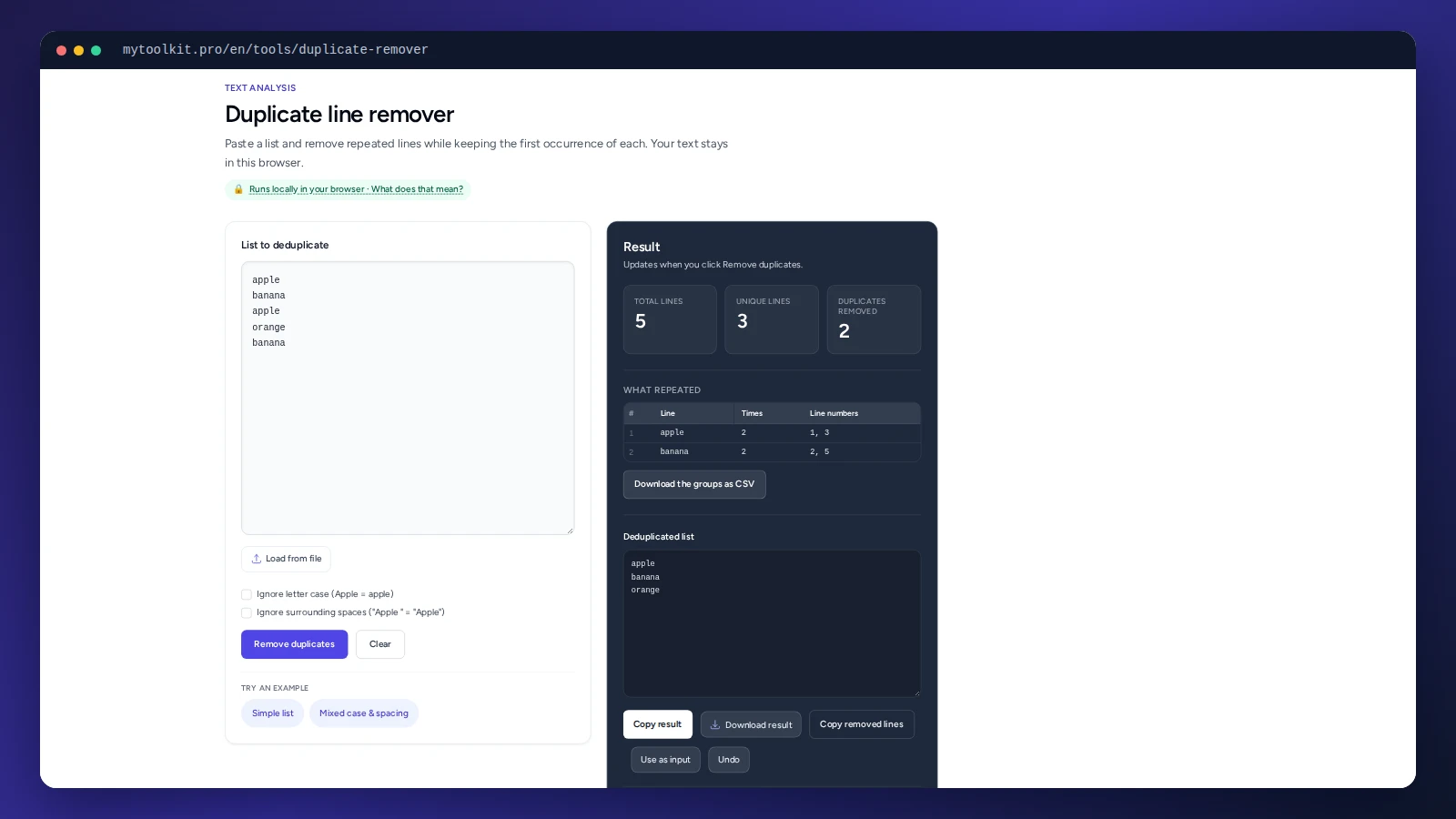
Removing duplicate lines sounds like the simplest text job there is: keep one copy of each line and drop the rest. Two decisions are hidden inside it. The first is what counts as a repeat. Consider 'Apple' and 'apple', 'apple' and 'apple ' with a trailing space, a line that ends in a Windows carriage return and the same line without one, or an é stored as one code point and an é stored as two. Each pair looks alike on screen, and to a computer each pair is two different strings. The second decision is where to look for repeats. The classic Unix command uniq checks only neighbouring lines, so on an unsorted list some duplicates survive.
Every deduplicator makes both decisions, usually without saying so. The Duplicate line remover makes them in one specific way, and the sections below use it as the reference point.
Deciding what counts as a repeat
Each line plays two roles. Its key is what gets compared, and the line itself is what gets written out. With both options off, the key is the raw line. With Ignore surrounding spaces ("Apple " = "Apple") turned on, the key is trimmed. With the case option on, the key is lowercased; when both are on, trimming happens first. The line that survives is always the first raw occurrence, unchanged.
line (both options on)   key        result
' Apple'                 'apple'    kept
'apple'                  'apple'    dropped
'APPLE '                 'apple'    dropped
'Banana'                 'banana'   kept
The output is ' Apple' and 'Banana'. The leading space survives because the key was trimmed and the line was not. A deduplicated list can therefore still contain stray spaces and mixed case, because comparing lines and cleaning them are separate jobs. A whitespace normalizer tidies the text itself.
Keys are always compared as exact code units, with or without the options. The tool applies no Unicode normalization and no locale rules. Whatever the two options do not remove still counts as a difference, and the next section covers the differences that are easiest to miss.
Because the tool makes one pass and keeps the first occurrence, the result is stable: kept lines appear in the order they first appeared. It is also idempotent: run the output through again with the same options and nothing changes. For sorted output, a line sorter does that as a separate step.
When lines that look equal refuse to merge
When two lines look identical but both survive, one of four differences is usually responsible.
A hidden carriage return
Text with Windows line endings ends every line with CR before the LF. If that CR stayed on the line, 'apple' followed by CR would never match 'apple'. Before building keys, the tool converts CRLF pairs and lone CR characters to LF and then splits on LF, and its output always uses LF. The HTML Standard already specifies that a textarea's API value, the text that scripts read, has its newlines normalized to LF. The tool's own conversion means the result does not depend on whether the text was typed, pasted or loaded with Load from file.
Splitting on LF also means a trailing newline produces a final empty line, which counts as a value. A line counter shows how many lines a list really has.
Invisible characters that trimming leaves in place
The space option applies String.prototype.trim() to the key. ECMA-262 defines trim as removing WhiteSpace and LineTerminator characters from both ends. That covers more than ordinary spaces: tab, vertical tab, form feed, the space, U+00A0 NO-BREAK SPACE, U+FEFF (the byte order mark), every other character in Unicode category Zs, and line terminators including U+2028 and U+2029.
Some invisible characters are not on that list. Two examples:
- U+0085 NEXT LINE is a control character that ECMAScript counts as neither WhiteSpace nor a LineTerminator.
- U+200B ZERO WIDTH SPACE is, despite its name, a format character (category Cf), not whitespace.
A line that starts or ends with such a character keeps a different key from its clean twin, so both lines survive.
One letter, two encodings
The letter é can be stored as one code point, U+00E9, or as e followed by U+0301 COMBINING ACUTE ACCENT. Unicode Standard Annex #15 calls such sequences canonically equivalent, but an exact comparison still treats them as different strings:
'\u00e9' === 'e\u0301'                   // false
'\u00e9'.normalize('NFD').length         // 2
'e\u0301'.normalize('NFC') === '\u00e9'  // true
Å has three canonically equivalent spellings: U+212B ANGSTROM SIGN, U+00C5, and U+0041 followed by U+030A COMBINING RING ABOVE. All three become U+00C5 under NFC. UAX #15 defines four normalization forms. NFD decomposes characters into base letters and combining marks, and NFC decomposes and then recomposes. NFKD and NFKC also apply compatibility mappings, which remove distinctions such as ligatures and width variants.
Text copied from different systems can arrive in different forms. If equivalent spellings should merge, normalize the whole list to one form before deduplicating. In a browser console, for example, text.normalize('NFC') returns the NFC version of a string, and JavaScript exposes all four forms through the same method.
Why Straße and STRASSE stay apart with case ignored
Ignore letter case (Apple = apple) lowercases the key with toLowerCase(). ECMA-262 defines that through Unicode's default case mappings, which do not depend on locale. Caseless matching is a different operation, case folding, which Unicode defines separately in CaseFolding.txt. Each entry there has a status: C for mappings shared by simple and full folding, S for simple one-to-one foldings, F for full foldings that can produce several characters, and T for the Turkic mappings of I and İ, which apply only when requested.
'ß'.toLowerCase()            // 'ß'
'İ'.toLowerCase().length     // 2  (i + U+0307)
'İ'.toLocaleLowerCase('tr')  // 'i'
Three cases show the gap:
- German ß: lowercasing leaves it unchanged, but CaseFolding.txt gives U+00DF a full folding to 'ss'. 'Straße' and 'STRASSE' get the keys 'straße' and 'strasse' and stay separate.
- Turkish İ: U+0130 lowercases to i plus U+0307 COMBINING DOT ABOVE, so the key is longer than the line. The T entries and
toLocaleLowerCase('tr')give Turkish results, and the tool uses neither. - Greek sigma: ECMAScript lowercases Σ to ς at the end of a word and to σ elsewhere, so one capital letter can produce two different keys. Case folding maps both to σ.
For everyday English lists, lowercasing behaves as people expect. The differences matter when a list mixes languages.
When merging goes too far
The opposite mistake is merging lines that really are different. Ignoring case throws information away, and sometimes that information is the point:
- In Base64, upper-case and lower-case letters are different digits, so the strings encode different data.
- Many identifier and token formats are case-sensitive.
- On case-sensitive file systems, two paths that differ only in case name two files.
- Usernames, voucher codes and keys may be case-sensitive on the systems that issue them.
Trimming carries the same risk when leading whitespace means something, as in indented text or fixed-width records. With the space option on, a line of only spaces also trims to the empty string and merges with genuinely blank lines, so only the first of them is kept. If blank lines should go entirely, an empty-line remover is the better tool. The safe habit is to start strict and relax only the differences you know do not matter.
Why uniq leaves repeats behind
The second decision, where to look, explains the most common surprise with Unix tools:
$ cat fruit.txt
apple
banana
apple
apple
$ uniq fruit.txt
apple
banana
apple
$ awk '!seen[$0]++' fruit.txt
apple
banana
The two copies of apple at the end merged, but the apple on line 1 and the apple on line 3 both survived. uniq is working as designed. The POSIX specification of uniq describes a filter that compares adjacent lines and writes one copy of each run of identical lines. Its options are -c (prefix each line with its count), -d (only repeated lines), -u (only lines that were not repeated), and -f and -s (skip leading fields or characters before comparing). POSIX has no option to ignore case.
GNU coreutils adds -i for case, -D to print every copy of a repeated line and --group to separate groups. Its manual notes that the input need not be sorted, but "repeated input lines are detected only if they are adjacent", and it points readers who want to discard non-adjacent duplicates to sort -u.
That design suits a pipeline stage. uniq keeps only the previous line in mind and never holds the whole input. Once the input is sorted, every set of identical lines forms a run, which is why the usual idiom is sort | uniq, or sort -u in one step.
Finding repeats anywhere: sort or remember
Sorting fixes adjacency but destroys the original sequence. There are two basic strategies for finding repeats anywhere in a list, and they trade order against memory.
The first is sort, then scan neighbours. Comparison sorting takes on the order of n log n comparisons, the territory Knuth covers in The Art of Computer Programming, Volume 3. The scan afterwards needs almost no memory, but the output comes out sorted.
The second is hash and remember. Walk through the lines once and record every line already seen. A hash function turns each line into a number that picks one of many buckets, so the question "have I seen this?" means looking in a single bucket. Different lines sometimes land in the same bucket. With chaining, each bucket holds a short list that is searched in turn. While keys spread evenly, a lookup takes constant time on average, and the whole pass is expected to be linear. Lines are written or skipped as they arrive, so order survives. The price is that every distinct line stays in memory until the end. In section 6.4 of Volume 3, Knuth credits H. P. Luhn with hashing with chaining, in an internal IBM memorandum from 1953, and Wikipedia's hash table article gives the same attribution.
The awk one-liner in the demo above is hash and remember. The gawk manual documents the pieces: awk arrays are associative and indexed by strings, and referring to an element that does not exist creates it with the null string as its value, which is 0 in a numeric context. seen[$0]++ returns the line's old count and then increments it, so !seen[$0]++ is true only the first time a line appears, and awk's default action prints it. The manual does not name the idiom. It is folklore built on documented semantics.
In JavaScript, Set packages the same idea. The ECMAScript specification requires Set objects to give access times that are sublinear in the number of elements on average, and it fixes iteration to insertion order, which is why [...new Set(lines)] keeps first occurrences in their original order. MDN's Set reference explains both. For strings, Set membership means exact identity: the same length and the same sequence of UTF-16 code units. The Duplicate line remover looks up each line's key in a Set and keeps the line only if the key is new.
| Approach | Keeps original order | Removes non-adjacent repeats | Memory |
|---|---|---|---|
uniq alone |
Yes | No | Only the previous line |
sort -u, or sort then uniq |
No, output is sorted | Yes | Whatever the sort needs |
awk '!seen[$0]++' |
Yes, first occurrence | Yes | Grows with the number of distinct lines |
| Duplicate line remover | Yes, first occurrence | Yes | Grows with the number of distinct lines, inside the browser tab |
One caveat about sort -u. The GNU sort manual explains that comparisons follow the collating sequence of the LC_COLLATE locale, and that -u outputs only the first of a run of lines that compare equal. Under a non-C locale that can merge lines that differ byte for byte. With LC_ALL=C the comparison is by bytes, and sort -u keeps the same set of lines as exact deduplication, only in sorted order.
Because hash and remember keeps every distinct key, very large inputs belong to command-line pipelines built around sort rather than to a browser tab. Finding identical files rather than identical lines is a different job, usually done by comparing digests, as explained in how MD5 and SHA-256 work. There, "hash" means a function designed to make collisions hard to find. A hash table's function only needs to spread keys quickly, and its collisions are expected and handled.
Getting the counts back
A clean list no longer tells you whether a line appeared twice or two hundred times. On the command line, the frequency table is a pipeline built on the -c option that POSIX and GNU both define:
$ sort fruit.txt | uniq -c | sort -rn
      3 apple
      1 banana
The first sort groups identical lines, uniq -c counts each run, and a reverse numeric sort puts the most frequent first.
The Duplicate line remover reports the repeated lines with their counts and line numbers above the cleaned list. The table previews the first 20 groups, and Download the groups as CSV saves all of them as a UTF-8 file that follows the conventions of RFC 4180, the Informational RFC from October 2005 that documents common CSV practice. For a walkthrough of reading the report, see how to remove duplicate lines, keep the first occurrence and see what repeated.
Privacy
The matching, the counting and both downloads happen in your browser, in JavaScript. The text is not uploaded or stored, and the CSV and text files are created locally. The tool page labels this "Runs locally in your browser".
FAQ
Is sort -u the same as removing duplicates while keeping order?
No. With LC_ALL=C, sort -u keeps the same set of lines as exact, order-preserving deduplication, but in sorted order, so the original sequence is lost. Under other locales it compares lines by collation rules, which can merge lines that differ byte for byte. If order matters, use a hash-and-remember approach such as the awk idiom or the Duplicate line remover.
Does awk '!seen[$0]++' give the same result as this tool?
Almost. With both options off and LF-only text without a trailing newline, both keep the first occurrence of each exact line, in order. On CRLF input, awk with its default newline record separator leaves the CR at the end of each line, so a line with a CR and the same line without one stay separate. The tool converts CR and CRLF to LF first, so they merge. When the text ends with a newline, the tool also treats it as the start of a final empty line, which awk does not. The tool's options change the key, which in awk you would write as, for example, !seen[tolower($0)]++.
Why do 'Straße' and 'STRASSE' stay separate with case ignored?
The option lowercases the key; it does not case-fold it. toLowerCase() leaves ß as ß, so the keys are 'straße' and 'strasse'. CaseFolding.txt maps ß to 'ss' for caseless matching, but the tool does not use that mapping.
Why can two lines that look identical both survive?
The tool compares code units, not appearance. The lines may use different Unicode forms of the same character, contain an invisible character such as U+200B that trimming does not remove, or differ in whitespace while the space option is off.
Does running the result through a second time remove anything else?
Not with the same options, because no two output lines share a key. Turning on an option that was off can merge more lines.
Further reading
- POSIX.1-2017: uniq, The Open Group
- GNU Coreutils: uniq invocation and sort invocation, GNU Project
- GAWK: Introduction to Arrays and Referring to an Array Element, GNU Project
- ECMAScript Language Specification (ECMA-262): Set objects, String.prototype.trim, String.prototype.toLowerCase
- Unicode Standard Annex #15: Unicode Normalization Forms, Unicode Consortium
- CaseFolding.txt, Unicode Character Database
- RFC 4180: Common Format and MIME Type for CSV Files, IETF
- HTML Living Standard: the textarea element, WHATWG
- Donald E. Knuth, The Art of Computer Programming, Volume 3: Sorting and Searching, section 6.4 Hashing, Addison-Wesley (author's page)