
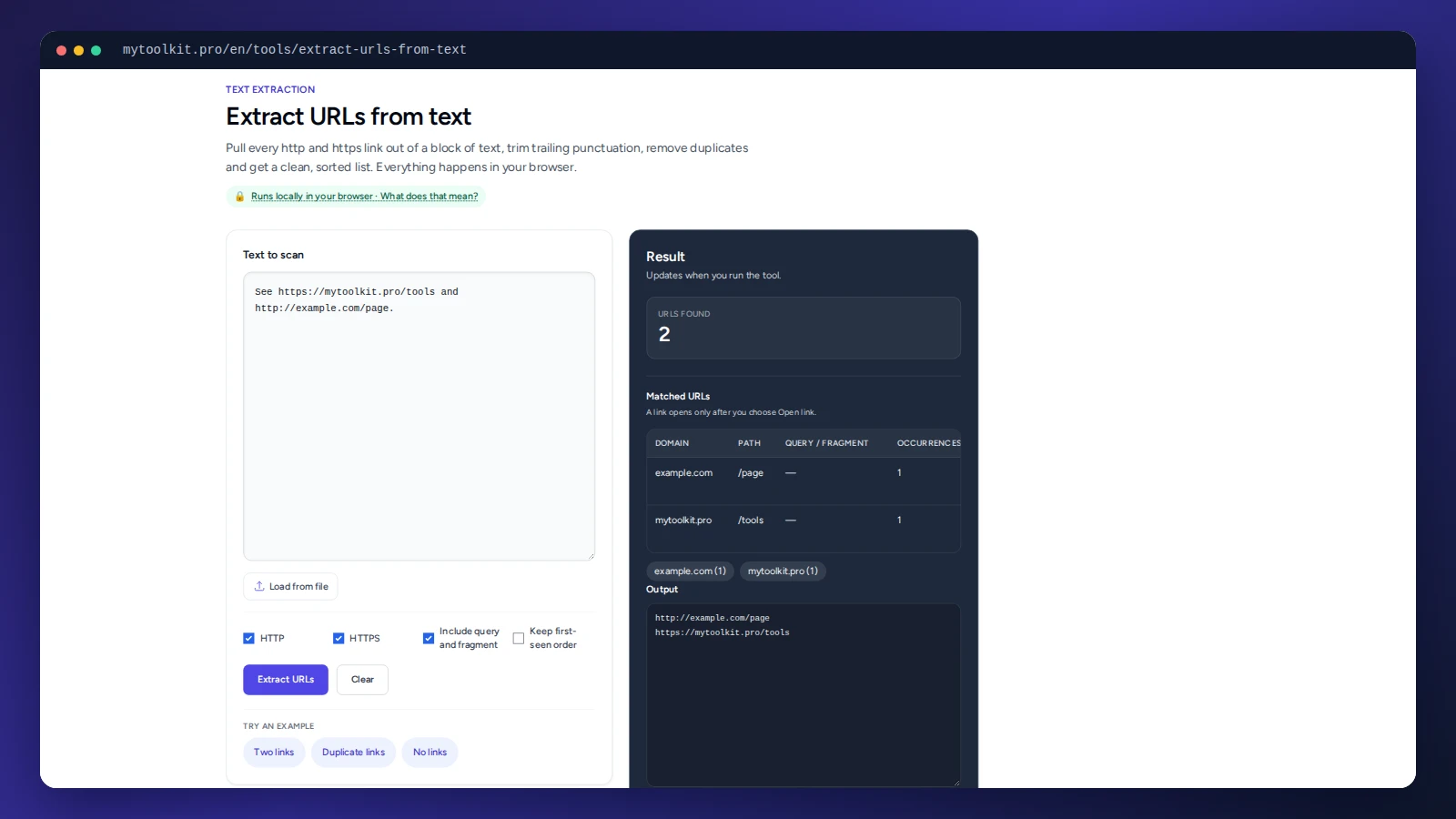
A URL written into a sentence has no closing mark. Take See https://en.wikipedia.org/wiki/Foo_(bar). as an example. Two link extractors can pull two different links out of it, one keeping the closing bracket and one dropping it, and neither is broken. https://en.wikipedia.org/wiki/Foo_(bar), https://en.wikipedia.org/wiki/Foo_(bar and the version that still ends in a full stop are all well-formed URLs.
The IETF grammar and the parsing algorithm that browsers implement both define what a URL is. Neither says where one stops in running text, so every extractor has to choose. The choices made by Extract URLs from text are compared below with the standards and with other published rules.
Sentence punctuation that the URL grammar also allows
The ambiguity comes from RFC 3986's character set. Section 2.2 lists the sub-delimiters ! $ & ' ( ) * + , ; = and the general delimiters : / ? # [ ] @. Section 2.3 makes the full stop an unreserved character, alongside letters, digits, -, _ and ~. So almost every mark that can end an English sentence is also a legal URL character. A grammar can say that https://example.com/a), is well formed. It cannot say whether the writer meant the ) and the ,.
The earliest specification already saw this coming. RFC 1738 called some characters "unsafe" and required them to be encoded: space, <, >, ", #, %, {, }, |, \, ^, ~, [, ] and the backtick. Its reason for excluding the angle brackets is that they "are used as the delimiters around URLs in free text". Its appendix on URLs in context recommends writing a URL as <URL:...>, so that surrounding punctuation is not taken as part of the address, and it adds that the wrapper itself is not part of the URL. RFC 3986's Appendix C, "Delimiting a URI in Context", keeps the idea and widens it: use angle brackets or double quotes, and treat the delimiters as outside the URI.
That advice helps human readers and any parser that respects delimiters. As the next section shows, it does not fully help with this extractor.
Trimming the end of a match: this tool's rule and two published ones
Once an extractor has found a candidate, it has to decide which trailing characters belong to the sentence. Three approaches are compared here: the rule this tool uses and two published alternatives.
Strategy A trims unconditionally, and this is what the tool does. Any run of . , ; : ! ? ) ] } at the end of a candidate is removed. Quotes and > never reach this step, because the match has already stopped at them. The rule is simple and predictable, and it handles (https://x.com/page). correctly. It also removes a ) that belongs to the URL, as in Wikipedia-style Foo_(bar) links, and it removes a final ?, ! or : that was meant to be part of the address.
Strategy B comes from the GitHub Flavored Markdown autolinks extension. Trailing ?, !, ., ,, :, *, _ and ~ are not treated as part of the link, although they may appear inside it. A trailing ) is handled by counting. If the candidate has more closing parentheses than opening ones, the unmatched trailing ones are excluded, and a ) that closes a ( inside the URL stays.
Strategy C is John Gruber's "liberal, accurate" regex, posted in 2010 as an update to his 2009 pattern. It allows balanced parentheses inside the URL and ends with a character class that rejects sentence punctuation, so a match cannot end in a full stop, a comma or an unmatched bracket.
Jeff Atwood's post "The Problem With URLs" explains why balancing matters. A URL in parentheses followed by punctuation looks, at its end, just like a Wikipedia URL that contains parentheses. A rule that gets one of them right breaks the other unless it looks at the brackets inside the URL.
| Input | This tool (unconditional trim) | GFM |
|---|---|---|
(https://x.com/page). |
https://x.com/page |
https://x.com/page |
https://en.wikipedia.org/wiki/Foo_(bar) |
https://en.wikipedia.org/wiki/Foo_(bar |
https://en.wikipedia.org/wiki/Foo_(bar) |
<https://en.wikipedia.org/wiki/Foo_(bar)> |
https://en.wikipedia.org/wiki/Foo_(bar |
https://en.wikipedia.org/wiki/Foo_(bar) |
https://x.com/page, |
https://x.com/page |
https://x.com/page |
The third row matters. In GFM, angle brackets make a standard autolink, and everything between them is kept. In this tool the match stops at >, but trimming still runs on what is left, so the ) goes anyway. The RFC advice to wrap a URL does not protect a final bracket here, and a URL that really ends in one of the trimmed characters has to be corrected by hand. For ways to spot and repair these cases in a real list, see Links pulled from text: trailing punctuation, brackets and duplicates.
Where a match starts and where it is cut
In practice people rarely wrap links, so extractors stop at characters that cannot appear unencoded. This one stops a match at whitespace, <, >, the double quote, the single quote and the backtick. Most of those are RFC 1738 delimiters or unsafe characters. The apostrophe is the exception, because RFC 3986 lists it as a legal sub-delimiter. As a result, https://example.com/o'brien is cut to https://example.com/o. The effect is that a URL quoted in source code, such as 'https://example.com', comes out cleanly, while a URL that really contains an apostrophe is cut short.
The start of a URL is easier to find than the end. The scheme:// prefix is the only reliable start marker in plain text. Without it, example.com could be a domain, a file name or part of a sentence. An extractor that requires http:// or https:// therefore gives up bare domains to avoid false matches. This one also needs a word boundary before http, so abchttps://x.com is not matched, while abc.https://x.com is.
Candidates the browser parser rejects
A link that is visibly in the pasted text can still be missing from the list. The extractor works in two steps. First comes a deliberately broad pattern: http or https, then ://, then characters up to a delimiter. Then each candidate goes to the browser's parser through the JavaScript URL constructor. According to MDN, new URL() throws a TypeError when its input cannot be parsed, and URL.canParse() runs the same check without throwing.
A candidate the parser rejects, such as http:// with no host or a URL with an invalid port, is simply left out. No message, warning or log says that anything was dropped. If a link you expected is missing and it was not cut by the rules above, a parser rejection is the likely cause.
Why not one regular expression that matches only valid URLs? Mathias Bynens published a comparison of community-submitted URL-validation regexes. Its test list covers private IP ranges, unusual ports, IDN hosts and trailing dots, and the entries disagree on many of them. Finding a URL in text and deciding whether it is valid are separate jobs, and a parser that follows the browser's rules answers the second one the way browsers do. Which rules those are depends on which of the two URL definitions you follow.
Two definitions of a URL
The photo above shows the NeXTcube that ran the first web server at CERN. The addresses it served were only formalised later. RFC 1738, Uniform Resource Locators (URL), appeared in December 1994, by T. Berners-Lee, L. Masinter and M. McCahill. It defines a URL as a scheme name, a colon and a scheme-specific part. Its generic syntax was later superseded, first by RFC 2396 and then by RFC 3986, which replaced RFC 2396 in January 2005 as Internet Standard STD 66 and is listed as updating RFC 1738. RFC 3986 is by T. Berners-Lee, R. Fielding and L. Masinter. The W3C's Addressing archive keeps the earlier notes and drafts from this period, including RFC 1630.
The second definition is the WHATWG URL Standard, a living standard that is revised continuously. It defines a parser as a state machine rather than a grammar, and browsers implement it. One of its stated goals is to align RFC 3986 and RFC 3987 with how implementations actually behave, and to obsolete those RFCs in the process. It is also more forgiving: it removes every ASCII tab and newline, strips leading and trailing spaces and control characters, and in http and https URLs reads a backslash as a slash. Each of these is a validation error, but parsing continues, so https:\\example.com\docs comes out as https://example.com/docs.
| Aspect | RFC 3986 | WHATWG URL Standard |
|---|---|---|
| Form | ABNF grammar | Parsing algorithm (state machine) |
| What fails | A string that does not match the grammar | The parser returns failure; new URL() throws |
| Host handling | Grammar for registered names and IP literals; host is case-insensitive | Host parser lowercases the host and converts non-ASCII domains to ASCII via UTS #46 |
| Sloppy input | Backslashes, tabs and newlines are not URI characters | Tabs and newlines removed; backslash read as slash in special schemes |
| Status | Fixed Internet Standard (STD 66), January 2005 | Living standard, continuously updated |
The extractor's second step uses the WHATWG side of this table, which is why it accepts what a browser accepts and rejects what a browser rejects.
Deciding when two links are the same
An extractor that removes duplicates needs to define "same". RFC 3986 §6 sets out a ladder of comparison methods, each going further than plain text matching:
- Simple string comparison: identical characters only.
- Syntax-based normalisation: the case of the scheme and host, percent-encoding, and dot segments such as
/a/../b. - Scheme-based normalisation: rules specific to a scheme, such as the default port and an empty path. The RFC's example is that
http://example.comandhttp://example.com/are equivalent. - Protocol-based normalisation: fetching the resource, for example to follow redirects.
Each step catches more duplicates, and each also raises the risk of merging two addresses that are actually different.
The extractor takes its normalisation from the WHATWG parser. The host is lowercased, :80 on http and :443 on https are dropped, dot segments are resolved, and characters that must be encoded in the path are percent-encoded. The path keeps its case, so /A and /a stay separate rows. That matches RFC 3986, where only the scheme and the host are case-insensitive. For example:
https://Example.com:443/docs/../Guide
https://example.com/Guide
https://example.com/guide
The first two lines become one row, https://example.com/Guide, with two occurrences. The third is a separate row.
The extractor stops short of scheme-based normalisation. https://a.com and https://a.com/ remain two rows, even though RFC 3986's scheme-based step treats them as one, and the path column shows / for both. The http and https versions of a page are also separate rows. Query parameters keep the order they were written in, and tracking parameters are not removed, so one page with different campaign tags appears several times.
One setting controls how broad "same" is. With Include query and fragment turned off, URLs that differ only in their query or fragment collapse into one row, and that row's occurrence count goes up. With it on, ?page=2 and #reviews produce different rows. Neither choice is wrong. They answer different questions: "which documents are linked?" and "which exact addresses are linked?"
For other comparison rules on the plain list, such as ignoring case everywhere or trimming whitespace, copy the list into the Duplicate remover. The Sort lines tool can reorder it afterwards.
Unicode hosts and the xn-- form
DNS labels are ASCII. UTS #46 defines how a Unicode domain name is mapped and validated, and how each label containing non-ASCII characters is converted to Punycode and given the xn-- prefix. Its own example converts bücher.de to xn--bcher-kva.de. The WHATWG host parser runs this domain-to-ASCII step on every non-ASCII host.
You can see the effect in the extractor. A host with accents or a non-Latin script appears in xn-- form in the domain column and in the Output list. Non-ASCII characters in the path are percent-encoded, so /café becomes /caf%C3%A9. A Unicode spelling and an xn-- spelling of the same host end up in one row, because they normalise to the same string.
The ASCII form can make a mixed-script look-alike host easier to notice, because it no longer reads like a familiar name. That is as far as it goes: the tool does not detect or warn about look-alike domains. UTS #46 itself says that neither its processing nor IDNA2008 addresses security problems caused by confusable characters, and it points implementers to the separate Unicode security documents.
Links that never appear as plain text
A text scan sees only characters. Several kinds of link never reach it in a form it can match:
- HTML anchors. When a link's visible text differs from its
href, or the link is relative (/pricing), copied text contains only the visible text. Recovering the targets needs an HTML or DOM parser that readshrefattributes and resolves them against the page address. - Escaped text. Text taken from HTML source or from escaped exports can contain
&where the page shows&. The entity stays in the query as literal characters, so the URL is not the one the page actually links to. Replacing&with&first, for example with Find and replace, gives the real target address. - URLs broken across lines. Email clients and PDFs often wrap long addresses. RFC 1738 and RFC 3986 both say that whitespace inserted to break a long URL should be ignored when the URL is extracted. A scan that stops at whitespace cannot do that, so it returns only the first part. The WHATWG parser's removal of newlines never comes into play, because the match has already ended.
- Schemeless addresses.
www.example.comand bare domains are not matched. GFM, by contrast, does autolink text that starts withwww.. - Other schemes. Only http and https are considered, so
mailto:,ftp:,data:andjavascript:are never matched. Turning off one of the two protocol checkboxes keeps only the links that use the other scheme.
Privacy
Matching and parsing happen in the browser. The extractor never requests a matched address, so pulling a link out of text does not visit it, and the destination server cannot tell that its URL appeared in your text.
A link opens only when you choose Open link on its row. It opens in a new tab with noopener and noreferrer, so the destination does not receive the extractor page as the referrer. This is not a safety check. Nothing is checked against a reputation or phishing list, so judge the address yourself before opening it. The same applies whether you paste a short note or a long log into Extract URLs from text.
FAQ
Is a full stop at the end of a URL part of the address?
It can be. The full stop is an unreserved character in RFC 3986, so https://example.com/a. is a legal URL. In prose it almost always ends the sentence, which is why GFM, Gruber's regex and this extractor all drop it. RFC 1738 recommends angle brackets, and RFC 3986 recommends angle brackets or double quotes, which tells readers and delimiter-aware parsers where the URL ends. This extractor still trims ., ,, ;, :, !, ?, ), ] and } inside such delimiters, so if a URL really ends in one of them, add the character back by hand in the output.
Why do browsers accept URLs that RFC 3986 would reject?
Browsers follow the WHATWG URL Standard, which describes how URLs are actually parsed on the web rather than which strings are well formed. It recovers from common mistakes: it removes tabs and newlines and reads a backslash as a slash in http and https URLs. It records these as validation errors but still produces a URL.
Are http://example.com and http://example.com/ the same address?
Under RFC 3986's scheme-based normalisation, yes: for http an empty path is equivalent to /. Plain string comparison says no, and some tools, including this extractor, keep the two forms as separate rows. The answer you want depends on which RFC 3986 §6 comparison method your use case needs.
Why does a domain with accented letters turn into xn--?
DNS works with ASCII labels, so the URL parser converts Unicode hosts with the UTS #46 domain-to-ASCII step. Each label with non-ASCII characters is converted to Punycode and prefixed with xn--. bücher.de becomes xn--bcher-kva.de, and both spellings name the same host.
Can a regular expression tell whether a URL is valid?
Only against a definition of "valid" chosen in advance, and community comparisons show how much those definitions differ. A regex is good at finding candidates. A parser that follows the WHATWG algorithm is a better judge of whether a browser would accept them. Neither can tell whether a trailing bracket was meant to be part of the link.
Does pulling links out of text visit those links?
Not in this extractor. Matching and parsing run in your browser, and no matched address is requested. A page is contacted only when you open a link yourself.