
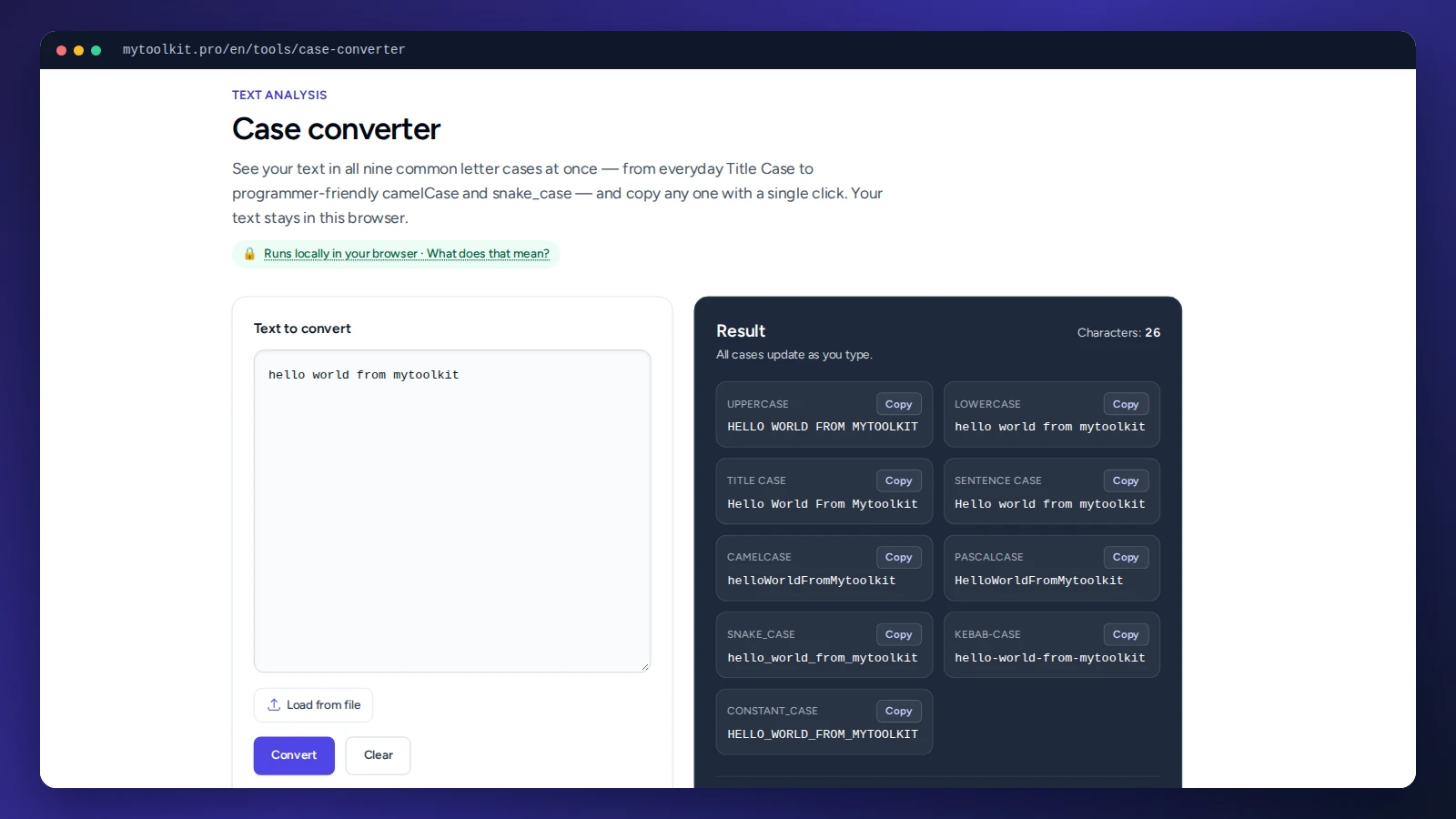
Type Straße into a standards-compliant uppercase function and you get STRASSE: six letters go in and seven come out. Lowercase that and you get strasse, which is not the word you started with. Greek and Turkish have their own surprises, editors disagree about what title case means, and in source code capital letters have turned into a kind of punctuation. Each of these explains a result you may see in a browser case converter, and some are limits worth knowing before you paste text in.
Nine results, three kinds of rule
A case converter that shows nine outputs side by side looks like one feature repeated nine times. In fact the outputs follow three unrelated rulebooks, and knowing which one applies explains most surprises.
| Group | Results | Who defines the rule |
|---|---|---|
| Character case | UPPERCASE, lowercase | The Unicode Standard, applied by the JavaScript engine |
| Editorial case | Title Case, Sentence case | Style guides, so a tool can only approximate them |
| Identifier case | camelCase, PascalCase, snake_case, kebab-case, CONSTANT_CASE | Programming-language conventions, after the text is split into words |
The sections below take the groups in that order, then look at text outside A–Z, at comparing text without regard to case, and finally at why Latin has two alphabets at all.
Character case: what Unicode decides
The Unicode Standard defines case conversion in §3.13 of its core specification and distinguishes two kinds of mapping. Simple case mappings are one-to-one: one character goes in and one comes out. Full case mappings can be one-to-many, and they come from an additional data file, SpecialCasing.txt.
In the case converter, the UPPERCASE card calls JavaScript's String.prototype.toUpperCase, and the lowercase card calls toLowerCase. The ECMAScript specification defines both as Unicode default case conversion, using the full mappings but none of the language-specific ones. Because the specification fixes this mapping, standards-compliant browsers uppercase and lowercase the examples below the same way.
When the output grows: German ß
German ß is the classic full mapping. The default algorithm uppercases it to SS, so the output can be longer than the input. Lowercasing the result gives ss, because the information about the original spelling is gone. The standard says explicitly that lowercasing the uppercase form of a string is not guaranteed to give back the original. A capital ẞ exists as a separate character, but the default mapping does not produce it.
The Characters counter counts the code points of the text you typed, not of the output, so it will not show you that the uppercased version is one character longer.
When neighbours matter: Greek Σ
Greek capital sigma lowercases to ς at the end of a word and to σ everywhere else. Unicode encodes this as the Final_Sigma condition, and ECMAScript's toLowerCase applies it: ΣΑΣ becomes σας. Case mapping therefore cannot be done one character at a time with a lookup table; a converter has to look at the neighbouring letters.
When the language matters: Turkish i
Turkish and Azeri pair dotted i with dotted capital İ, and dotless ı with plain capital I. The default Unicode mappings ignore this and pair i with I, as English does. JavaScript applies the Turkish pairs only in its locale-aware functions, such as toLocaleUpperCase called with the locale tr.
The case converter uses the locale-independent functions, so istanbul becomes ISTANBUL, not İSTANBUL. That is the right choice for code and identifiers and the wrong one for Turkish prose. The tool has no Turkish mode, so Turkish display text needs a manual fix afterwards.
A third case: digraph Dž
Unicode treats titlecase as a separate case with its own mappings. Some digraph letters show why: the single character DŽ has an uppercase form DŽ, a titlecase form Dž and a lowercase form dž. Only the titlecase form looks like a capital followed by a small letter.
Editorial case: what style guides decide
Title case and sentence case are not Unicode operations. They are writing conventions, and they inherit the character rules above: the tool's Title Case and Sentence case both lowercase the whole string before capitalising anything, so ΣΑΣ comes out as Σας in both.
Title case has no single definition
APA Style capitalises major words and every word of four letters or more. It lowercases short minor words such as a, an, the, and, of and in, unless they start the title or subtitle, and it capitalises both parts of a hyphenated major word. Chicago, AP and MLA each use their own rules.
The converter's version is the simplest variant: it capitalises every word. Several results follow from that:
- It lowercases everything first, so
TESTbecomesTestand a brand name such asiPhonebecomesIphone. - An apostrophe keeps a word together:
it's a TESTbecomesIt's A Test. - A hyphen splits a word, so
well-knownbecomesWell-Known. This matches APA's rule for hyphenated major words. - A word must start with a letter, so
3rdbecomes3Rd. - It uppercases a word's first letter instead of titlecasing it, so a word that starts with dž gets DŽ, not Dž.
Treat the output as a draft. If a heading has to follow APA or Chicago, lowercase the short words by hand and restore brand names and acronyms.
Sentence case needs to know where sentences end
Turning a shouted paragraph back into normal sentences means finding where sentences begin, which is harder than it looks. Unicode's UAX #29 defines default sentence boundaries with a long set of rules over character properties, and even those are only a default that can be tailored for a particular language.
The tool's Sentence case uses a much shorter rule. After lowercasing everything, it capitalises the first letter of the text and any letter that follows one or more of ., ! or ? plus whitespace. hello world. bye WORLD gives Hello world. Bye world, and one! two? three gives One! Two? Three.
The short rule misfires in a few places:
- Abbreviations look like the end of a sentence, so
e.g. thebecomesE.g. The. - A line break without punctuation does not start a sentence, so the next line keeps a lowercase first letter.
- Punctuation without a space after it does not count, so
a.bstaysA.b. - If the text starts with a quotation mark or a digit, its first letter stays lowercase.
Because everything is lowercased first, proper nouns and acronyms lose their capitals too: Warsaw becomes warsaw and NASA becomes nasa unless they start a sentence. Names have to be restored by hand.
Identifier case: what programming conventions decide
Identifiers in most programming languages cannot contain spaces, and in C-family languages a hyphen means minus, so user-name reads as a subtraction. Programmers mark word boundaries with underscores (user_name) or with capitals (userName) instead. Lisp-family languages and CSS allow hyphens in names, which is where hyphenated names stayed common (Wikipedia: Naming convention). Who first used the names camelCase, snake_case or kebab-case is not reliably documented.
Splitting comes before joining
Google defines camel case as an algorithm rather than by example, because the same phrase can reasonably be camel-cased in more than one way. The steps are: convert the phrase to plain ASCII and remove apostrophes, split it into words, lowercase everything including acronyms, then capitalise the first letter of each word (or of every word except the first).
The converter follows the same outline. It splits the text at spaces and punctuation, where a lowercase letter or digit meets a capital, and before the last capital of an acronym run when a lowercase letter follows it (HTTPResponse → HTTP Response). Only then does it join the words in the chosen style. It differs from Google in two ways. It does not convert to ASCII, so accented letters stay as they are. It also treats apostrophes as separators rather than removing them, so it's becomes it_s in snake_case.
Style guides that became rules
How the conventions hardened into rules is documented:
- Sun's Code Conventions for the Java Programming Language (1999) give methods and variables mixed case with a lowercase first letter and classes a capital first letter. Constants are all uppercase with words separated by underscores.
- PEP 8, created in 2001, sets lowercase_with_underscores for Python functions and variables, CapWords for classes and UPPER_CASE_WITH_UNDERSCORES for constants.
- The Rust API Guidelines set UpperCamelCase for types, snake_case for functions and variables, and SCREAMING_SNAKE_CASE for constants. The compiler enforces this with warn-by-default lints such as
non_snake_case,non_camel_case_typesandnon_upper_case_globals.
Acronyms divide the guides
Google's Java guide and the Rust guidelines treat an acronym as an ordinary word, which gives XmlHttpRequest and Uuid. PEP 8 prefers to keep the whole acronym in capitals, as in HTTPServerError. The converter's camelCase and PascalCase follow the first camp: parseHTTPResponse handler becomes parseHttpResponseHandler, and parseHTTPResponse becomes parse-http-response in kebab-case. What happens when you convert names back and forth is covered in renaming identifiers between naming conventions.
Does the style affect reading speed?
Sharif and Maletic tested this in an eye-tracking study presented at ICPC 2010. With a small group of participants, they reported that under_score identifiers were recognised faster than camelCase ones. A later study by Binkley and colleagues, published in Empirical Software Engineering in 2013, reported that the effect of style was modest and depended on the readers' training and on the task.
The practical conclusion is modest too. The convention your language and codebase already use matters more than the style itself, because consistency is what readers rely on.
Why URLs prefer lowercase and hyphens
The web has its own reasons to prefer lowercase, hyphenated names. RFC 3986 lists the hyphen, period, underscore and tilde as unreserved characters, alongside letters and digits, so they can appear in a URL without percent-encoding. The same RFC makes the scheme and host case-insensitive, but the path is generally case-sensitive, so /Guide and /guide can be two different resources. Lowercase slugs avoid that kind of duplicate, and making them is the job of the slug generator. For how a URL's parts are divided, see where does a URL end.
Text outside A–Z
The converter relies on regular expressions with Unicode property escapes, enabled by the u flag: \p{L} for letters, \p{Lu} and \p{Ll} for uppercase and lowercase letters, \p{N} for numbers and \p{M} for combining marks. These make word detection work beyond ASCII. The Polish phrase zażółć gęślą jaźń becomes ZAŻÓŁĆ GĘŚLĄ JAŹŃ in uppercase, and its first two words become zażółćGęślą in camelCase.
Text in a caseless script has nothing to switch, so Chinese, Hebrew or Arabic passes through uppercase and lowercase unchanged. In the identifier cases the converter still treats those characters as letters, because \p{L} matches any Unicode letter, not just A–Z. In snake_case or kebab-case, a Hebrew phrase gets underscores or hyphens where it had spaces; in camelCase and PascalCase its words are joined with nothing in between. Chinese written without spaces stays one word.
JavaScript stores strings as UTF-16 code units, and an emoji such as 😀 takes two of them. The Characters counter counts code points instead, so hi 😀 counts as 4 characters. Emoji pass through the character and editorial cases unchanged. The identifier cases treat them as separators, because they are neither letters nor digits, so they disappear.
Decomposed accents are a less obvious trap. In NFD form, é is stored as e followed by a combining acute accent (U+0301), which is a mark, not a letter. Title Case keeps marks inside words, but the identifier cases treat them as separators, so a decomposed résumé comes out as re_sume in snake_case. The converter applies no normalisation. If your text may contain decomposed characters, normalise it to NFC first, for example with JavaScript's normalize('NFC'), and then convert it.
Comparing text is a different job
Unicode defines case folding as a separate operation for caseless matching. Folding maps text to a form meant only for comparison, not for display. Lowercasing two strings and comparing them usually works but fails on some characters: ß and SS lowercase to ß and ss, which do not match, while full case folding maps both to ss.
The Turkish i makes the problem worse. Microsoft's guidance on comparing strings uses this “Turkish I problem” as a cautionary example: under Turkish rules, lowercasing FILE gives fıle with a dotless ı, so a program that lowercases a keyword or file name using the user's culture can fail to recognise it. Microsoft recommends invariant or ordinal rules for identifiers, paths and protocol keywords, and culture-aware rules for text shown to people.
This matters whenever you search or sort without regard to case. The find-and-replace tool has a case-sensitivity option, and the line sorter has an ignore-case option. If results look odd on non-English text, remember that ignoring case when comparing is a different job from changing case for display.
Why there are two alphabets at all
All of these rules exist because case is not a property of writing in general. It belongs to a few scripts, such as Latin, Greek, Cyrillic and Armenian, that keep two parallel sets of letterforms. Many of the world's scripts, including Han, Hebrew, Arabic and Devanagari, have no case at all (Wikipedia: Letter case).
Even in Latin the two sets did not appear together. Capitals came first: Roman inscriptions are cut entirely in them. Small letters grew out of later book hands written with a pen, and Carolingian minuscule is usually described as the ancestor of modern lowercase letterforms. The names come from the printing house, where compositors kept capitals in the upper type case and small letters in the lower one.
Because the two sets developed separately, they never lined up one to one, and Unicode had to write the mismatch down as rules. To see the effects yourself, paste ΣΑΣ, a Turkish word, well-known or e.g. the into the case converter and compare the nine results side by side. All nine conversions run in your browser: the converter's code makes no network request, so your text is not uploaded or stored, and Copy all and the per-card copy buttons use your browser's clipboard.
Questions readers ask
Why does German ß turn into SS instead of a capital ß?
The default Unicode uppercase mapping for ß is the two letters SS, defined as a full (one-to-many) mapping in SpecialCasing.txt. JavaScript's toUpperCase uses that mapping, so a converter built on it produces SS. A capital ẞ exists as a separate character, but the default mapping does not produce it.
Why is uppercasing and then lowercasing not always a round trip?
Some mappings lose information. ß becomes SS, and SS lowercases to ss, so the original ß cannot be recovered. Unicode states explicitly that lowercasing an uppercased string is not guaranteed to give back the original.
Is lowercasing two strings a safe way to compare them?
It is an approximation. Unicode defines case folding specifically for caseless matching, and it treats some characters differently from lowercasing; for example, it maps ß and SS to the same form. For identifiers, Microsoft also recommends locale-independent rules, so that the Turkish I does not break comparisons.
Why does a case converter give the wrong i for Turkish text?
The default case functions pair i with I, as English does. Turkish and Azeri pair i with İ and ı with I, and JavaScript applies that only through locale-aware functions such as toLocaleUpperCase('tr'). A converter that uses the default functions, as this one does, produces ISTANBUL instead of İSTANBUL. Correct that by hand in Turkish prose.
Which title case rules match APA or Chicago style?
None of the simple “capitalise every word” approaches does. APA lowercases short minor words such as a, the, and, of and in when they appear in the middle of a title, and capitalises every word of four letters or more. Chicago, AP and MLA have their own rules. Use the converter's output as a draft and adjust the short words by hand.
Do languages without capital letters change at all in a case converter?
Not in the uppercase or lowercase results. Scripts such as Han, Hebrew, Arabic and Devanagari have no case, so there is nothing to change. In the identifier cases their characters still count as letters, so they form words and only the separators between them change.