
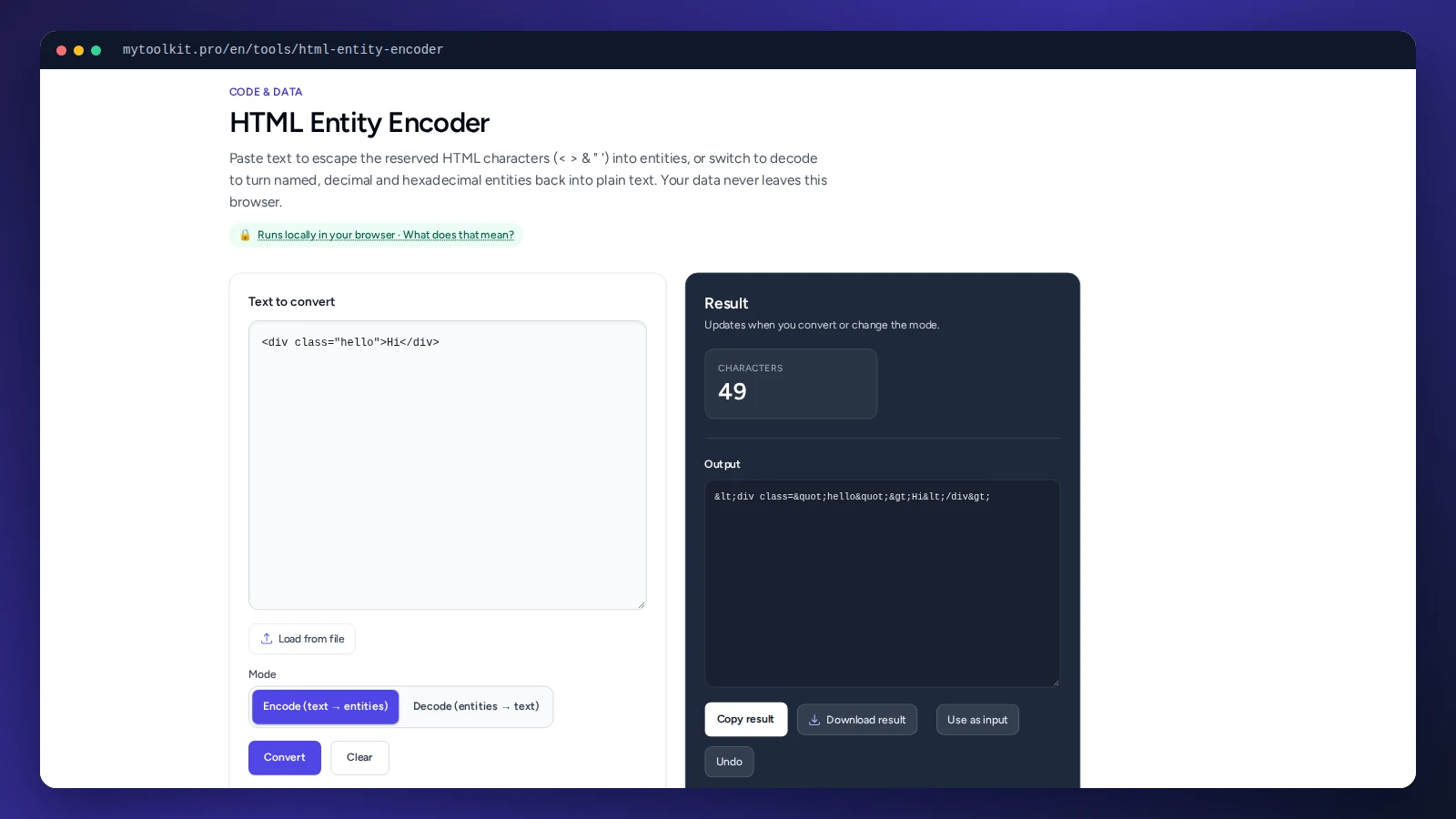
The HTML Entity Encoder converts the characters that HTML treats as markup — &, <, >, " and ' — into character references, and as a decoder turns references such as < or 😀 back into plain text. Both directions run in your browser, with no upload. Each run adds or removes exactly one layer of escaping. This guide explains exactly what the tool replaces, what it recognises when decoding, and why the order of replacements matters.
What the HTML Entity Encoder does
The tool has two modes. Encode replaces reserved characters with entities so that text can be pasted into an HTML page, a CMS field or a code sample without being interpreted as markup. Decode does the reverse: it resolves entities back into the characters they stand for, so a blob of <…> becomes readable.
An entity is a piece of text that starts with & and ends with ; and that the browser replaces with a single character. The HTML specification formally calls this a character reference. A reference can be named (&) or numeric (& in decimal, & in hexadecimal), and all three forms resolve to the same &.
Why do these particular characters need escaping? <, > and & are markup delimiters: in text content the parser reads them as the start of a tag or a reference. " and ' matter inside attribute values, where an unescaped quote would end the value early. The encoder handles all five, so its output is safe both in element content and inside quoted attributes.
How to use it
- Paste or type your text into the input box. The field accepts up to 1,000,000 characters.
- Choose a Mode: Encode or Decode.
- Read the result in the output box. It updates as you type; the Convert button recomputes it on demand, and Clear empties the input.
- The Characters metric shows the length of the output.
- Click Copy to put the result on the clipboard; a short "copied" status confirms it.
Three quick examples sit next to the input: HTML tags and Ampersand & quotes fill the box with encode-mode samples, while Encoded entities inserts entities and switches the mode to decode.
Encode mode: exactly what gets replaced
Encode mode performs exactly five replacements:
| Character | Output |
|---|---|
& |
& |
< |
< |
> |
> |
" |
" |
' |
' |
Nothing else is changed. Accented letters, non-Latin scripts, emoji, line breaks and other punctuation pass through untouched, because they are not markup-significant.
The single quote becomes the numeric reference ' rather than the named '. The WHATWG named character reference table does include apos, and it is one of the five references predefined in XML and XHTML, but classic HTML 4 predefined only amp, lt, gt and quot. A numeric reference is understood by every parser, so it is the safer choice.
Two worked examples, both available as quick-example presets:
<div class="hello">Hi</div>
→ <div class="hello">Hi</div>
Tom & Jerry said "hi"
→ Tom & Jerry said "hi"
Decode mode: what it recognises
Decode mode resolves the following references:
| Reference | Result |
|---|---|
< > " ' & |
< > " ' & |
&#NNN; (decimal) |
the character with that code point |
&#xHHHH; (hexadecimal; digits in either case, prefix must be lowercase x) |
the character with that code point |
Only these five named references are recognised. Other names from the WHATWG table — , é, © and so on — are left exactly as written. If you need one of them resolved, write it as a numeric reference first (  for a non-breaking space, for example).
Numeric references are converted with String.fromCodePoint, so code points beyond the Basic Multilingual Plane decode correctly: 😀 becomes 😀 rather than a broken pair of surrogates. Hex digits may be upper or lower case (😀 and 😀 both work), but the prefix itself must be &#x with a lowercase x: 😀 is not decoded, even though a browser's parser accepts both forms. Leading zeros are accepted in numeric references: ' and A decode like ' and A.
Numeric references are resolved before the final & step. That is why & (the decimal form of &) becomes a plain &, while &lt; ends up as < rather than < — the ampersand produced by the numeric step is not fed back into the named-reference replacements.
The trailing semicolon is required. A browser's parser tolerates a handful of legacy references without a semicolon for compatibility, but the tool does not: < without ; stays as it is.
<b>bold</b>
→ <b>bold</b>
Why the order of replacements matters
When encoding, & is replaced first. If it were replaced later, the & inside a freshly created < would be escaped again, producing &lt;. Handling ampersands first means every character in the input is escaped exactly once.
When decoding, & is resolved last. The input a&lt;b therefore becomes a<b, not a<b: one layer of escaping is removed per pass, which is exactly what a browser would display for that markup.
A consequence: encoding text that already contains entities produces double escaping such as &lt;. This is correct behaviour, not a bug — the & in the input is a literal ampersand and is escaped as one — and it is a well-known source of confusion in ad hoc encoding scripts. To unwind several layers, run decode more than once.
Encode: a < b & c > d → a < b & c > d
Decode: a < b & c > d → a < b & c > d
Encode again: a < b → a &lt; b
Decode once: a &lt; b → a < b
Decode twice: a < b → a < b
Limits and edge cases
- The input box accepts up to 1,000,000 characters.
- Empty input gives empty output and a Characters count of 0.
- The Characters metric counts UTF-16 code units, the same as JavaScript's
length. An emoji such as 😀 counts as 2, and the count refers to the output, not the input. - A numeric reference above U+10FFFF (for example
�) stops the conversion:String.fromCodePointrejects the value, and the output box simply keeps whatever it showed before instead of being refreshed. There is no error message. - A numeric reference to a surrogate code point (U+D800–U+DFFF, for example
�) does complete, but the output contains a lone, unpaired surrogate rather than a usable character. - In both cases a browser's parser would substitute U+FFFD for the reference; the tool does not. Avoid such references.
- There are no error messages. Any other text is accepted and converted.
- The tool is not an HTML sanitizer. It does not know whether your text will end up in element content, an attribute, a script, a stylesheet or a URL — see the next section.
Is entity encoding enough to prevent XSS?
Only in one context. The OWASP Cross Site Scripting Prevention Cheat Sheet recommends HTML-entity-encoding untrusted data before inserting it into HTML element content, and its rule for that context covers &, <, >, " and ' — the same five characters the HTML Entity Encoder replaces. Older revisions of the cheat sheet also listed / (as /); the tool does not encode /.
Two further points from the same guidance:
- Entity encoding is only safe for the HTML body context. Inline JavaScript, CSS and URLs each need their own encoding rules; the same string can be harmless in one place and executable in another. Because the tool encodes both quote characters, its output is also safe inside a quoted attribute value, but not in an unquoted one, where spaces and other characters can end the value.
- Encode at output time. Keep the original, unencoded data in storage and apply encoding when the text is rendered into HTML.
Use the tool to prepare a snippet or to check what encoded output should look like. In an application, apply the encoding in the template engine or output layer, where the context is known.
Privacy
Everything runs in JavaScript on your device. No text is uploaded or stored.
Related tools
- Base64 Encoder / Decoder — converts bytes into a text-safe alphabet for transport in URLs, JSON or email. Base64 is not about markup: base64 output pasted into HTML is opaque text, not escaped text.
- Caesar cipher (ROT13) — another reversible text transform, shifting letters by a fixed amount. Neither Base64 nor ROT13 is a substitute for entity encoding; only entities tell the HTML parser to treat a character literally.
FAQ
Why does my text show &lt; instead of < after I encode it twice?
Because the second pass sees the & of < as a literal ampersand and escapes it to &, giving &lt;. That is the correct result for encoding the string < — a browser would display it as <, not <. Encode each piece of text once, at the point where it goes into HTML.
Should I use ' or ' for a single quote in HTML?
The tool emits '. ' is a valid named reference in the WHATWG table and in XML/XHTML, but it was not part of the HTML 4 entity set, so older parsers may not recognise it. The numeric form works everywhere, which is why it is the default here.
What characters actually need to be escaped in HTML — just <, >, & or also quotes?
In text content, <, > and & are the markup delimiters that must be escaped (MDN). Quotes only become a problem inside attribute values, where an unescaped " or ' would end the value early. The encoder replaces all five so the same output can be used in either place.
Why did decoding only turn &lt; into < and not into <?
Decode resolves & last, so a single pass removes exactly one layer of escaping. &lt; represents the literal text <, and that is what you get, matching how a browser would render it. Run decode a second time to reach <.
Can the decoder handle emoji written as numeric references like 😀?
Yes. Decimal and hexadecimal references are converted with String.fromCodePoint, so code points above U+FFFF decode to the correct character rather than to a broken surrogate pair. 😀 becomes 😀, and the Characters metric counts it as 2 because it measures UTF-16 code units. Write the prefix as lowercase &#x; 😀 is left unchanged.
Does the tool decode or accented-letter entities like é?
No. Decode mode recognises only the named references lt, gt, quot, apos and amp, plus any decimal or hexadecimal numeric reference. Other named references are left as they are. If you can rewrite them numerically —   for , é for é — the tool will decode those.
Is HTML-encoding user input enough to stop XSS?
Not on its own. OWASP treats entity encoding of &, <, >, " and ' as the right defence for HTML element content, which is what this tool does. Inline JavaScript, CSS, URLs and unquoted attributes each require their own encoding, and encoding belongs in the output layer of your application, not in a manual paste step.