
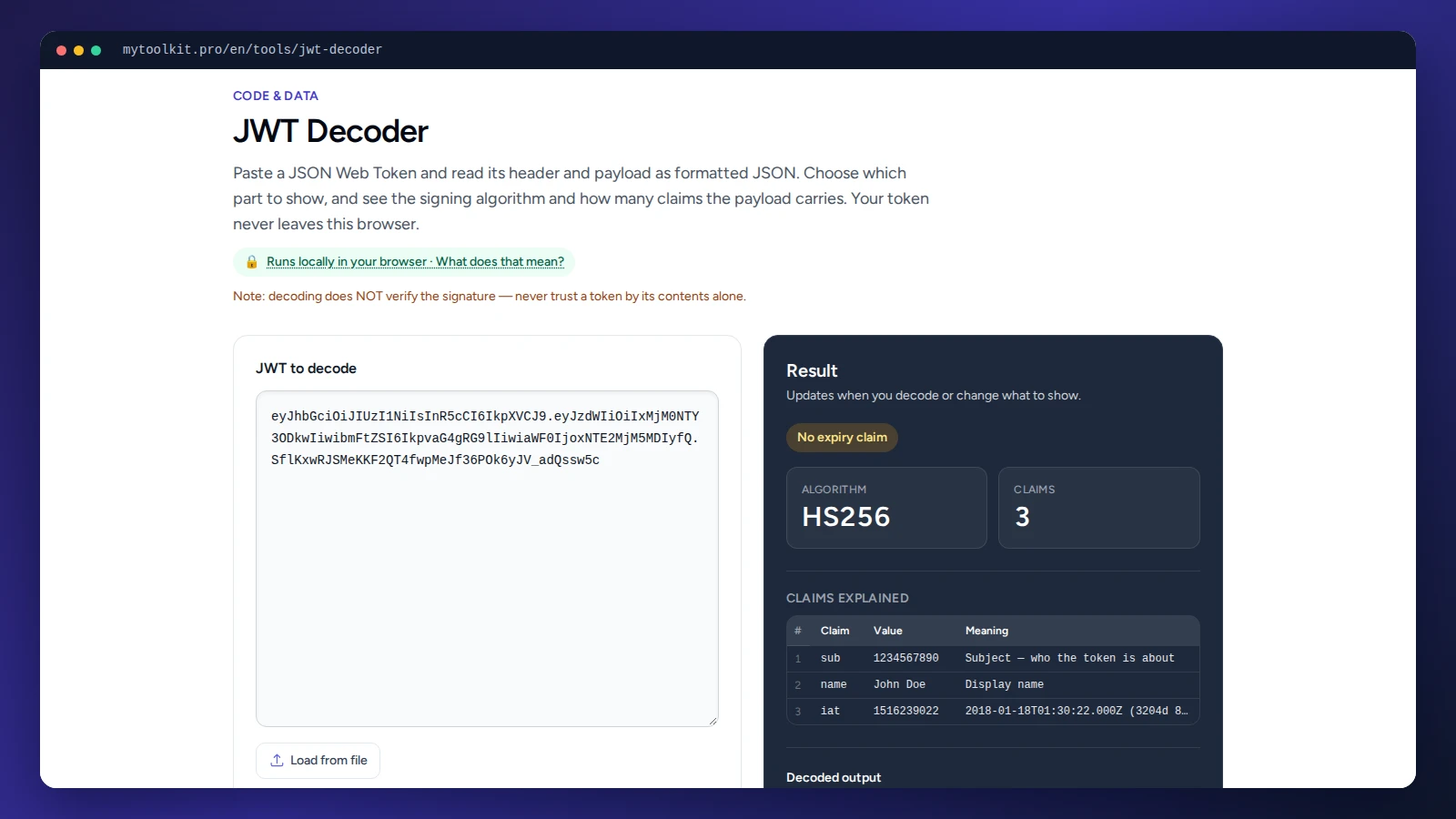
Most JWT rejections come down to a few causes, and you can see most of them in the token itself. This article covers signed JWTs (JWS): the order in which to check the likely causes, and the point where reading the token stops helping.
A 401 that tells you almost nothing
A request that worked an hour ago now gets a 401, and the response contains one word: invalid_token. Nothing changed in the client, and the server logs, if you can see them, say little more.
A signed JWT is encoded, not encrypted. Anyone holding the token can read its header and payload, which are plain JSON, without a key. You can usually find the token in the Authorization request header in your browser's developer tools (Network tab) or in your client's logs. Paste it into the JWT decoder to see the claims a server uses to decide whether to accept it. Decoding runs in your browser and nothing is uploaded, but a live token still works like a password, so use an expired or test token where you can.
One limit applies from the start. Reading a token can rule causes in or out, but it cannot prove the token is good. RFC 7519 (section 7.2) describes validation as a series of checks, including the signature, and says the JWT must be rejected if any check fails. Decoding is only the first of those steps.
What a token shows without the key
In compact form, a signed JWT is three base64url-encoded parts separated by dots (RFC 7519 section 3; RFC 7515 section 7.1). The header and payload are JSON objects. The third part is the signature, which is binary data and means nothing to the eye.
Anyone who has a signed token can read it. That is why Auth0's documentation warns against putting sensitive information in a JWT.
Encrypted tokens (JWE, RFC 7516) have five parts and an encrypted payload, so no decoder can show their claims without the decryption key. To spot one, count the dots in the raw string: four dots mean five parts. If you paste a JWE into the decoder, you get "Invalid JWT — could not decode.", because its second part is an encrypted key, not JSON. For these tokens you need logs from the system that decrypts them.
Check time first: exp, nbf and whose clock counts
Expiry is the most common cause and the quickest to rule out. The status pill above the claims shows one of four states for a pasted token: "Valid now", "Expired", "Not valid yet" or "No expiry claim".
The rules come straight from RFC 7519. Section 4.1.4 says a token must not be accepted on or after its exp time, so a token whose exp equals the current second already shows "Expired". Section 4.1.5 says the current time must be at or after nbf, so a future nbf gives "Not valid yet" even when exp is also in the future.
All registered claims are optional, so a token without exp is legal. In that case the decoder shows "No expiry claim" instead of calling the token valid. The iat claim records when the token was issued, which lets a server work out its age. It does not decide validity, and the status ignores it.
Most disagreements between the decoder and a server come from clock skew. The RFC lets implementations allow a small leeway for clock differences, usually no more than a few minutes. The decoder applies no leeway and compares against your own device's clock. So a token within a few minutes of exp can look expired in the tool and still be accepted by a lenient server, or the other way round. If your system clock is wrong, the status will be wrong too.
Dates in the claims table are ISO 8601 strings ending in Z, which means UTC, not your local time. If a time looks off by exactly your UTC offset, that is why.
Seconds, not milliseconds
RFC 7519 (section 2) defines NumericDate as the number of seconds since 1970-01-01T00:00:00Z UTC, ignoring leap seconds. A common issuer bug is to write milliseconds instead:
"exp": 1700000000       10 digits: seconds, 2023-11-14T22:13:20Z
"exp": 1700000000000    13 digits: milliseconds, read as seconds
Read as seconds, the 13-digit value is tens of thousands of years in the future, so the token never seems to expire. The article on understanding Unix timestamps explains how to tell the two units apart.
A quoted exp such as "1700000000" is a string, not a NumericDate. The decoder shows it as plain text, and the status falls back to "No expiry claim". Servers handle values like this in different ways, so fix it where the token is issued.
Right token, wrong place: iss, aud, azp and typ
A token can be current and still be meant for a different service. RFC 8725, the IETF's best-practice document for JWTs, tells servers to validate the issuer (section 3.8) and the audience (section 3.9). Section 2.8 describes cross-JWT confusion, where a token issued for one purpose is accepted for another.
The typical case is sending an OpenID Connect ID token to an API that expects an access token. The ID token's aud is the client application, not the API, so an API that checks the audience rejects it. OpenID Connect Core defines the ID token's required claims (iss, sub, aud, exp, iat) and the azp (authorized party) claim.
What to compare:
issagainst the issuer URL the API is configured to trust. Look for a trailing slash, a different tenant or a staging environment.audagainst the API's identifier.audcan be a single string or an array, and arrays appear as compact JSON in the Value column.scope,roleorrolesagainst the permission the endpoint needs.
Claims explained gives a short meaning for common claims such as iss, sub, aud, jti, azp and scope. Custom claims have an empty Meaning cell.
typ is a header parameter, and RFC 8725 (section 3.11) recommends explicit typing so that different kinds of JWT are not confused. The claims table lists only payload keys, so set Show to Header or Both to see it in the decoded JSON.
When every claim looks right: algorithm and signature
If time, issuer and audience all check out, the remaining causes are cryptographic, and no decoder can confirm them. The key may be wrong or rotated, the token may have been modified, or the algorithm may not be one the server expects.
The Algorithm tile shows the header's alg. In RFC 7518 (section 3.1), HS256 is HMAC with SHA-256 and a shared secret, and RS256 is an RSA signature with a key pair. RFC 8725 (section 3.1) requires libraries to check that alg is one they expect instead of trusting the header, so a server that follows it rejects a token signed with the other algorithm.
An alg of none marks an unsecured JWT with an empty signature (RFC 7519, section 6). RFC 8725 (section 3.2) says servers should not accept such tokens unless they explicitly expect unsecured tokens. If you find none in a token you received, treat it as a red flag, not a fix.
The decoder never checks the signature, and its own warning says so. RFC 8725 (section 3.10) makes the same point for servers: do not trust received claims until they are verified.
Copy mistakes: some fail, some decode silently
The decoder reads only the header and payload. That means some copy mistakes break decoding, while others go through without a warning.
These produce "Invalid JWT — could not decode.":
- including the
Bearerprefix from an Authorization header (paste only what follows it) - a leading quote picked up from a JSON log
- a token cut short inside the header or payload
These decode without any error but give the server a broken token:
- a trailing quote or comma
- a token cut short inside the signature
- two tokens run together
In the second group, the decoder shows the first token's claims and everything looks fine, but the server rejects the signature.
Token anatomy shows the header, payload and signature segments even when the token does not decode. A missing or very short signature segment points to a token that was cut off. The box shows only the first three parts, so it cannot reveal extra parts. Count the dots yourself if in doubt.
Base64url uses - and _ instead of + and /, and it usually leaves out = padding. That is normal, and the JWT decoder handles both, so missing padding is not the cause. The article what is Base64 encoding and when to use it covers the difference between the two alphabets.
FAQ
The API returns 403, not 401. Is the token the problem?
Usually not its validity. Under RFC 6750 (section 3.1), a resource server should answer 401 with invalid_token when the token is expired, revoked or malformed, and 403 with insufficient_scope when the token is valid but does not grant enough access. With a 403, compare the scope, role or roles claims with what the endpoint requires. Many APIs follow this split loosely, so read the error body or the WWW-Authenticate response header as well.
My access token has no dots at all. Is it a JWT?
Probably not. OAuth 2.0 (RFC 6749, section 1.4) does not require access tokens to be JWTs, and many servers issue opaque strings that only the issuer can look up. The decoder reports these as invalid. The only way to inspect one is through the issuer, for example a token introspection endpoint if it offers one.