
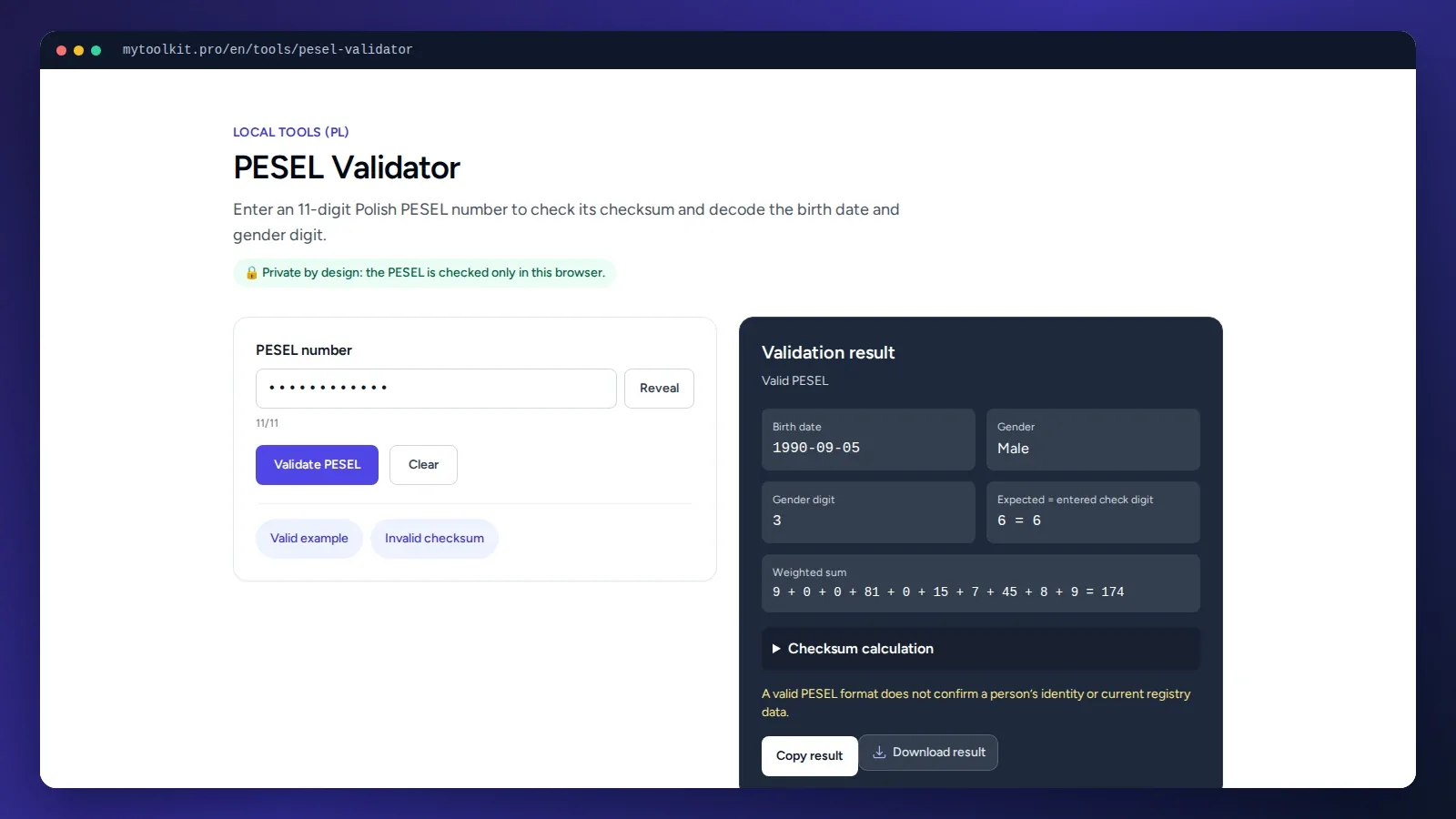
You may have a PESEL in front of you: your own, a customer's, or a test value for a form. This guide shows how to check it in the browser, how to read each line of the result, what each error message means, and what a valid result does not prove.
What the PESEL Validator does
The PESEL Validator checks whether an 11-digit Polish PESEL number is well-formed. It also decodes the birth date and gender digit stored in the number.
Polish law defines PESEL as an 11-digit number made up of the birth date, a sequential number, a sex designation and a check digit (Act on Population Registration, Art. 15; official consolidated text on ISAP).
This is only a format check. The tool does not look anything up in the PESEL register. It cannot confirm that a number was ever issued or who it belongs to.
How to use it
- Open the PESEL Validator and type or paste the number into the PESEL number field. The field is masked by default. Use Reveal to show the digits and Hide to mask them again.
- Non-digit characters are removed, and once you have typed six digits the field groups the input as "NNNNNN NNNNN". The field accepts at most 12 characters, though. A PESEL pasted with several separators, such as "900-905-158-36", is cut short before the separators are removed, and you get the length error. Paste the digits only, or with at most one space or dash.
- The result updates as you type. Until you have entered all 11 digits, the length error is shown. Validate PESEL runs the check again.
Clear empties the field and masks it again.
When the number is valid, a Copy result button appears with the result. It copies a plain-text summary: the "Valid PESEL" line, the birth date and the gender.
To try the tool without a real number, use the example buttons. Valid example loads 90090515836. Invalid checksum loads 12345678901, which fails the checksum.
While the field is empty, the "Validation result" area shows "Enter 11 digits to validate." and no details.
Reading the result
For a valid number, the status reads "Valid PESEL". The result then lists:
- Birth date: the decoded date, for example 1990-09-05.
- Gender: Male or Female.
- Gender digit: the 10th digit of the number.
- A check-digit comparison labelled "Expected = entered check digit".
- Weighted sum: the product for each digit and their total, for example "9 + 0 + 0 + 81 + 0 + 15 + 7 + 45 + 8 + 9 = 174".
Below the list is Checksum calculation, a collapsible block. It shows each digit multiplied by its weight ("9×1 + 0×3 + …").
Here is the calculation for the valid example 90090515836:
| Position | 1 | 2 | 3 | 4 | 5 | 6 | 7 | 8 | 9 | 10 |
|---|---|---|---|---|---|---|---|---|---|---|
| Digit | 9 | 0 | 0 | 9 | 0 | 5 | 1 | 5 | 8 | 3 |
| Weight | 1 | 3 | 7 | 9 | 1 | 3 | 7 | 9 | 1 | 3 |
| Product | 9 | 0 | 0 | 81 | 0 | 15 | 7 | 45 | 8 | 9 |
The products add up to 174, the same total the tool shows next to Weighted sum. The last digit of 174 is 4, and (10 − 4) mod 10 = 6. That matches the 11th digit, 6. The first six digits decode to 1990-09-05. The gender digit is 3, which is odd, so the result is Male.
A valid result also includes a note that a valid format does not confirm identity.
How the check works
The tool runs five steps. The weights and the check-digit formula are the same as those in independent implementations such as the KKSzymanowski PESEL library.
Step 1: length
The tool removes every non-digit and keeps at most 11 digits. If the count is not exactly 11, it shows the length error.
Step 2: birth date and century
The first six digits are read as year, month and day (Art. 15). The month field also carries the century. The tool decodes these bands:
| Month field | Century | Real month |
|---|---|---|
| 01–12 | 1900s | as written |
| 21–32 | 2000s | subtract 20 |
| 41–52 | 2100s | subtract 40 |
| 61–72 | 2200s | subtract 60 |
| 81–92 | 1800s | subtract 80 |
Any other month value is rejected. For a plain-English overview of the same scheme, see Wikipedia.
Example: in 02270803624, the month field is 27. That means July in the 2000s, so the birth date is 2002-07-08. The gender digit is 2, which is even, so the result is Female. The check digit is 4.
Step 3: the date must exist
Next, the tool checks that the date exists on the calendar. A 31st in a 30-day month fails, and so does 29 February in a year that is not a leap year.
Step 4: checksum
The tool multiplies each of the first 10 digits by its weight (1, 3, 7, 9, 1, 3, 7, 9, 1, 3) and adds up the products. The expected check digit is:
(10 − (sum mod 10)) mod 10
This value is compared with the 11th digit. For 02270803624, the sum is 146, and (10 − 6) mod 10 = 4, which matches.
Step 5: gender digit
The 10th digit is the gender digit. An even digit (including 0) means Female. An odd digit means Male.
Error messages and edge cases
When a number fails, the status line changes to "PESEL is invalid" and the error message appears below the PESEL number field. The details, including the checksum breakdown, are not shown for invalid numbers.
- "Invalid: PESEL must be exactly 11 digits." appears when there are too few digits, including while you are still typing. It also appears when the input contains no digits at all.
- "Invalid: the encoded birth date does not exist." has two causes: a month value outside every century band (for example 13 or 34), or a real month with a day that cannot exist.
- "Invalid: checksum does not match." means the date decoded correctly, but the 11th digit does not equal the calculated check digit. This is usually caused by one mistyped digit or two swapped digits.
One pitfall has two sides. The field keeps at most 12 characters, so anything longer is cut off without a warning. And of what remains, the tool keeps at most 11 digits. If you paste a PESEL joined to another number, only the first 11 digits are checked. If you paste a PESEL with many separators, digits at the end are lost and you get the length error.
Privacy
Validation runs entirely in your browser. The number is never sent to a server.
Because the field is masked by default, the digits stay hidden until you choose Reveal. Clear masks the field again. This helps if you are working in a shared or public space.
The summary from Copy result includes the birth date and gender. Treat anything you paste elsewhere as personal data.
FAQ
Does a valid result mean the PESEL really exists or belongs to this person?
No. A valid result means only that the number has 11 digits, a real birth date and a matching check digit. The tool does not query the PESEL register, so it cannot confirm that the number was issued or who holds it.
Can two people have the same PESEL?
The law defines PESEL as a number that uniquely identifies one person (Art. 15). The validator cannot check this, because it does not see the register. It only checks the format.
Why does my PESEL have a month like 23 or 45?
The month field also stores the century. 21–32 means a birth in the 2000s, so 23 is March. 41–52 means the 2100s, so 45 is May. See the table above for all the bands the tool decodes.
How can the tool tell the gender from a PESEL?
It reads the 10th digit. Even digits, including 0, give Female. Odd digits give Male. The result shows this digit next to Gender digit.
My PESEL is rejected by a form. What should I check?
Paste the number into the PESEL Validator and read the error. A length error means digits are missing, you pasted extra text, or separators made the paste too long. A birth-date error points to the first six digits. A checksum error usually means one mistyped digit or two swapped digits.
Is my PESEL sent anywhere when I check it?
No. The check runs only in your browser, and the field stays masked until you choose Reveal.
Can I check a Polish bank account number the same way?
Yes, with a different tool. The NRB validator checks Polish account numbers. The IBAN validator checks international account numbers. Like this tool, both rely on a checksum.