
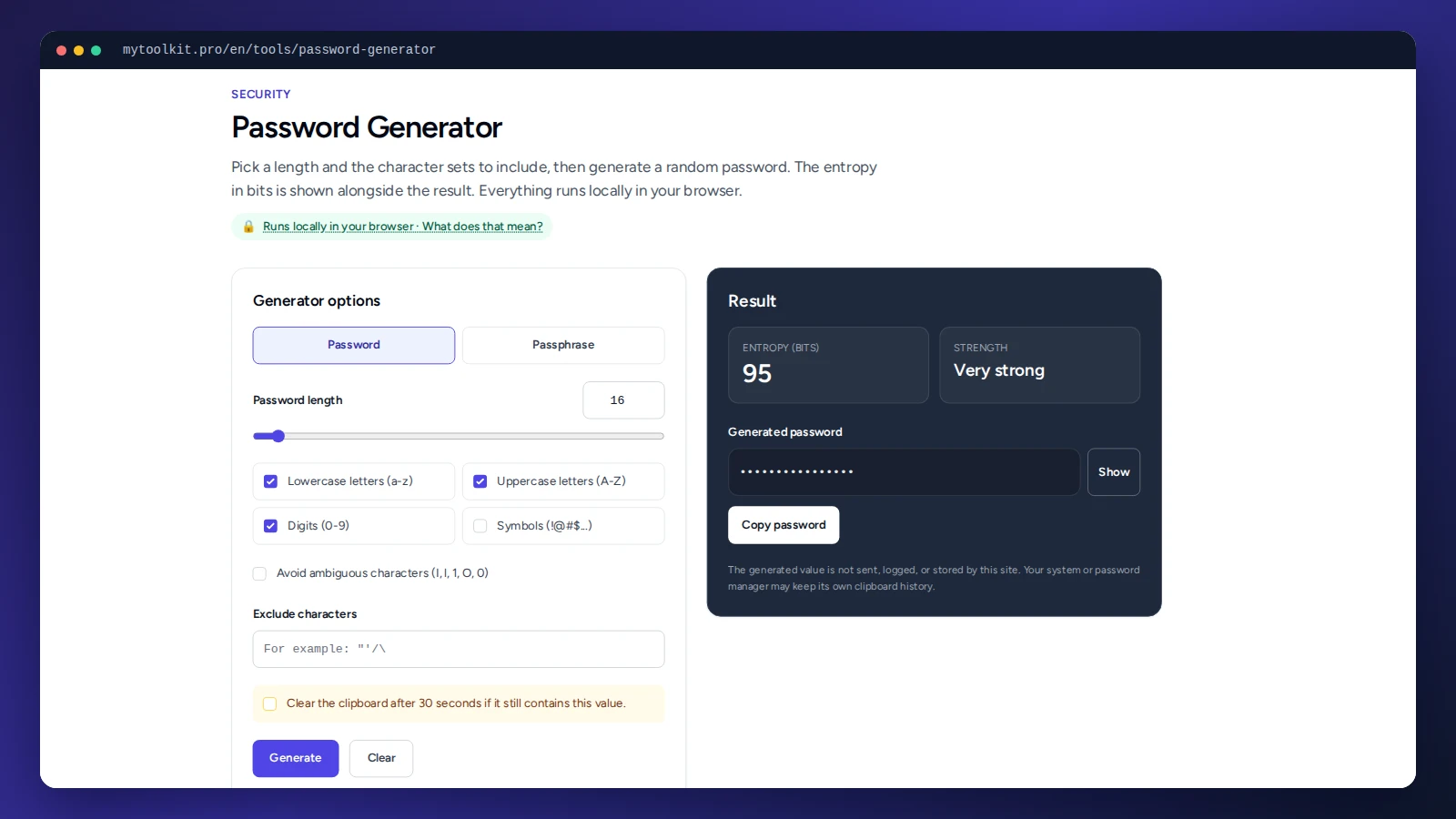
Open the generator with its default settings and it shows a sixteen-character password, masked until you choose to show it, next to the number 95 and a strength label. Generate draws a fresh password, and the 95 stays the same. Only the password is random. The 95 is arithmetic about the process that drew it, and that arithmetic is only as good as three things: the random source, the way random bits become characters, and the settings you choose.
Reading the 95: a property of the process, not the string
In A Mathematical Theory of Communication (1948), Claude Shannon defined entropy as a property of the source that produces symbols, not of any single message. A source that picks one of N equally likely options, independently each time, delivers log2 N bits per pick. L picks from a pool of N symbols therefore carry L × log2 N bits.
The Password Generator computes Entropy (bits) with exactly this formula: the password length times log2 of the pool size after any exclusions, rounded to a whole number. The default sets (lowercase, uppercase and digits) give a pool of 62 characters:
16 × log2(62) = 16 × 5.954 ≈ 95.3 → displayed as 95
| Pool | Characters | Bits per character |
|---|---|---|
| Lowercase only | 26 | 4.70 |
| Letters and digits (default) | 62 | 5.95 |
| All four sets, ambiguous characters removed | 82 | 6.36 |
| All four sets | 87 | 6.44 |
The figure is the base-2 logarithm of the number of equally likely outcomes the process could have produced. It does not inspect the string you got, and it would mean little for a password a person invented, a point the section on human choice comes back to.
Should you tick Symbols, or add length?
Ticking Symbols (!@#$...) takes the pool from 62 to 87, about 0.49 bits per character. Over 16 characters that adds roughly 7.8 bits. Adding two characters of length to the default pool instead adds about 11.9 bits, and every extra character adds about 6.
Current guidance points the same way. NIST SP 800-63B revision 3 (2017) dropped mandatory complexity and expiry rules. Revision 4 (2025) makes length the main requirement: at least 15 characters for a password used on its own, at least 8 when it is one factor of multi-factor authentication. Verifiers should accept a maximum of at least 64 characters, must screen new passwords against blocklists of compromised values, must not force periodic changes without evidence of compromise, and must not impose composition rules such as 'at least one digit and one symbol'. NIST's reasoning is that length and blocklists do more, and forced rules push people into predictable patterns.
Trimming the pool works in the opposite direction, and the estimate follows. Ticking Avoid ambiguous characters (I, l, 1, O, 0) moves the full pool from the 87 row to the 82 row of the table, which costs roughly 1.4 bits over 16 characters.
Characters typed into Exclude characters leave the pool and the estimate in the same way. If an exclusion empties a ticked set completely, the tool shows an error instead of quietly dropping that set. For settings suited to typing on a remote control or reading aloud, see choosing a password you can type by hand.
Why every ticked set appears at least once, and what that costs
The generator guarantees at least one character from each ticked set. It takes one random character from each set, fills the remaining positions from the combined pool (where every character has equal weight, whichever set it belongs to), and then shuffles all positions with a Fisher–Yates shuffle. Without the shuffle, the first characters would always come from known sets in a known order.
The rule exists because some sites still demand a mix of character types. It is there for compatibility, not strength, and its cost can be worked out exactly. At the shortest length with all four sets, 4 characters, every valid output has one character from each set, in any order:
valid strings = 4! × 26 × 26 × 10 × 25 = 4,056,000 ≈ 2^21.95
formula       = 4 × log2(87) ≈ 25.8   → displayed as 26 ('Weak')
The output is uniform over those 4,056,000 strings, so the true figure is about 22 bits, almost 4 below the display.
At length 16 with the 87-character pool the gap nearly closes. About 84.8% of all 87^16 strings already contain every set, so excluding the rest costs about 0.24 bits against the formula's 103.1. Above the minimum length the output is also not perfectly uniform over valid strings, because some compositions can be produced in more ways than others. Both effects push the true value below the formula, so read the displayed bits as an upper bound that tightens as length grows.
Is a six-word passphrase enough?
A passphrase uses the same formula with bigger symbols: each word carries log2(list size) bits. The list can be public. As the Diceware page explains, the security comes from random selection, not from a secret list.
The Passphrase mode draws each word independently from a fixed list of 64 words, 6 bits per word. Six words give 36 bits, and ten, the maximum, give 60. Repeats are possible because each draw is independent, which is what the 6-bits-per-word figure assumes.
The tool's thresholds label 36 bits 'Strong'. Yet at the hypothetical offline rate in the next section, the default six-word passphrase would be exhausted in about 7 seconds. Use it only where guessing is rate-limited, such as a login that locks or slows after failed attempts, and use password mode for anything that could face offline guessing.
Larger lists change the picture. Arnold Reinhold's Diceware (1995) uses 7,776 words, 6^5, so five dice rolls choose one word. In July 2016 the EFF published new word lists: a long list of 7,776 words and short lists of 1,296 words meant to be easier to type.
| Word list | Words | Bits per word | Six words |
|---|---|---|---|
| This tool's list | 64 | 6 | 36 |
| EFF short list | 1,296 | ≈ 10.34 | ≈ 62 |
| Diceware / EFF long list | 7,776 | ≈ 12.92 | ≈ 77.5 |
Matching six Diceware words with a 64-word list would take 13 words, beyond the maximum of 10. xkcd 936 (2011) put 'correct horse battery staple' at about 44 bits, assuming four words drawn at random from about 2,048. That holds only if the words really were drawn at random, not picked because they made a pleasing picture.
How long the number holds against a guesser
Each extra bit doubles the worst-case number of guesses. On average an attacker finds the value after searching about half the space. Suppose, purely hypothetically, an attacker tests 10 billion guesses per second offline, or only 1,000 per second through a login. Covering the whole space takes:
| Bits | Possibilities | At 10^10 guesses/s | At 1,000 guesses/s |
|---|---|---|---|
| 36 | ≈ 6.9 × 10^10 | ≈ 7 seconds | a little over 2 years |
| 60 | ≈ 1.2 × 10^18 | ≈ 3.7 years | ≈ 37 million years |
| 78 | ≈ 3.0 × 10^23 | ≈ 960,000 years | ≈ 9.6 × 10^12 years |
| 95 | ≈ 4.0 × 10^28 | ≈ 1.3 × 10^11 years | ≈ 1.3 × 10^18 years |
The rate is not a property of the password. It depends on whether the attacker holds a leaked hash or must go through a login form, and on how the site stores passwords. Deliberately slow hashing cuts the offline rate, and salting forces an attacker to attack each account separately instead of all at once. Online rate limiting, which NIST SP 800-63B requires of verifiers, cuts the rate far further. No bit count helps if a site stores the password itself in readable form and leaks it.
The Strength label is a fixed cut-off on the formula: below 28 bits 'Weak', 28 to under 36 'Fair', 36 to under 60 'Strong', 60 and above 'Very strong'. It summarises the bit count. It does not measure how long a particular attacker would need.
The number only works because nobody chose
In Password Security: A Case History (Communications of the ACM, November 1979), Robert Morris and Ken Thompson described how Unix moved from clear-text password files to storing a salted, DES-based one-way encryption. When they examined real passwords, many were short or ordinary dictionary words. The weak point was human choice, not the cipher.
Three decades later, Joseph Bonneau's analysis of about 70 million anonymised passwords measured how skewed human choices are and argued for metrics based on how many guesses an attacker needs. The zxcvbn estimator takes that approach, looking for dictionary words, keyboard patterns, repeats and dates.
Those estimators ask how an attacker would guess one particular string. The generator's figure is instead the base-2 logarithm of the number of equally likely outcomes its process could have produced. That figure is valid only when a machine picked every character uniformly and independently, which is what the next two sections check.
Where the random bits come from
The tool's only source of randomness is crypto.getRandomValues from the Web Cryptography API. The specification requires a cryptographically strong generator and leaves the algorithm to the browser. One call can return at most 65,536 bytes. The tool asks for four bytes, one 32-bit number, per draw.
Behind that call, the operating system typically collects physical noise from the hardware and uses it to seed a deterministic random bit generator (DRBG), which expands the seed into a long stream of output. Some services go further: Cloudflare mixes a video feed of a wall of lava lamps into its servers' entropy. A browser does nothing of the kind. It relies on the operating system's own noise sources.
NIST SP 800-90A Rev. 1 defines three DRBG mechanisms, Hash_DRBG, HMAC_DRBG and CTR_DRBG, at security strengths from 112 to 256 bits, and requires the seed to carry at least as much entropy as the claimed strength. The Web Crypto specification does not fix which mechanism a given system uses. That revision, published in June 2015, also removed a fourth mechanism, Dual_EC_DRBG, after public concerns about its design: a reminder that a generator is trustworthy only as far as its design and seeding.
The contrast that matters in practice is with Math.random(). MDN says it is not cryptographically secure and must not be used for passwords or tokens. Its output may look random, but nothing guarantees it cannot be predicted.
From 32 random bits to one character, without bias
A 32-bit number has 4,294,967,296 possible values, and the pool has 62 or 87 characters. The obvious mapping, 'number modulo pool size', is biased whenever the pool size does not divide the range evenly, as Daniel Lemire's paper sets out. At a small scale the bias is plain. With one random byte and a 62-character pool:
256 = 4 × 62 + 8
The first 8 characters would each be reached by 5 byte values and the rest by 4, making those 8 characters 25% more likely. With 32 bits the effect shrinks but remains:
2^32 mod 87 = 16
2^32 mod 62 = 4
2^32 mod 64 = 0
The tool removes the bias exactly with rejection sampling. It accepts a draw only below the largest multiple of the pool size that fits in 32 bits, and draws again otherwise:
limit = floor(2^32 / 87) × 87 = 4,294,967,280
redraw if value >= limit   (probability 16 / 2^32 ≈ 3.7 × 10^-9)
index = value mod 87
Every character then has the same number of accepted values. For the 64-word passphrase list, 2^32 is an exact multiple of 64, so no draw is ever rejected.
Moving the password somewhere safe
Once the value is in the Generated password field, the remaining risks are about where it travels. Under the Clipboard API, browsers usually require a user action such as a click to write to the clipboard, and may refuse a later read or write that has no fresh user action behind it. Other applications and the system's clipboard history are outside the page's control.
With Clear the clipboard after 30 seconds if it still contains this value. ticked, the page tries to read the clipboard after 30 seconds and empties it only if it still holds the same value. If the read is refused, it leaves the clipboard alone rather than overwrite something else. Because the browser may refuse that later access and the system may keep its own history, the clearing is best effort, not a guarantee.
The natural next step after Copy password is a password manager. NIST revision 4 requires verifiers to allow password managers and autofill, and says they should permit paste. To generate the value itself, open the Password Generator.
Privacy
The password or passphrase is generated in your browser with crypto.getRandomValues. The site does not send, log or store the generated value.
FAQ
Is the randomness from crypto.getRandomValues 'true' randomness?
Not in the strict physical sense. It typically comes from a deterministic generator seeded with physical noise by the operating system. The Web Crypto specification requires that output to be cryptographically strong, meaning it cannot feasibly be predicted or told apart from true randomness. For passwords, that is the property that matters.
If a generated password happens to contain a real word, is it weaker?
No. Every possible string was equally likely, including the ones containing a word, and an attacker does not know in advance which string you got. Throwing such passwords away would shrink the set of possible outputs slightly.
Would regenerating until a password 'looks random enough' make it safer?
No. Generating a fresh password is fine, but choosing among outputs by taste brings back the human selection the generator was meant to remove. It narrows the space while the figure on screen stays the same.
Is 'Very strong' enough for a password that protects an encrypted file?
An encrypted file or a leaked database can be attacked offline, at whatever speed the attacker's hardware allows. 'Very strong' starts at 60 bits, which the table above puts at a few years at the hypothetical offline rate. For secrets exposed that way, aim well above the threshold; the default 16-character password already gives 95 bits.
What if a site rejects a long password or certain symbols?
Shorten the password only as far as the site forces you to, and type the rejected characters into the exclusion field so the estimate reflects the smaller pool. NIST asks verifiers to accept at least 64 characters, but not every site follows that guidance.
Does the entropy figure take into account how a website stores my password?
No. It is only the base-2 logarithm of the number of equally likely passwords the generator could have produced. Guessing speed depends on the site's hashing, salting and rate limiting.
Further reading
- Shannon, A Mathematical Theory of Communication (1948): the origin of entropy measured in bits.
- Morris and Thompson, Password Security: A Case History (1979): how Unix moved to salted one-way password storage, and what real users chose.
- NIST SP 800-63B-4: current guidance on length, composition rules, blocklists, storage and rate limiting.
- NIST SP 800-90A Rev. 1: the deterministic random bit generators behind many system random sources.
- W3C Web Cryptography API: the specification of getRandomValues.
- MDN, Crypto.getRandomValues(): practical notes, including why Math.random() is unsuitable.
- Cloudflare, LavaRand in Production: how a lava-lamp camera feed is mixed into server entropy.
- Lemire, Fast Random Integer Generation in an Interval (2018): modulo bias and how to remove it.
- Reinhold, Diceware: the original dice-based passphrase method.
- EFF, New Wordlists for Random Passphrases (2016): the design of the long and short EFF lists.
- Bonneau, The Science of Guessing (2012): why entropy figures mislead for human-chosen passwords.
- Dropbox, zxcvbn: estimating guesses from patterns in a password.
- W3C Clipboard API and events: the permissions and limits behind copying and clearing the clipboard.