
A heading that fits on one line with three words of Latin can wrap onto three lines once a real product name goes in. A card that looks tidy with one sentence can push a button out of view when an editor pastes four. Filler text is useful because it lets you find these breaks before real copy exists. It only helps if you choose its length on purpose, keep it the same between test runs, and can find every copy of it before launch.
Which unit fits which component
Filler carries no meaning, so what you end up judging is its shape: line length, the ragged right edge and the height of the block. For each slot, check three things. Does the text wrap where you expect? Does the container grow or clip it? Do the elements below move or overlap?
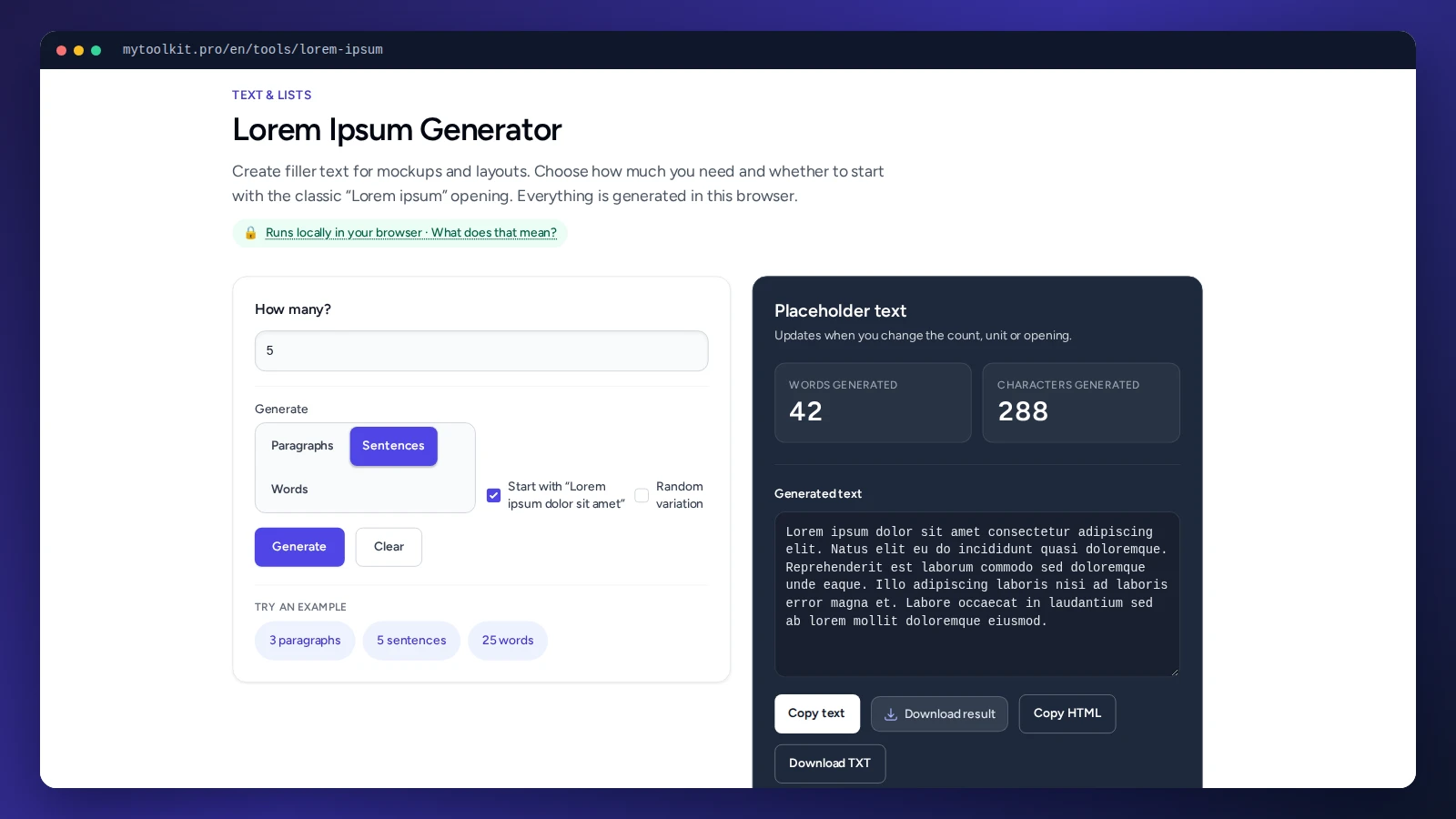
The Lorem ipsum generator has three units, and each one suits a kind of component:
- Words for buttons, labels, headings and table cells.
- Sentences for teasers, captions and card descriptions.
- Paragraphs for article bodies and long-form templates.
Sentences are 6–13 words long, and paragraphs have 3–6 sentences. The first sentence is an exception when it carries the standard opener: it always has at least eight words, so a single sentence never comes out at the short end of that range. Words mode gives you exactly the number of words you ask for, so use it for precise checks.
Test each slot at both extremes. A heading should survive 3 words and 25 words. A card description should survive one sentence and four. Layouts are often fine at the default length and break later, when an editor pastes something much shorter or much longer.
Counting toward a hard cap
Some slots have a fixed limit, such as a CMS excerpt cap, a meta description or a button that must stay on one line. For these, use the counters above the output.
Characters generated shows the length of the generated text. The output is plain ASCII, so this number matches the characters you see, including spaces and line breaks. Real copy with accents or emoji can count differently; see why text counters disagree.
For slots capped in words, read Words generated instead. Change the count until the text sits just under the cap, then just over it, so you see both sides of the limit.
Keeping screenshots identical between runs
By default the generator is deterministic: the same count, unit and opener setting always give the same text. Design-review screenshots, visual-regression snapshots and before/after comparisons then differ only in your layout change. If the words changed on every run, a heading could wrap differently for reasons unrelated to your CSS, and you would chase a difference that is not really there.
Random variation does the opposite and gives new text each time the text is generated. It is useful for watching how card heights react to different lengths: regenerate a few times and look.
Leaving a trail you can search for
The cheapest safeguard is to decide at the start how you will find leftover filler again.
In the generator, leave Start with “Lorem ipsum dolor sit amet” switched on. The first sentence of each text you generate then starts with a searchable phrase, and a search of templates, the CMS and the database for "lorem ipsum" finds whole pasted blocks.
The opener has limits:
- It appears only once, at the very start of the generated text. The second and later paragraphs do not start with it.
- Its full form is eight words: "lorem ipsum dolor sit amet consectetur adipiscing elit". In Words mode with fewer than eight words it is cut short, so 3 words give "Lorem ipsum dolor."
- A fragment copied from the middle of a block contains no opener at all.
With the opener off, the text starts with random words from the word list instead of the standard phrase. That can look more natural in a mockup, but leftovers become harder to trace. Turn it off only if you track where the filler goes some other way.
Searching for fragments: a hit means filler, a miss proves nothing
Outside the opener, every word is drawn at random from a list of roughly 85 filler words. Words such as "adipiscing" or "consectetur" are ordinary entries in that list, so a later paragraph or a short copied fragment of 20–80 words will often contain neither of them. Searching for one word cannot prove a page is clean.
Search for several distinctive filler words at once instead, for example "lorem", "adipiscing", "eiusmod", "incididunt" and "ullamco". The more of them you include, the smaller the chance that a fragment slips through. For full certainty, add your own marker, such as a TODO tag placed next to every filler block, and search for that.
A match is easier to judge than a miss. The filler is a garbled cut of Cicero's De finibus bonorum et malorum, sections 1.10.32–33. In the original Latin the phrase reads "qui dolorem ipsum, quia dolor sit, amet, consectetur, adipisci velit". "Lorem" is a truncated "dolorem", and "adipiscing" does not appear in Cicero at all, so a whole-word hit on either almost always means filler. Match whole words only: a plain substring search for "lorem" also finds Cicero's genuine "dolorem" and "doloremque". "Consectetur" is Cicero's own word, so a hit on it may be a genuine Latin quotation. Check those matches by hand.
The often-repeated story of a 1500s printer has no known source. Slate's history of the text and Wikipedia both date the earliest documented use as dummy text to 1960s Letraset sheets.
Getting the text out: HTML, plain text or a file
Copy HTML wraps each paragraph in its own <p> element, one per line. In Sentences or Words mode the whole output becomes a single element. For example, 3 words with the opener on gives:
<p>Lorem ipsum dolor.</p>
This format suits static HTML prototypes and rich-text fields that accept markup.
Copy text gives plain text with a blank line between paragraphs. It suits Markdown files and plain textarea fields.
Download TXT saves the same text as a file, which is useful when a test fixture or seed script reads its content from disk.
Layout bugs only real copy reveals
The generated text is plain. The only punctuation is the period at the end of each sentence. There are no digits, no letters outside basic ASCII and no very long compound words. The vocabulary is a fixed list of Latin-derived words, and you cannot choose another language or supply your own word list.
Some failures therefore show up only with real or realistic copy:
- Polish diacritics (ą, ę, ł) and accented capitals, which a tight line height can clip.
- Long German-style compound words in narrow columns, which have no space to break on.
- URLs and e-mail addresses, which often refuse to wrap.
- Numbers in tables, where column widths and alignment behave differently than with words.
- Translations that run longer than the English source.
Uppercase heading styles need their own check, because case mapping can change the length and shape of words. The article why uppercase is not a simple letter swap explains why. The case converter lets you preview a real heading in upper case before you style it.
Where the text is generated
The text is generated in your browser. The only inputs are a count, a unit and two switches, so there is no project text to send. The page's own note says "Private by design: no text is uploaded or stored."
On your next layout, open the Lorem ipsum tool, keep the opener on so leftovers stay findable, and test each component at its short and long extreme.
FAQ
Can Lorem ipsum show whether Polish or German text will fit my layout?
No. The output is plain ASCII with no diacritics, no digits, no commas and no long compound words. It cannot reveal clipped accents, compound words that cannot break, or translations that run longer than the source. Test those with real or realistic copy in every language the page ships in.
How do I find leftover placeholder text before a site goes live?
Keep the opener on so the first sentence of each generated text starts with "Lorem ipsum dolor sit amet", then search templates, the CMS and the database for "lorem ipsum". Later paragraphs and copied fragments do not carry the opener, and any single filler word appears in them only by chance, so search for several distinctive filler words at once, such as "lorem", "adipiscing", "eiusmod" and "incididunt", matching whole words so that "lorem" does not also hit "dolorem". A whole-word hit on "adipiscing" is almost always filler. A miss proves nothing, so a project-specific marker next to every filler block is the safest net.
Do I need to escape the HTML output before pasting it into a template?
No. The generated text contains only Latin letters, spaces and periods, so there are no characters such as <, > or & that need escaping. The only markup is the <p> element around each paragraph.